AcruxCore vs Braintrust: when the platform runs your tool code
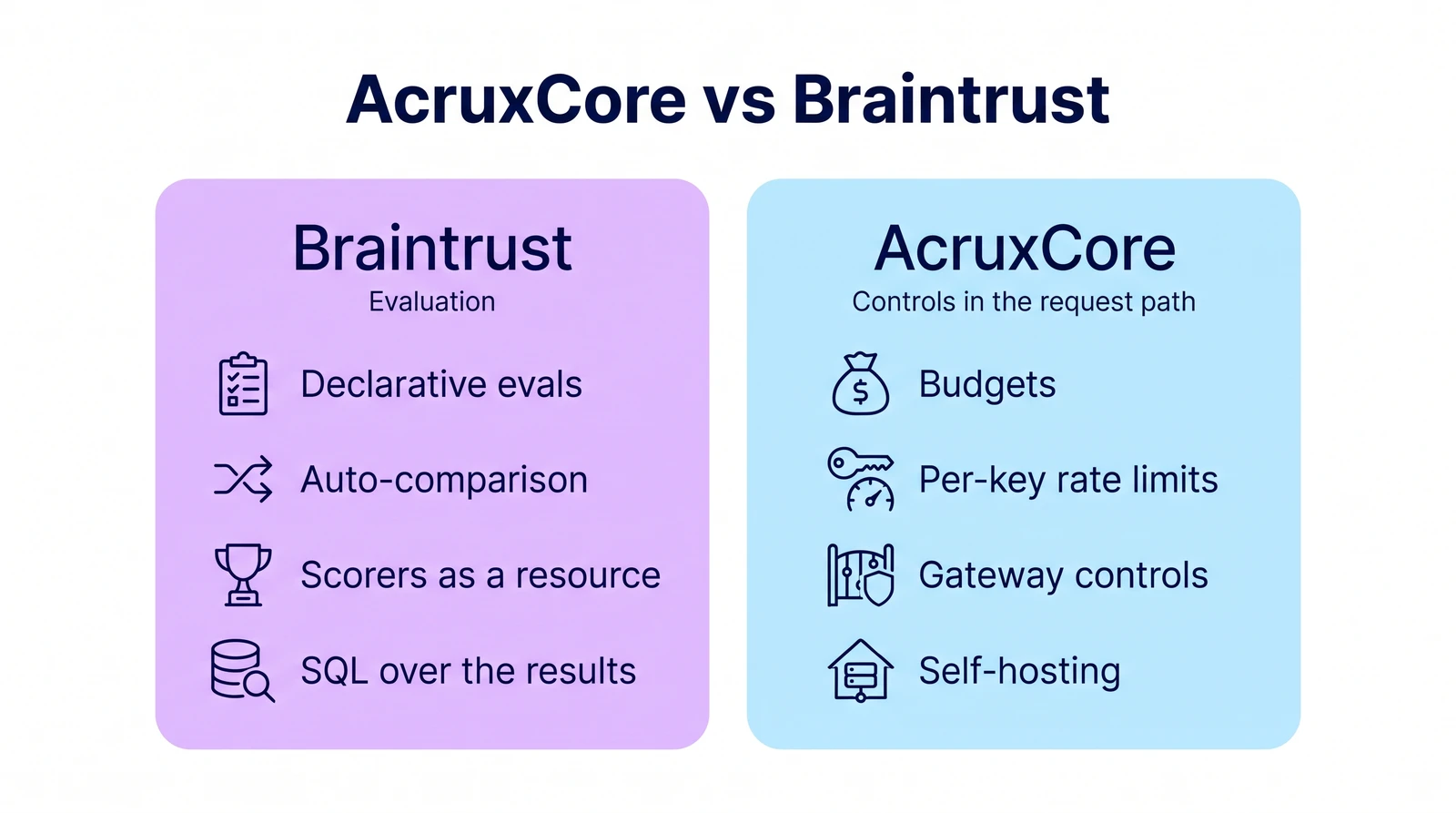
Braintrust is a hosted LLM evaluation platform that runs your tool code instead of only storing the tool's schema. Braintrust takes your Python, bundles it, and runs it on its own infrastructure. That one decision sets the Python version you may use, whether your handler can open a file, and where your data has to live. This comparison is built around that decision. To compare Braintrust with all the other alternatives at once, see 9 Braintrust alternatives.
Braintrust is not open source, and self-hosting needs the Enterprise plan. There is no free self-hosted install to test against, so everything below ran on their hosted Starter tier.
The short answer: if your main job is to measure prompt quality against a dataset, Braintrust does it better. AcruxCore is stronger on controls in the request path: budgets that refuse the call, per-key rate limits, and tool code that stays in your own process.
AcruxCore is our product. All four scripts from this comparison are linked in the SDK section.
How we tested
- Prompt:
vip-support-triage, a support agent that changes tone for VIP customers and lists their open tickets, with the same customer message on both platforms. - Tool:
search_flights, from the travel-planner tutorial. It reads a committed JSON file of flights and needs no API key. - Braintrust plan: the hosted Starter tier. License, self-hosting, plans and access control are covered in this post, because the compare page covers open-source alternatives only.
- Dates: hands-on steps and screenshots on 13 September 2026. Braintrust pricing checked on 25 October 2026, and the Python SDK source re-checked on 2 November 2026.
At a glance
| Aspect | Braintrust | AcruxCore |
|---|---|---|
| Evaluation and datasets | Eval() declares data, task and scorers; the CLI compares each run with the previous one | Server-side runs, LLM judges, sampled rules on live spans |
| How tools are handled | Braintrust runs your handler in a sandbox, on a Python version it chooses | AcruxCore stores the contract; your process or an upstream service runs the code |
| Prompt authoring and versioning | Nunjucks in the web UI and a whole-object diff; the Python SDK renders mustache | Versions, aliases, a message-text diff, one renderer server-side |
| Sending a live call | Playground runs the stored prompt with variables; telemetry is one click away, not inline | Cost, cache and latency shown inline on the run |
| Tracing and observability | init_logger() plus wrap_openai() | The gateway writes the span, with prompt-version lineage |
| Where the platform sits | An optional AI proxy, or ingest only | Always in the request path |
| SDK and developer experience | braintrust push and braintrust eval CLIs; two SDKs disagree on templating | Render and send through the gateway, no tracing code, no CLI |
| Querying your own data | A SQL sandbox over experiments, logs and datasets | Fixed analytics pages, no query editor |
| MCP server | Hosted by Braintrust, nothing to install: SQL queries over your data, create a prompt, run an eval | Hosted or local: commit and promote prompts, run a stored prompt through the gateway, run experiments |
| Spend and rate controls | Spend alerts on the invoice, informational only; the proxy caches and load balances | Budgets that refuse the call at the cap, plus per-key RPM and TPM limits |
| Self-hosting | Enterprise plan only; the Docker data plane runs but cannot be connected | Apache 2.0, docker compose up |
- Pick Braintrust if your bottleneck is measuring quality, you want tools callable with nothing of yours deployed, and hosted-only is fine.
- Pick AcruxCore if you need self-hosting, tools that reach your own data, or gateway controls that apply whether or not the caller asks.
Evaluation and datasets
An evaluation declares the data, the task and the scorers in one place, and the CLI runs it:
Eval(
    "My Project",
    data=lambda: DATASET,
    task=task,
    scores=[mentions_every_ticket, Factuality],
)
mentions_every_ticket is ordinary Python that checks whether the reply names each of the row's
open ticket numbers. Factuality is an LLM judge from autoevals, Braintrust's own scorer
library. The cheap check and the paid judge are declared the same way, in the same list.
By default, braintrust eval prints a comparison against the previous experiment:
vip-support-triage-a64bd2f5 compared to vip-support-triage-55989b5e:
100.00% (+53.33%) 'Factuality'            score	(2 improvements, 0 regressions)
100.00% (+66.67%) 'mentions_every_ticket' score	(2 improvements, 0 regressions)
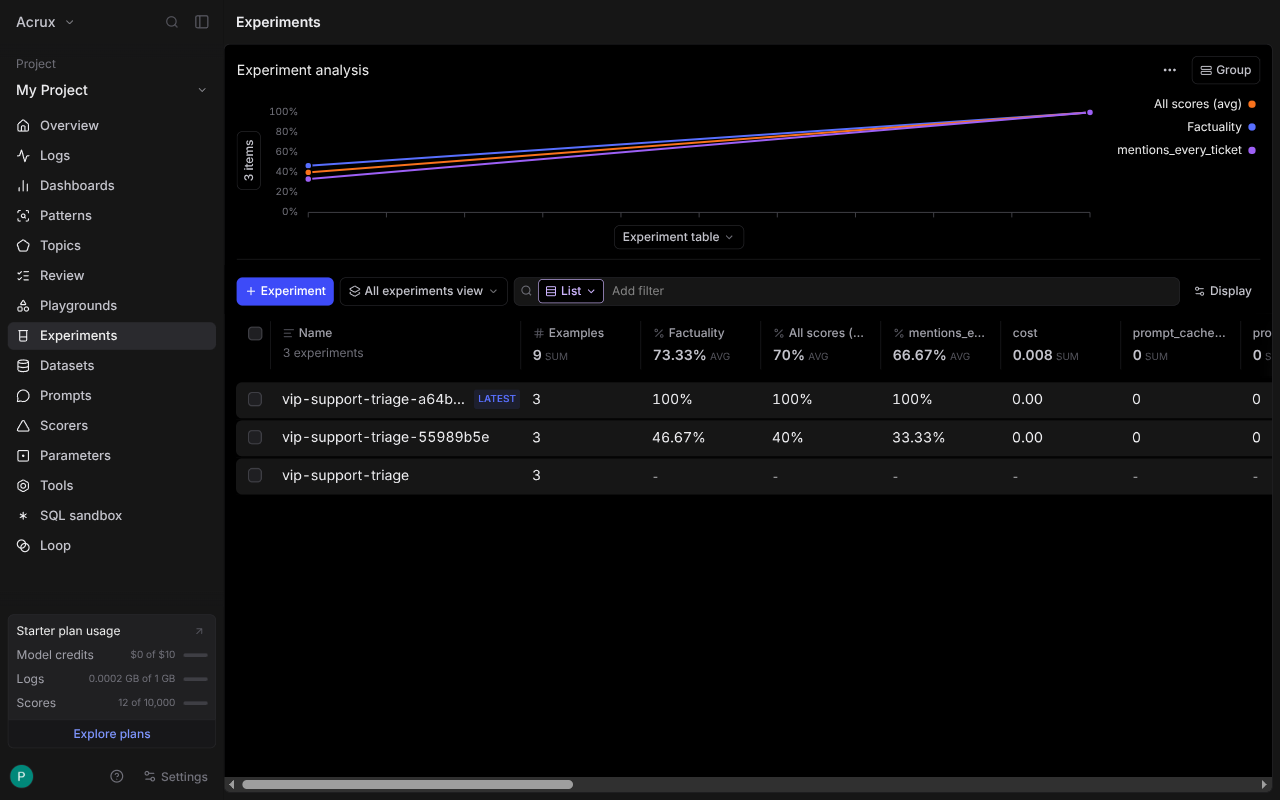
In the dashboard every run of this eval appears on one trend line, and the table below it carries every scorer as its own column.
Show screenshot: Braintrust experiments list
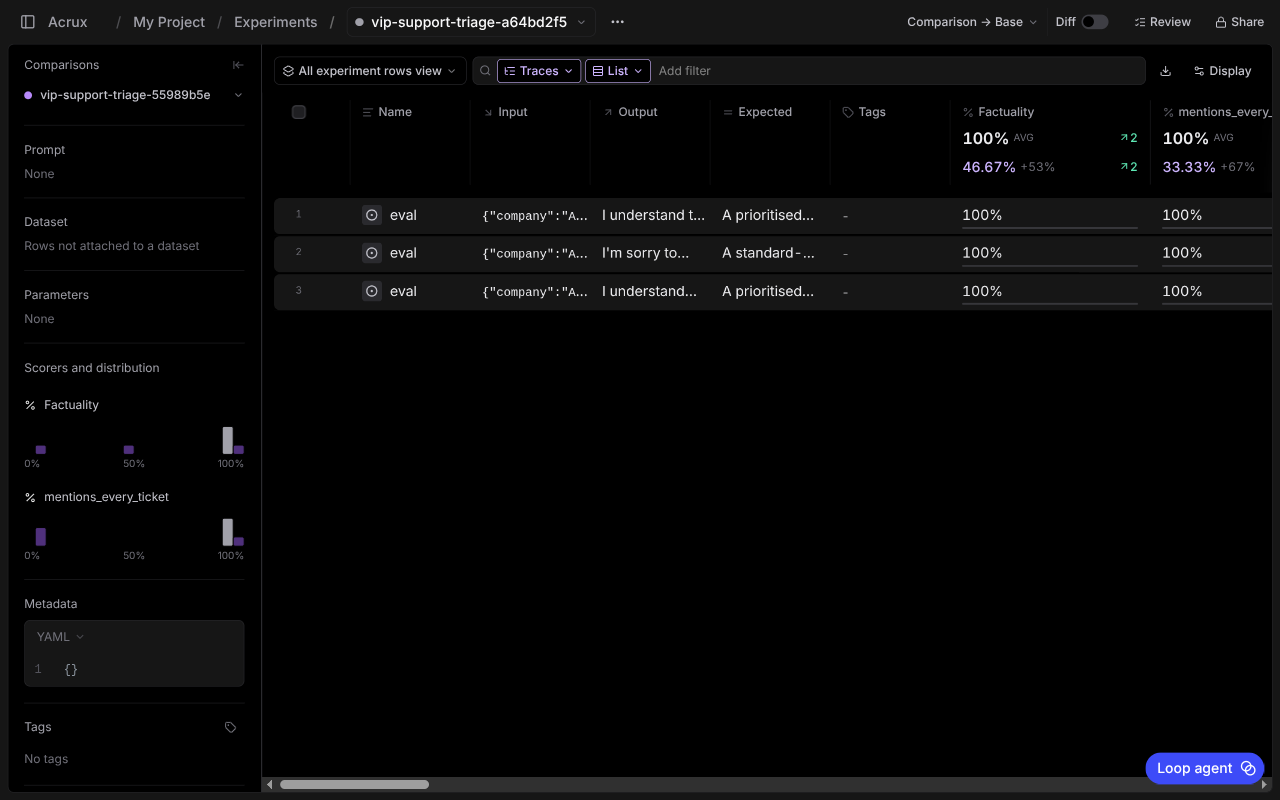
A run shows per-row scores beside a score distribution for each scorer, with the delta against the base experiment in the column header.
Show screenshot: Braintrust experiment comparison
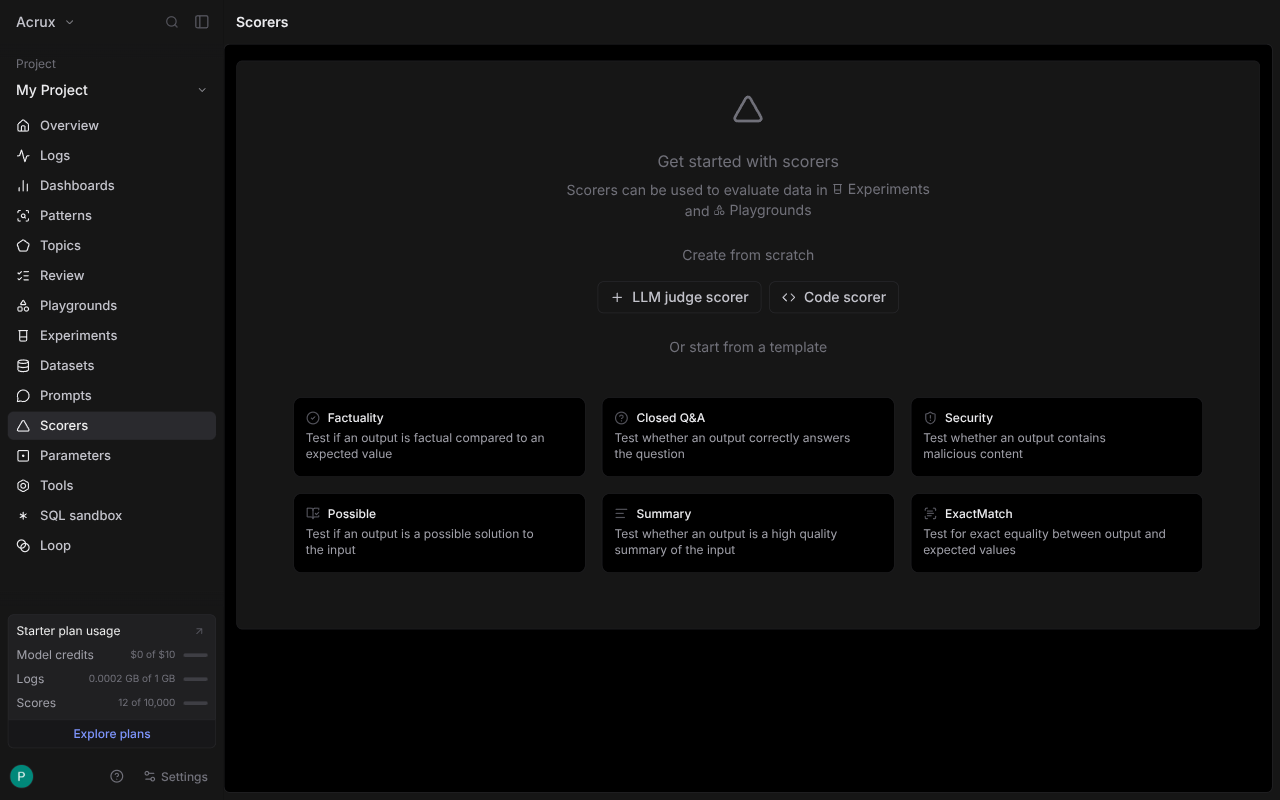
Scorers are a resource with their own page. You can create one in the UI as an LLM judge or as code, starting from six templates.
Show screenshot: Braintrust scorers page
AcruxCore runs evaluations server-side against a stored dataset, or from your own code on your
machine with the SDK's run_local. AcruxCore has no CLI command for it. Both platforms also score
live production traffic: AcruxCore with sampled online rules, Braintrust with online scoring rules
under Automations.
| Feature | Braintrust | AcruxCore |
|---|---|---|
| Declaring an eval | Eval(data, task, scores), run by CLI | Dataset plus judge, run server-side; or run_local with your own task and scorers |
| Auto-compare to previous run | Yes, in the CLI output and the UI | Not automatic; pick two runs and see which examples changed |
| Scorer as its own resource | Yes, versioned, UI or code | Judge config lives inside the run |
| Scoring live production traffic | Yes, online scoring rules (Automations) | Sampled online rules |
| Score distribution per scorer | Yes | Aggregates per run |
How tools are handled
The Tools page answers one question before you have created anything, which is where a tool can be written:
Show screenshot: Braintrust tools page before pushing a tool
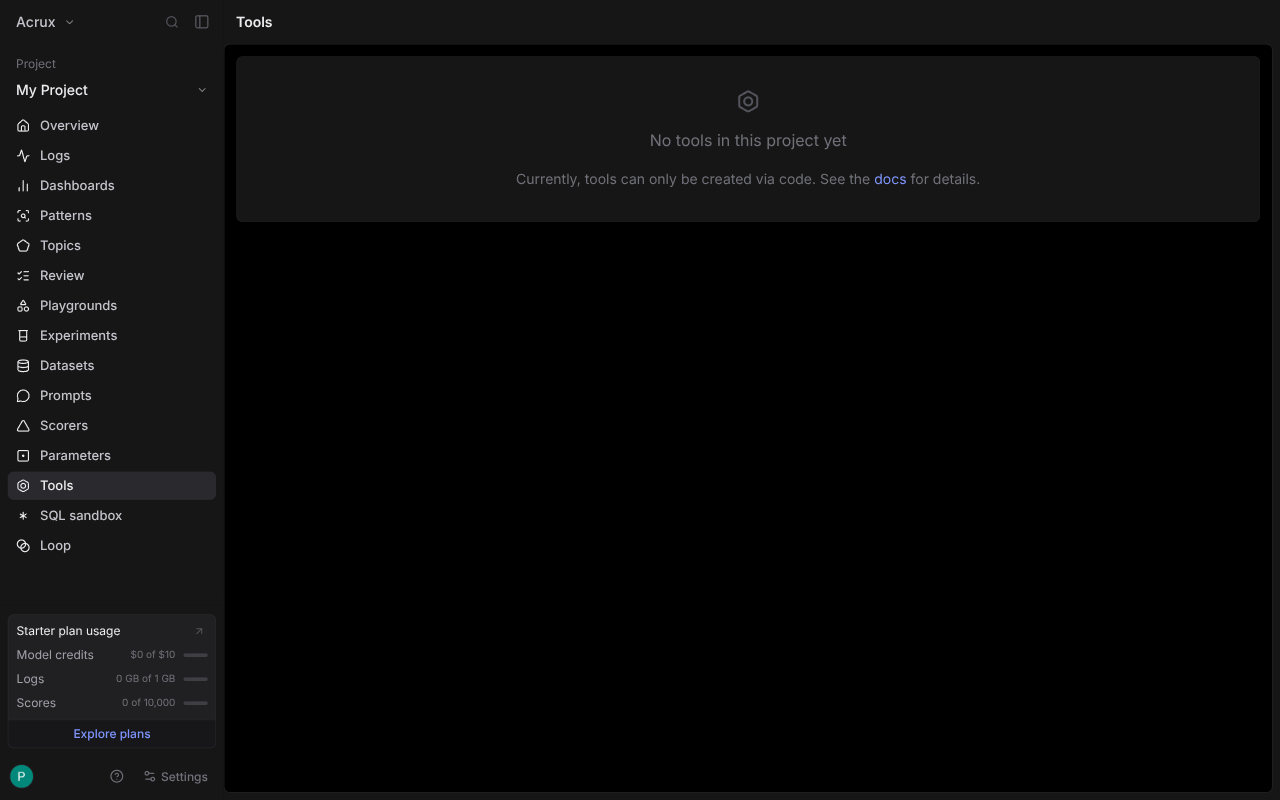
So the tool is declared in a file and pushed:
project.tools.create(
    handler=search_flights,
    name="search_flights",
    slug="search-flights",
    parameters=SearchFlightsArgs,   # a pydantic model
    if_exists="replace",
)
braintrust push bundles the module and uploads it. What lands is not a schema pointing at your
service, but the code itself:
"function_data": {
  "data": {
    "type": "bundle",
    "runtime_context": { "runtime": "python", "version": "3.13" }
  }
}
And the code executes. POST /v1/function/<id>/invoke with the schema's fields runs the handler
on Braintrust's infrastructure and returns the rows:
{ "origin": "Amsterdam", "destination": "Lisbon", "count": 3,
  "flights": [ { "flight_no": "KL1693", "airline": "KLM", "price_eur": 189 }, … ] }
The tool page shows the uploaded source, with two notices:
Show screenshot: Braintrust tool detail
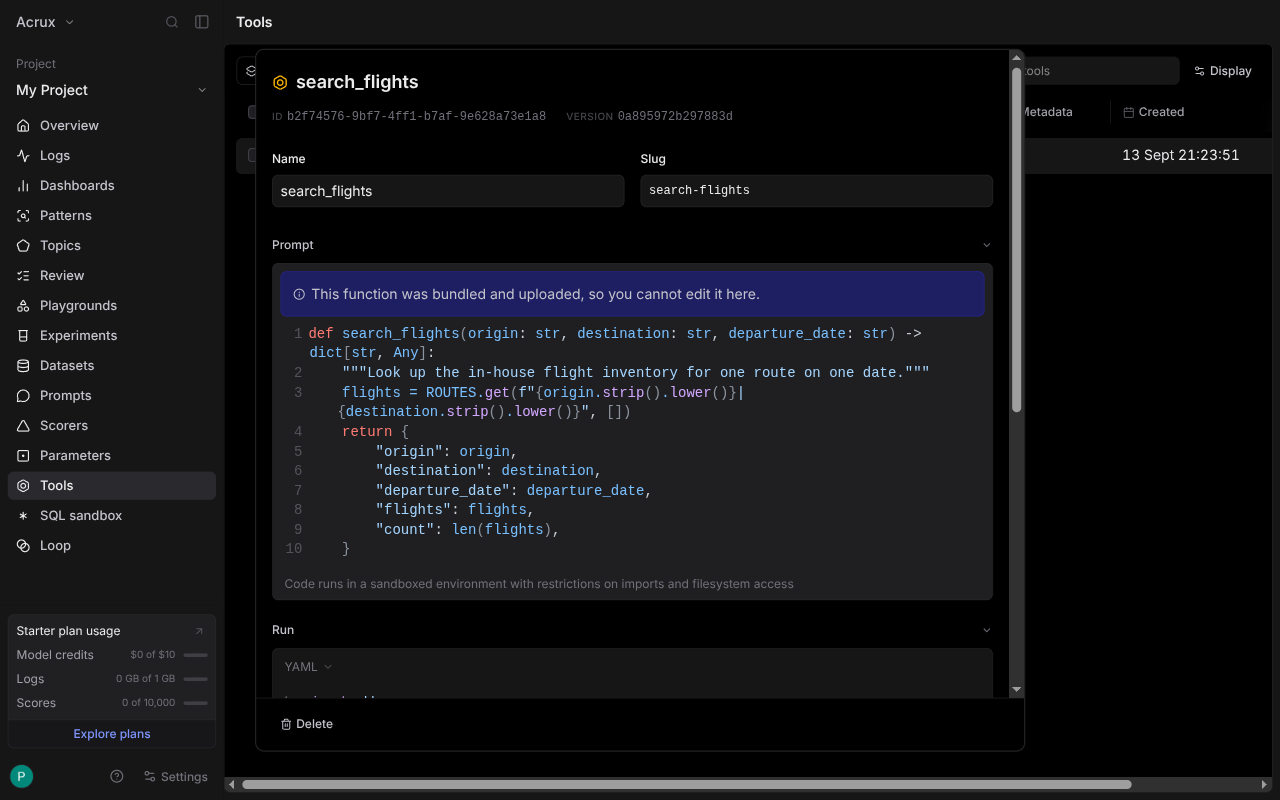
This function was bundled and uploaded, so you cannot edit it here.
Code runs in a sandboxed environment with restrictions on imports and filesystem access
The sandbox had two effects. The flight inventory had to be inlined into the pushed file
instead of read from ../data/flights.json, because the handler does not run where the data is.
In the tutorial, the same function reads that file from your own process. And the runtime is
pinned, so a push from Python 3.14 is refused:
Unsupported python version "3.14". Supported versions: 3.8, 3.9, 3.10, 3.11, 3.12, 3.13
The refusal is not a bug: if Braintrust runs the code, Braintrust picks the interpreter.
One thing did not work. The tool page has a Run panel with a Test button, and that button could
not call search_flights at all. Two different YAML shapes for the arguments were tried, both
returned the same error, and the REST API accepted the identical payload and returned the three
flights.
search_flights() missing 2 required positional arguments: 'destination' and 'departure_date'
Show screenshot: Braintrust tool test run with an error
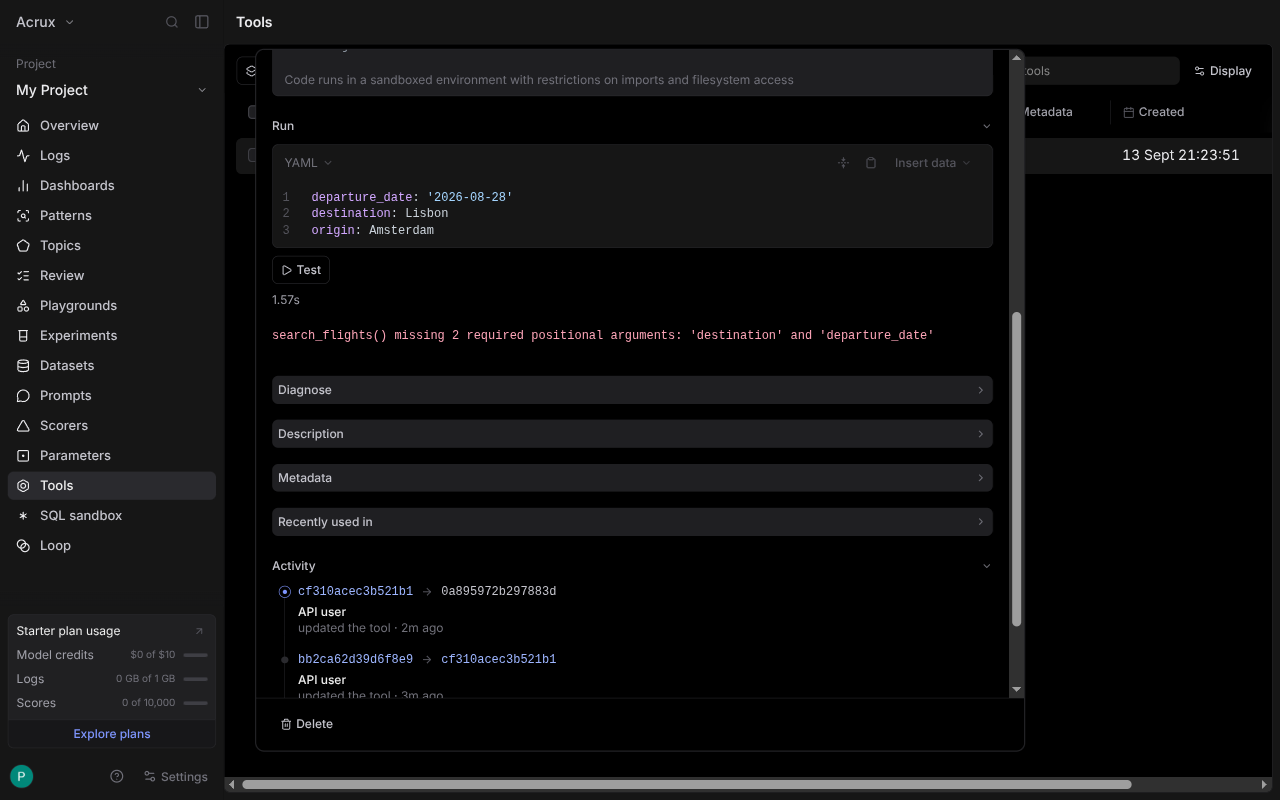
The panel passes the whole input object as one positional argument, and the API spreads the same object into keyword arguments. Because the button calls the handler differently from the real path, a green result from it would prove nothing.
AcruxCore stores the contract and leaves the choice of runner to you. A client executor keeps
both the code and the data in your process, and the platform holds only the name, description and
schema. An http executor calls an upstream service server-side instead. The catalog then
reports per-tool volume, error rate and latency.
Neither choice is wrong. Braintrust's choice is better when you want a tool to be callable by anything that can reach the platform, with nothing of yours deployed. AcruxCore's choice is better when the tool needs your database, your filesystem, your VPC or your Python version, which is the usual case for a tool built in-house.
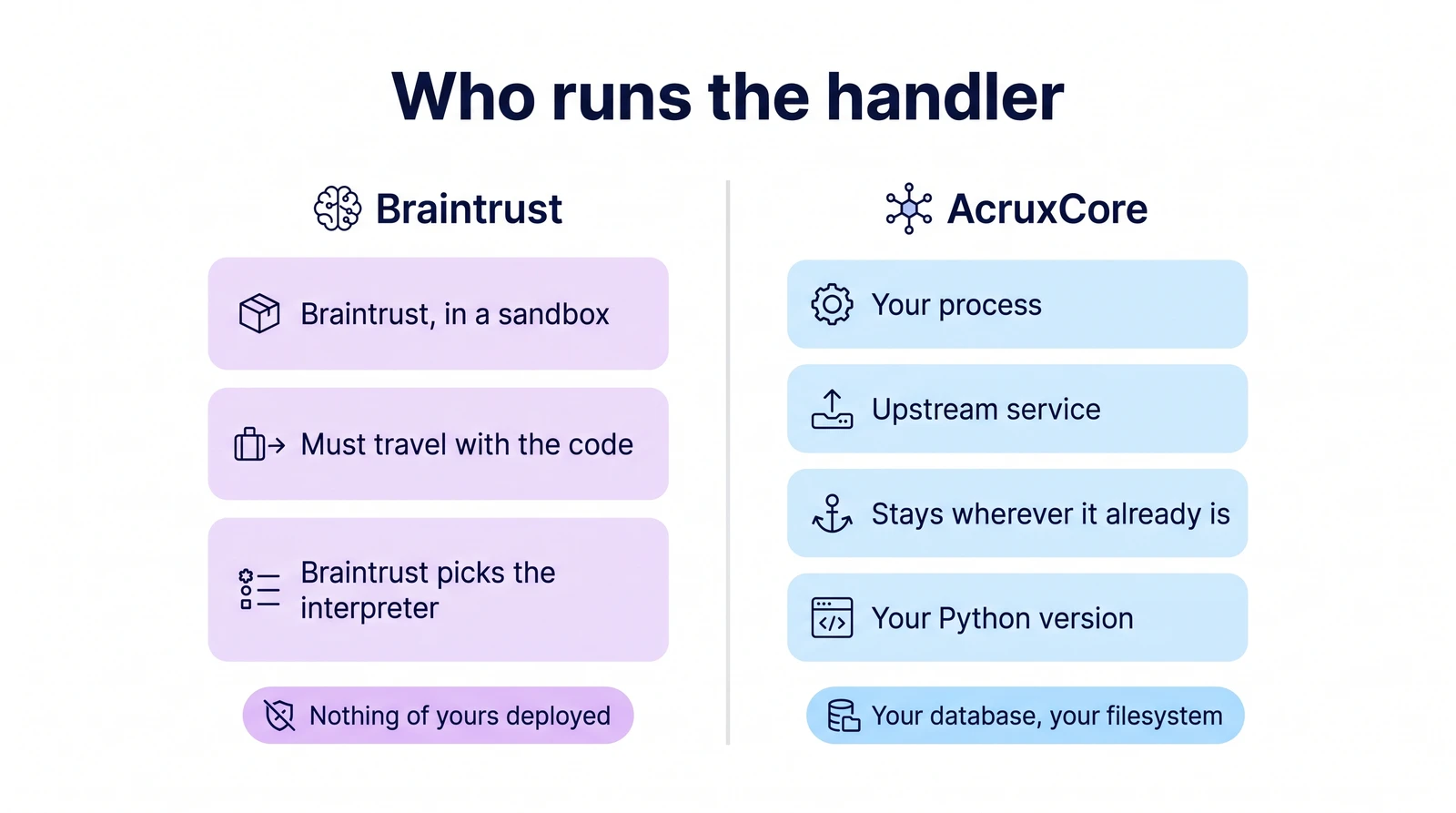
| Feature | Braintrust | AcruxCore |
|---|---|---|
| Create a tool in the UI | No — "tools can only be created via code" | Yes, or by code |
| Who runs the handler | Braintrust, in a sandbox | Your process (client) or an upstream service (http) |
| Where the tool's data lives | Must travel with the code | Stays wherever it already is |
| Runtime version | Braintrust's: 3.13 max on 13 September 2026 | Yours |
| Filesystem and imports | Restricted | Unrestricted |
| Per-tool analytics | No: none found | Yes: volume, error rate, P50/P95 |
Prompt authoring and versioning
Braintrust's authoring UI is ahead of ours.
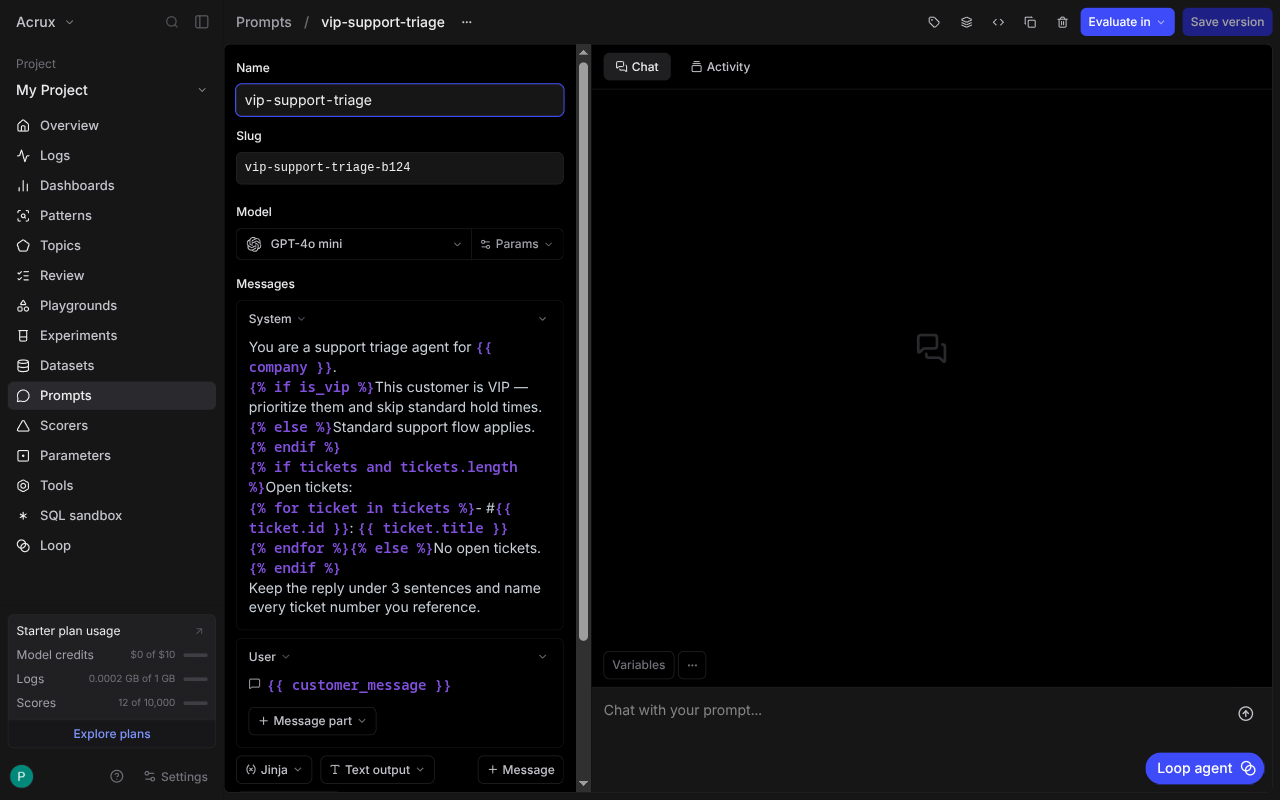
Each prompt picks its own template engine: Mustache, Jinja, or no templating at all. The editor notes that the web runtime uses nunjucks wherever a prompt says Jinja. AcruxCore has no "no templating" option, so a prompt full of JSON examples or LaTeX needs its braces escaped by hand.
Because the engine is real nunjucks, the vip-support-triage prompt went in verbatim: the
conditionals and the {% for %} loop over tickets, unchanged.
Show screenshot: Braintrust prompt editor
The version history is better than ours in one specific way. The diff covers the entire prompt
object: the model, the params, endpoint_name and template_format all appear in it, not only
the message text. You can also restore any version with "Set as editor contents".
Show screenshot: Braintrust prompt version diff
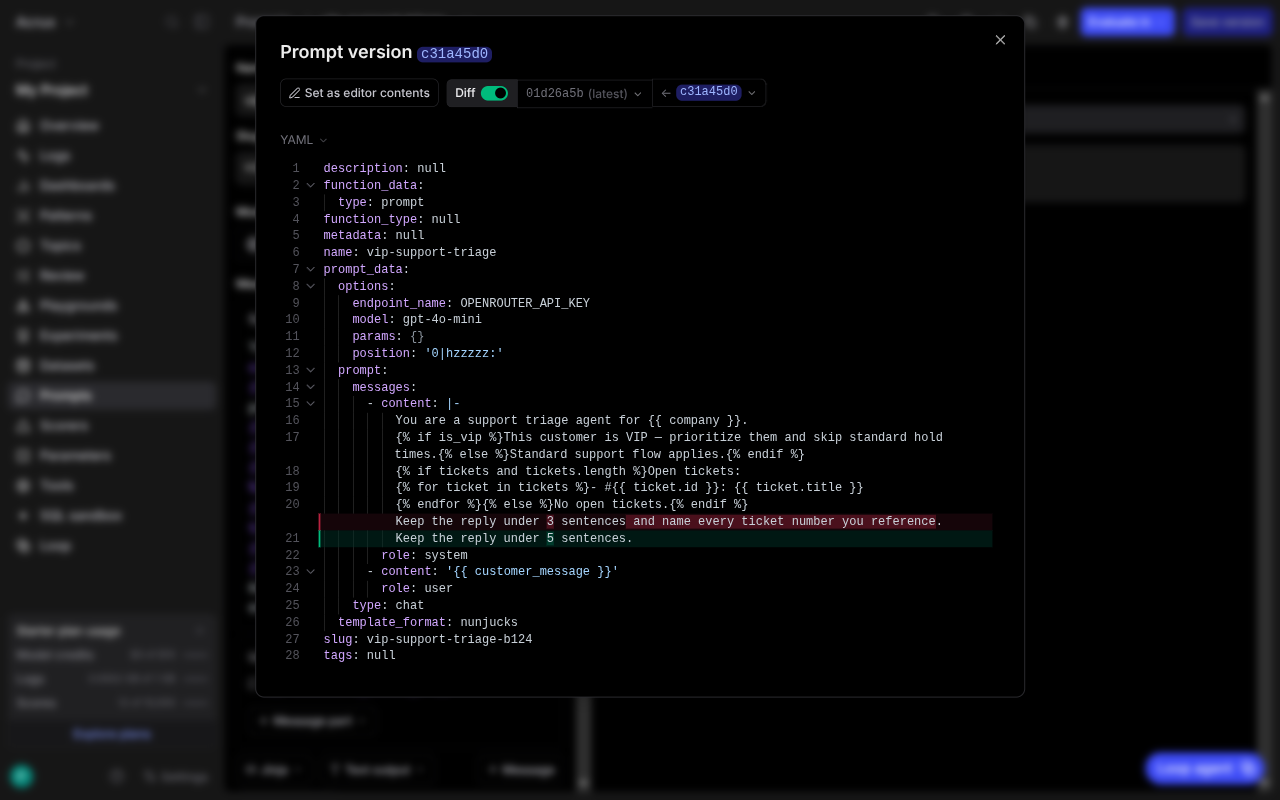
A model change alters behaviour without changing a word of the message, so our message-text diff would miss that edit.
Then the Python SDK renders that prompt with a different engine. Loading the same stored
prompt through the Python SDK and calling build() produces this:
You are a support triage agent for Acme Corp.
{% if is_vip %}This customer is VIP — prioritize them…{% else %}…{% endif %}
{% if tickets and tickets.length %}Open tickets:
{% for ticket in tickets %}- #:
{% endfor %}{% else %}No open tickets.{% endif %}
{{ company }} resolved, because mustache and nunjucks agree on that syntax. Every {% %} block
passed through as literal text, so the model received both branches of every conditional. And
{{ ticket.id }} and {{ ticket.title }} became empty strings, so the ticket numbers and
titles vanished while the "Open tickets:" heading above them stayed. Braintrust raised no
exception and printed no warning, and the model answered plausibly.
The cause is in the source. In braintrust==0.39.0, template_format appears only inside
generated type stubs, and Prompt.build() calls render_mustache() unconditionally. The same
is true in braintrust==0.49.1, the latest release on 2 November 2026.
Their Node SDK reads the same field and refuses to render rather than guessing:
Error: Nunjucks templating requires @braintrust/template-nunjucks.
Install and import it to enable templateFormat: 'nunjucks'.
Refusing is better than rendering with an engine the prompt never asked for. But the package that message names returned 404 on npm on 2 November 2026, so the instruction cannot be followed.
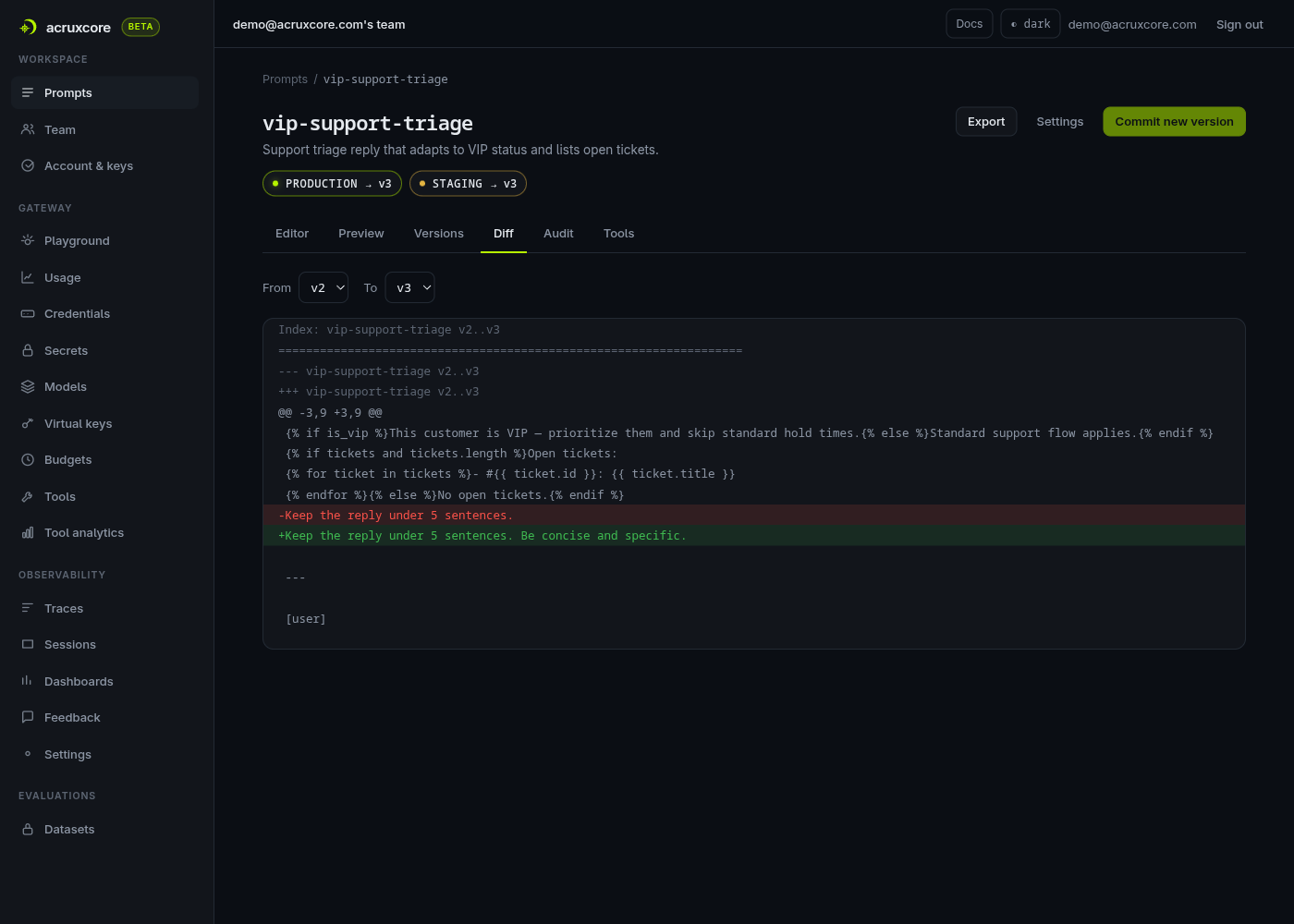
AcruxCore renders nunjucks server-side in prompts.render(), so there is one renderer and no
client-side engine that can disagree with it. The diff is narrower than Braintrust's: it covers
message text only, between any two versions.
Show screenshot: AcruxCore Diff tab
| Feature | Braintrust | AcruxCore |
|---|---|---|
| Conditionals and loops in the UI | Yes, nunjucks | Yes, nunjucks |
| "No templating" mode | Yes | No |
| Diff scope | Whole prompt object, any two versions | Message text, any two versions |
| Restore an old version | One click | Promote by alias |
| SDK renders the stored format | Python no, Node refuses | Yes — rendered server-side |
Sending a live call
The prompt page runs the stored prompt with values taken from a variables panel, and Braintrust
builds that panel from the template itself. The panel inferred tickets.0.id, tickets.0.title
and tickets.length without being told. Filling the panel in and sending produces a real
completion, and in this screenshot the web runtime renders the nunjucks correctly, naming both
tickets:
Show screenshot: Braintrust prompt playground
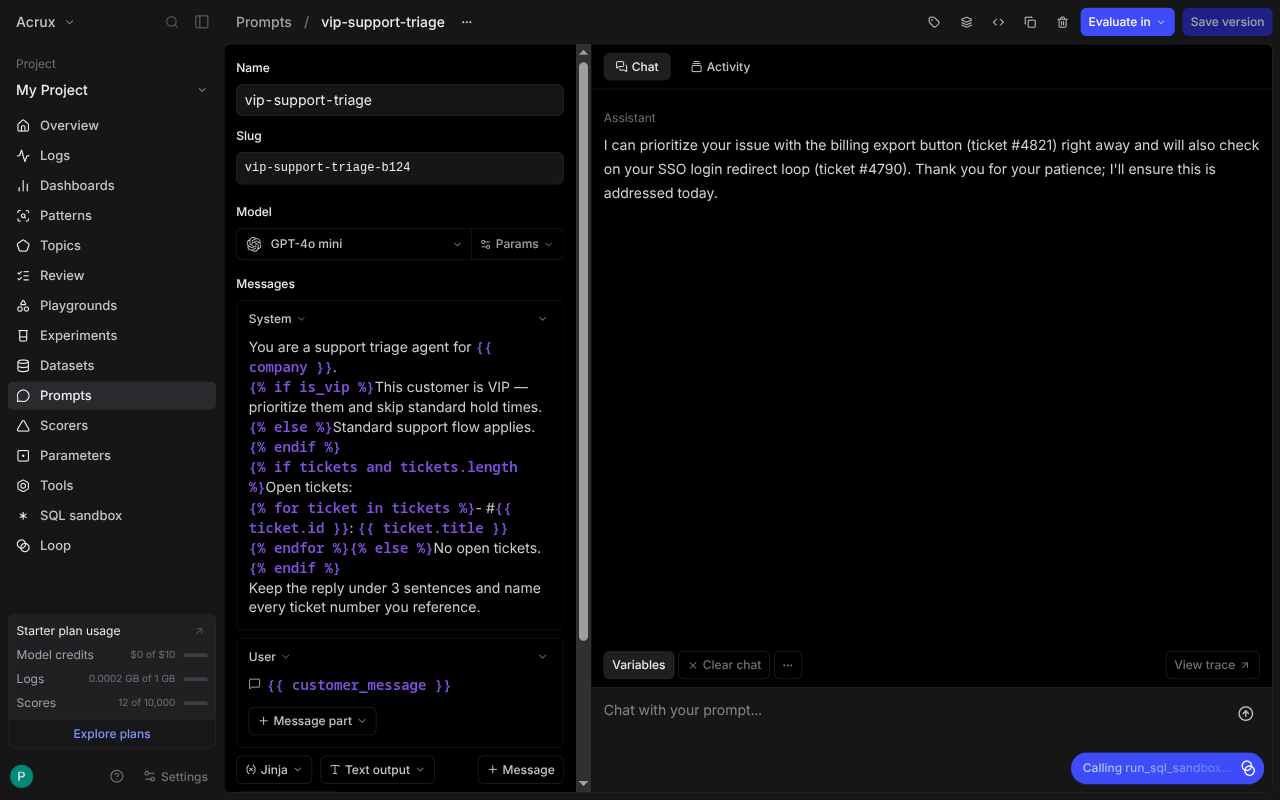
That reply and the SDK output above came from the same stored prompt with the same variables.
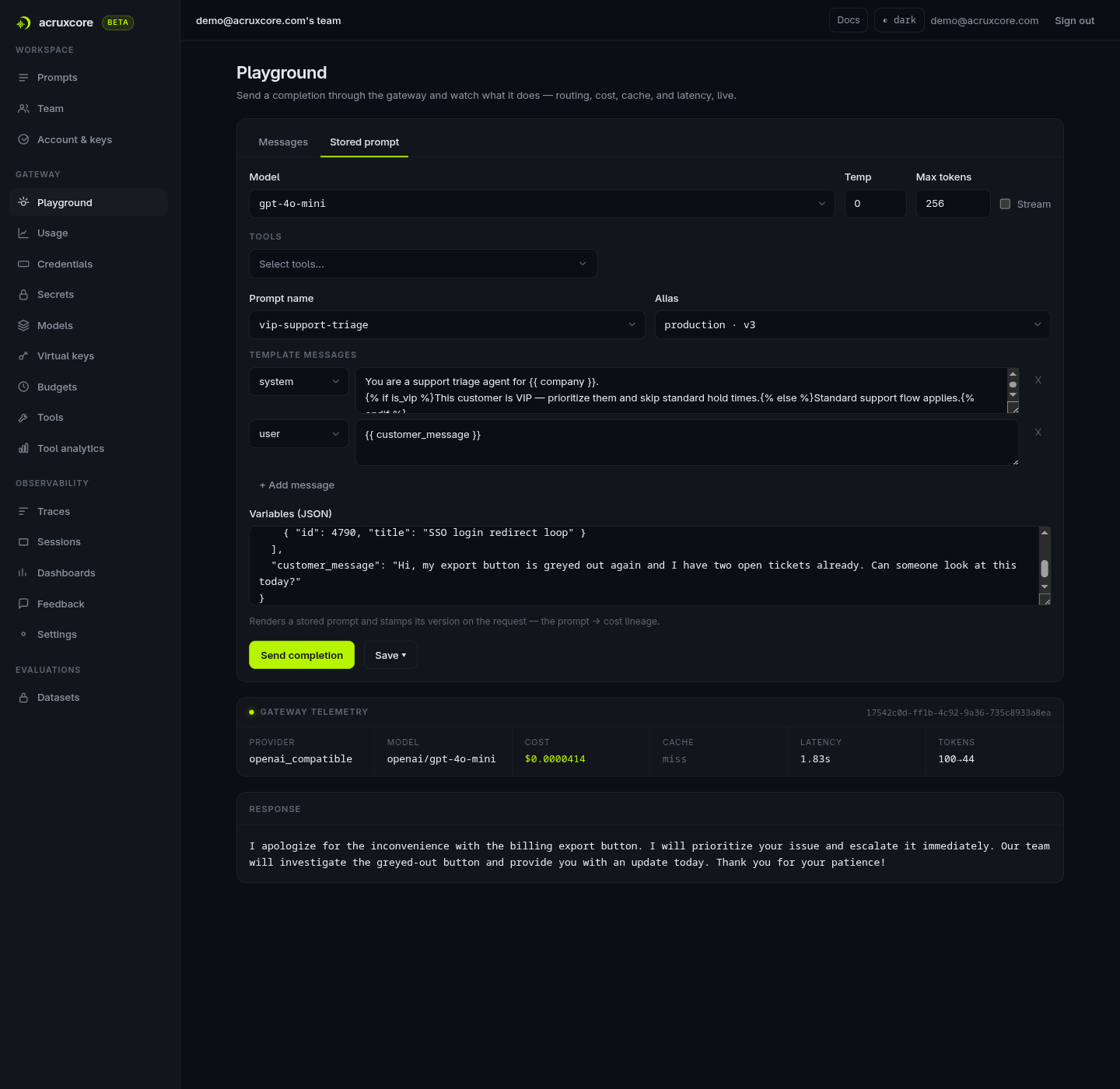
The playground does not show what the call cost. Tokens, cost and duration are one click away behind "View trace". AcruxCore shows all three on the run itself.
Show screenshot: AcruxCore Playground run
| Feature | Braintrust | AcruxCore |
|---|---|---|
| Run a stored prompt with variables | Yes, variables scaffolded from the template | Yes |
| Cost and latency inline | No — one click to the trace | Yes |
| Renders the stored template correctly | Yes, in the web UI | Yes |
Tracing and observability
Braintrust's tracing is explicit. Nothing is recorded until you both name a destination and instrument the client:
logger = init_logger(project="My Project")
client = wrap_openai(OpenAI(base_url="https://api.braintrust.dev/v1/proxy", api_key=KEY))
With those two lines the model call is captured in full: the system message, the user message, the tokens, the cost and the duration.
Show screenshot: Braintrust trace detail
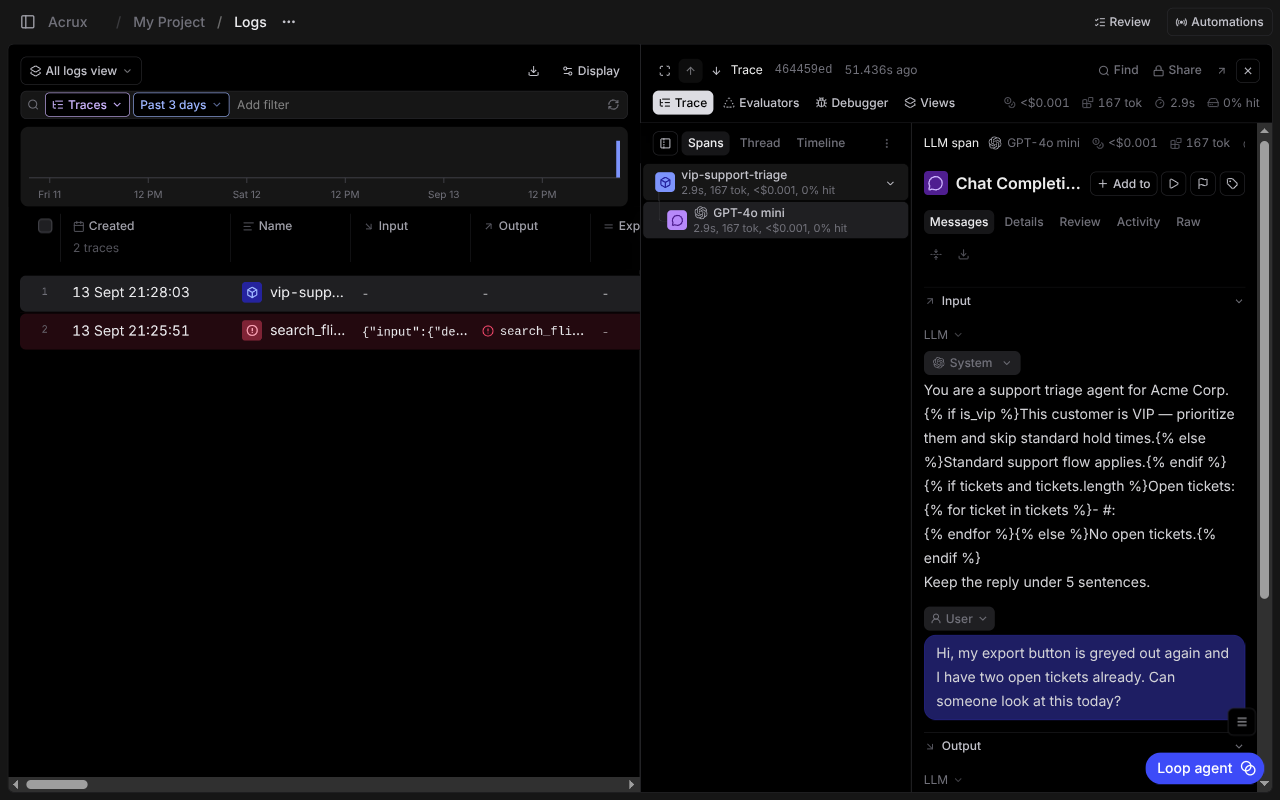
A parent span you create yourself behaves differently. Wrapping the call in
logger.start_span() produces a root span whose input reads null, because a manual span records
only the fields you write to it. The child LLM span is complete; the root span above it carries
nothing but a name.
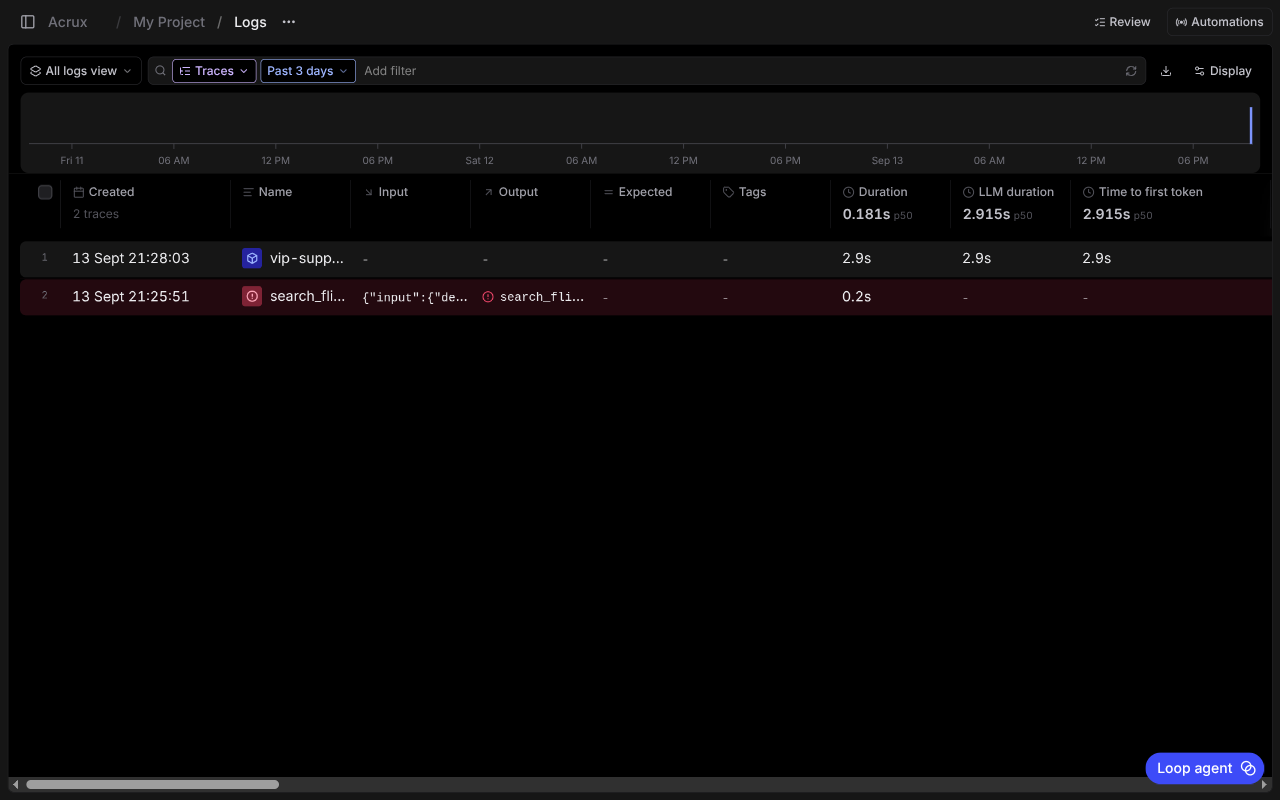
The log view carries a duration histogram over time, p50 columns for duration, LLM duration and
time to first token, and failures highlighted in red. The failed search_flights test from
earlier appears in the log list as a trace of its own.
Show screenshot: Braintrust logs with a failed tool run
AcruxCore writes the span from the gateway, server-side, so the script contains no tracing code. The span also carries a link back to the prompt version that produced it.
| Feature | Braintrust | AcruxCore |
|---|---|---|
| Tracing code required | init_logger() plus wrap_openai() | None on the gateway path |
| Manual parent span captures input | Only what you log to it | N/A — gateway writes the span |
| Prompt-version lineage on the span | Not on this path | Yes |
| Failures surfaced in the log list | Yes, highlighted | Yes |
Where the platform sits
Braintrust can sit in the request path or beside it, and you choose. Its AI proxy at
api.braintrust.dev/v1/proxy sits in the request path, and that proxy resolved gpt-4o-mini
against the org's OpenRouter credential while the script never knew which provider would serve the
call. But wrap_openai() around a direct client works too, and then Braintrust only receives.
AcruxCore is always in the request path for completions. Routing, caching, budgets and virtual keys apply because the call goes through the gateway, whether or not the application asked for them. The cost is a hop you cannot skip.
| Feature | Braintrust | AcruxCore |
|---|---|---|
| Sits in the request path | Optional, via their AI proxy | Always |
| Works without the proxy | Yes, wrap_openai() ingests only | No, for completions |
| Routing, caching, budgets, virtual keys | Not on the ingest-only path | Apply to every call |
SDK and developer experience
Both platforms' Python SDKs completed every task in this post. The Braintrust CLI does more:
braintrust push bundles Python and uploads it, and braintrust eval runs experiments and prints
a comparison. braintrust push also caused three small problems that together cost about twenty
minutes:
- It needs the
[cli]extra foruv. - It refuses to run from a path whose folder names contain hyphens, because it turns the path into a dotted module name.
- It refuses Python 3.14.
The templating mismatch above costs more, because the surface you author on and the surface you deploy from disagree.
The AcruxCore script is shorter, because rendering and tracing both happen server-side:
rendered = await hub.prompts.render("vip-support-triage", "production", VARIABLES)
result = await hub.gateway.chat(rendered.model, rendered.messages, prompt_version_id=rendered.version_id)
bt_sdk_run.py— the Braintrust SDK run.bt_eval_run.py— the Braintrust evaluation.bt_tool_push.py— pushes the tool to Braintrust.acx_sdk_run.py— the AcruxCore run.
| Feature | Braintrust | AcruxCore |
|---|---|---|
| Push runnable code to the platform | Yes, braintrust push | No |
| Run experiments from the CLI | Yes, braintrust eval | No: no CLI; run_local in your code, or server-side runs |
| Tracing code in the script | init_logger() plus wrap_openai() | None |
| SDKs agree on template rendering | No — Python renders mustache, Node refuses | One renderer, server-side |
Latency overhead
There is no benchmark number in this post.
A fair overhead benchmark runs both products on the same machine. Braintrust cannot be self-hosted on a Starter account, so any timing would compare a round trip to their datacenter with a loopback call, which measures distance, not either product's overhead. Their Docker data plane runs locally but cannot be attached to a Starter organization (see the next section), so a Starter reader could not reproduce such a benchmark either.
License, self-hosting and plans
Braintrust is not open source. The JavaScript SDK is Apache-2.0 and autoevals is MIT, but
the hosted platform is proprietary. AcruxCore is Apache-2.0 in full.
Self-hosting is Enterprise-only. The containers are not the obstacle:
braintrustdata/braintrust-deployment brought up Redis, Postgres and a standalone-api
container in about 25 seconds, with no license key, and GET :8000/status answered. But those
containers are only the data plane. The UI, authentication and metadata stay on
braintrust.dev, and attaching your own data plane needs a custom API URL on the organization. On
a Starter account that setting is read-only:
Show screenshot: Braintrust data plane settings
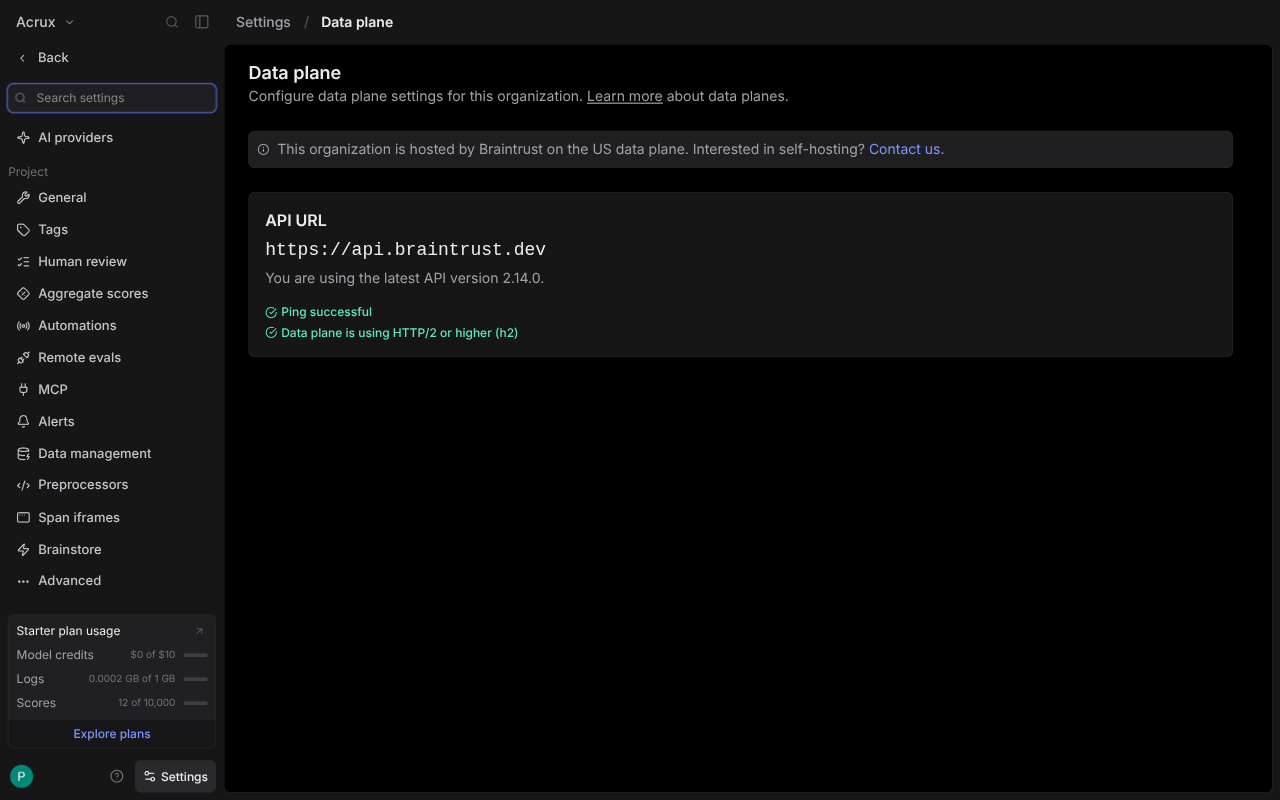
Their docs say the same: "Self-hosting is only available on the Enterprise plan."
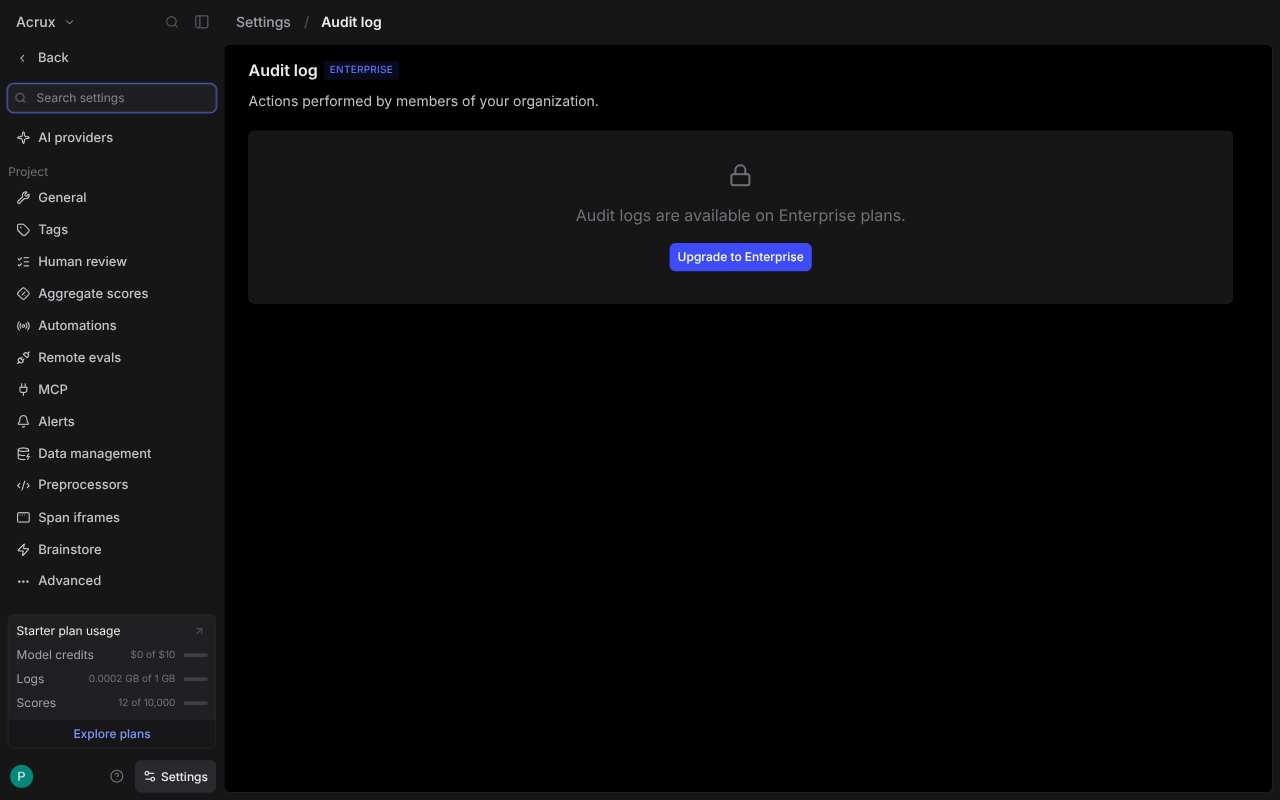
Access control starts at $249/month. Starter has no roles. Pro has "Basic roles" and Enterprise has custom roles. Audit logs are Enterprise-only:
Show screenshot: Braintrust audit log on Enterprise only
Environments is Pro and above. It tags a prompt version as production, staging or development so you can pull it by name, the same job AcruxCore's aliases do.
| Braintrust | AcruxCore | |
|---|---|---|
| License | Proprietary. JS SDK Apache-2.0, autoevals MIT | Apache-2.0, all of it |
| Self-host | Enterprise plan only; the Docker data plane runs but cannot be attached | docker compose up |
| Starter | $0: 1 GB processed data, 10k scores, $10 model credits, 14-day retention, unlimited users | The hosted platform is free to use; self-hosting is Apache-2.0 |
| Next tier | Pro, $249/mo: 5 GB, 50k scores, 30-day retention, RBAC, environments, custom charts | — |
| Roles | None on Starter; basic roles on Pro; custom on Enterprise | One role per member |
| Audit log | Enterprise only | Team audit trail and a per-prompt audit tab, with no export |
| Prompt environments/aliases | Pro and above | Included |
Sources: braintrust.dev/pricing, prices checked 25 October 2026, and the organization settings pages above, checked on 13 September 2026.
What Braintrust does that AcruxCore doesn't
A SQL sandbox over your own data
Braintrust ships a query editor over experiments, logs and datasets. This is real SQL against the experiment created earlier, returning in 0.41s:
SELECT input.customer_message AS message, scores.mentions_every_ticket AS ticket_score,
       scores.Factuality AS factuality
FROM experiment('a14e0c95-5d81-411b-b2d6-b3856df5bcf7')
WHERE scores.Factuality IS NOT NULL
Show screenshot: Braintrust SQL sandbox result
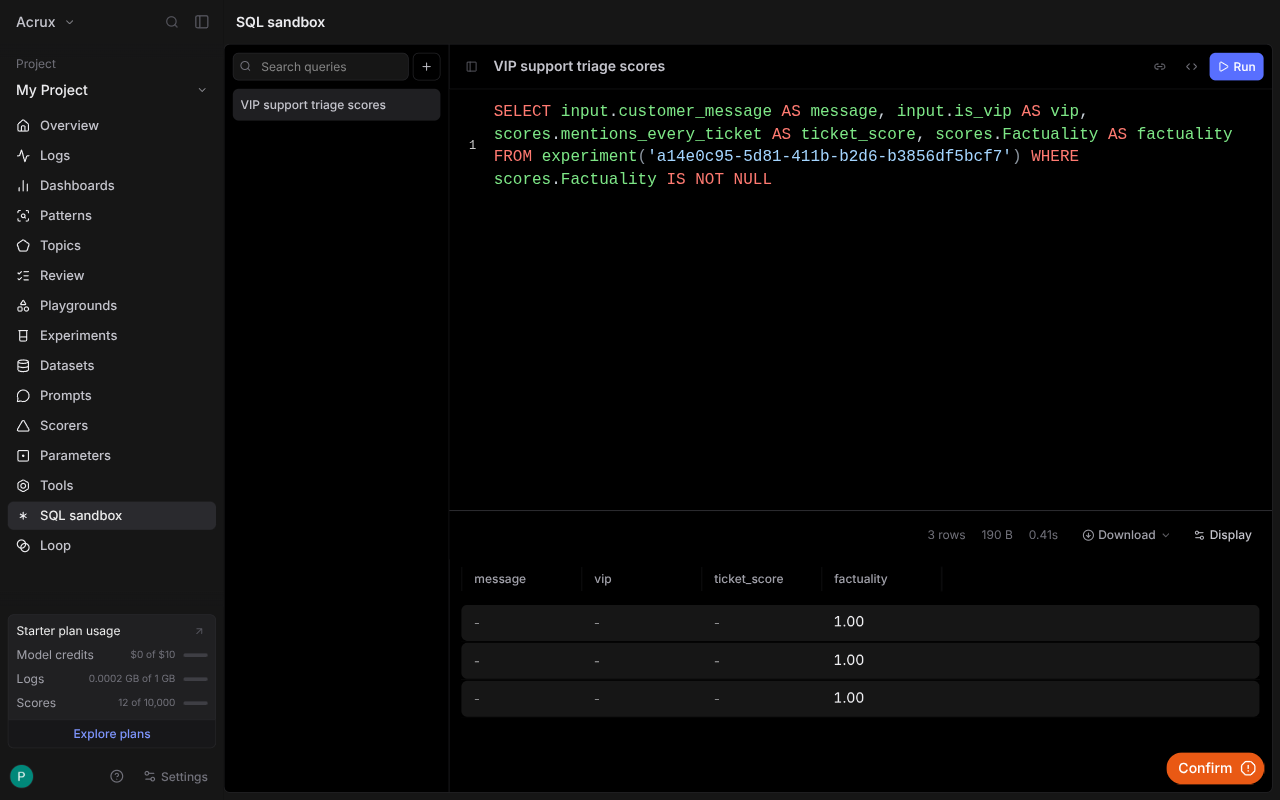
AcruxCore's analytics pages answer a fixed set of questions, and you cannot query the underlying data. Braintrust's schema takes learning: scores and inputs sit on different rows of the same experiment, so a query that selects both returns half-empty columns until you know that.
Loop, an agent inside the dashboard
An earlier attempt at that query failed, and the error came with a Fix with Loop button. Loop took the broken query as context, called its own tools to inspect the project, and proposed a rewrite as a red/green diff with Accept, Skip and an auto-accept toggle.
Show screenshot: Braintrust Loop agent panel
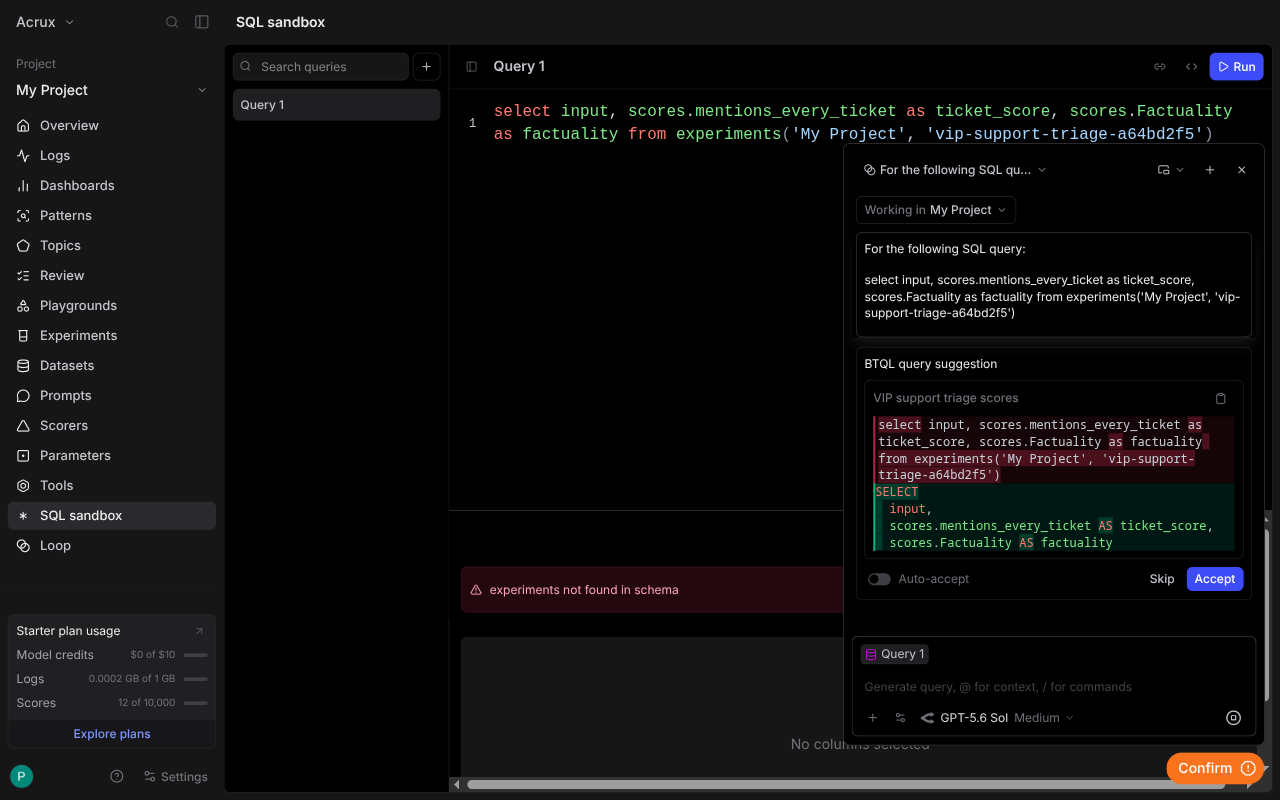
The answer was wrong: the rewrite dropped the FROM clause and failed in a new way, and
Braintrust's own error message then named the BTQL syntax the query needed. The pattern of
proposing a diff and asking before applying it has no counterpart in AcruxCore.
Several more, not tested here
The project sidebar also lists Patterns, Topics, a human Review queue, Automations, Remote evals, Preprocessors, Span iframes and a project MCP page. Of these eight, AcruxCore has an equivalent only for Automations (its online evaluation rules) and the MCP page.
What AcruxCore does that Braintrust doesn't
Braintrust's proxy and AcruxCore's gateway both sit in the request path. Two controls are in AcruxCore and not in Braintrust, checked against Braintrust's own documentation.
Budgets that stop the call
An AcruxCore budget is a cap in dollars, set per team or per virtual key, for a period. The gateway reserves
the estimated cost of a call before the provider is contacted, and a request that would cross the
cap is refused with 402 BUDGET_EXCEEDED rather than sent.
Braintrust has spend alerts, and their documentation says plainly what those do:
Spend alerts are informational-only and do not interrupt or limit your usage.
Their alerts also watch a different number: the Braintrust invoice for the whole organization, at up to three thresholds, by email or Slack (re-checked on 2 November 2026). An AcruxCore budget caps model spend on one key.
Per-key request and token limits
A virtual key in AcruxCore carries an optional requests-per-minute and tokens-per-minute limit,
and the gateway checks both against a trailing 60-second window before the call goes out. A caller
over either limit gets a 429 with Retry-After. That window lives in the API process today, so a
deployment running several API instances enforces the limit per instance rather than across all of
them.
Braintrust rate-limits its own API endpoints per organization, which protects their service rather than your spend. Their organization settings expose no rate limit you can set on model calls.
What was checked and ruled out
Four controls that look like ours alone are not. Braintrust's AI proxy caches responses ("The proxy automatically caches results and reuses them when possible"). It issues temporary credentials that do the job virtual keys do, and it load balances across several keys for one model. Organizations also hold provider credentials and per-function environment variables.
Sources: the AI proxy guide, spend alerts and organization settings, all checked on 13 September 2026.
Verdict
| Braintrust | AcruxCore | |
|---|---|---|
| Strongest at | Evaluation: declarative evals, auto-comparison against the last run, scorers as a resource, SQL over the results; a prompt editor ahead of ours | Controls in the request path: budgets that refuse the call, per-key rate limits, and tool code that stays in your process |
| Weakest at | The gap between its own surfaces: a prompt the UI authors correctly, the Python SDK renders differently | No query editor, and no SQL over your own trace data |
If the job is iterating on prompt quality against a dataset, Braintrust does it better than we
do. The Python SDK limits that lead: until it reads template_format, a prompt authored in
nunjucks renders as mustache, drops data and raises no error. On tools,
neither product is behind. Braintrust's choice buys a tool anything can call with nothing of
yours deployed, and AcruxCore's keeps the tool next to your own database and filesystem.
The compare page puts the open-source alternatives side by side.
Key point: Choose by where your work is hardest. Braintrust's strength is the loop from dataset to scored experiment. AcruxCore's strength is what the gateway enforces on each live call, and where your tool code runs.
FAQ
Is Braintrust open source?
No. Parts of its tooling are published, such as the JavaScript SDK (Apache-2.0) and autoevals
(MIT), but the hosted platform is proprietary.
Can Braintrust be self-hosted?
Only on the Enterprise plan. Its Docker data plane starts locally, but a Starter organization has no setting to attach it, and the UI, authentication and metadata stay on braintrust.dev.
How much does Braintrust cost?
Starter is $0, with 1 GB of processed data, 10k scores and 14-day retention. Pro is $249 a month and adds basic roles and environments. Audit logs are Enterprise-only.
Does Braintrust run tools?
Yes. braintrust push uploads your Python handler, and Braintrust runs it in a sandbox with
restricted imports and filesystem access, on a Python version it chooses. Tools can only be
created in code.
Does Braintrust have spend limits?
It has spend alerts on the Braintrust invoice, by email or Slack, and its docs say they are
informational-only and do not limit usage. AcruxCore's budgets refuse a call with
402 BUDGET_EXCEEDED before it reaches the provider.
Nine more options are ranked in 9 Braintrust alternatives, and the open-source field is in 10 LLM observability tools tested hands-on. To try AcruxCore, start with the Quickstart.