AcruxCore vs Opik: prompts, tracing, tools and guardrails compared
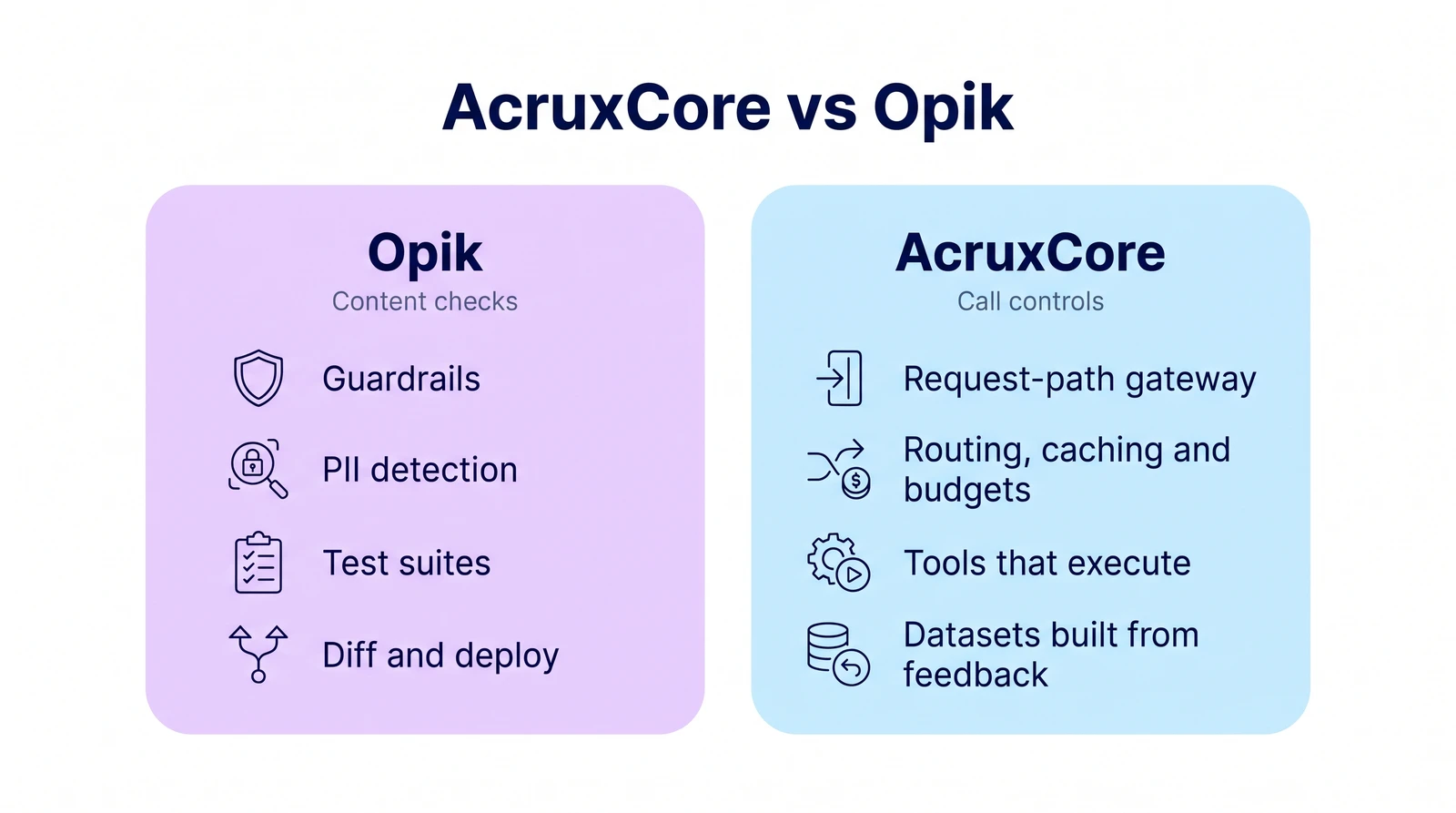
Opik is Comet's open-source LLM-ops platform, released under Apache 2.0. It traces calls that a
wrapped client makes, keeps a prompt library, and adds two things many tracing tools lack: content
guardrails, and a separate object for regression test suites. AcruxCore is built around
a gateway in the request path instead. We rebuilt the support prompt vip-support-triage on a
self-hosted Opik and on AcruxCore. The prompt changes tone for VIP customers and lists their
open tickets. On Opik we versioned it, ran it in the Playground, traced an SDK call, built a
dataset from the trace and ran an experiment over it.
The short answer: Opik has guardrails and test suites, and AcruxCore has neither. AcruxCore runs every call through a gateway that applies budgets and caching, executes the tools in its catalog, and writes a trace with no client code. Opik's own LLM Gateway is a beta that its docs describe as built for development and testing.
AcruxCore is our product. Each script we ran is linked next to its result.
How we tested
- Opik: self-hosted with
docker composeathttp://localhost:5175. The instance had no login screen, so we worked as the anonymous local user a first-time self-hoster sees. Opik version not recorded. - Model:
openai/gpt-4o-minithrough OpenRouter, with the same prompt and customer message on both sides. Opik's Playground lists OpenRouter as a named provider. - Dates: we worked in the Opik UI and took the screenshots on 7 August 2026. The three latency runs were committed a month later, on 7 September 2026.
- AcruxCore in the benchmark: a local gateway at
http://localhost:3001. Hardware not recorded.
At a glance
| Aspect | Opik | AcruxCore |
|---|---|---|
| Dataset creation | Add-to-dataset from any trace, inline dataset creation | Span-level trace feedback, manual entry, API, or a CSV/JSON file |
| Prompt templating | Mustache by default; a Jinja2 prompt type with conditionals and loops in the SDK (not tested). The UI dialog we used gave flat {{variable}} substitution | Nunjucks {% if %} / {% for %} logic, Diff tab |
| Fetching the live version | get_prompt(..., environment="production") returns the version deployed there | prompts.render() by alias, or a prompt reference in the gateway call |
| Playground | Latency + tokens shown inline, no cost, no cache | Cost, cache, latency shown inline |
| Tracing depth | Span tree via client-side SDK instrumentation | One automatic span per gateway call; trees through SDK steps or OTel framework instrumentors |
| Request-path gateway | A beta LLM Gateway for development and testing (not tested here); tracing records a call your own client made | Built in: routing, caching, budgets |
| Tool catalog | No catalog; the "Agent playground" needs a live connected process | Versioned catalog, executed calls, analytics |
| Guardrails | PII, Topic, prompt-injection, LLM-judge and custom-classifier guards (per docs; we tested the Topic and PII panel) | None |
| SDK trace capture | Wrap a client with track_openai() | Automatic with each gateway call |
| MCP server | Opik Cloud, or a local server for self-hosted installs: read and write traces, scores, prompt versions, test suites and experiment records; no delete | Hosted or local: also promote an alias, run a stored prompt through the gateway, run experiments |
- Pick Opik if you want content guardrails and regression test suites added to an OpenAI client you already own.
- Pick AcruxCore if your calls should pass through one gateway that traces them with no client code, runs your tools and builds datasets from feedback.
License, pricing, team structure, security, and community stats: see AcruxCore vs Opik on the compare page.
Evaluation & datasets
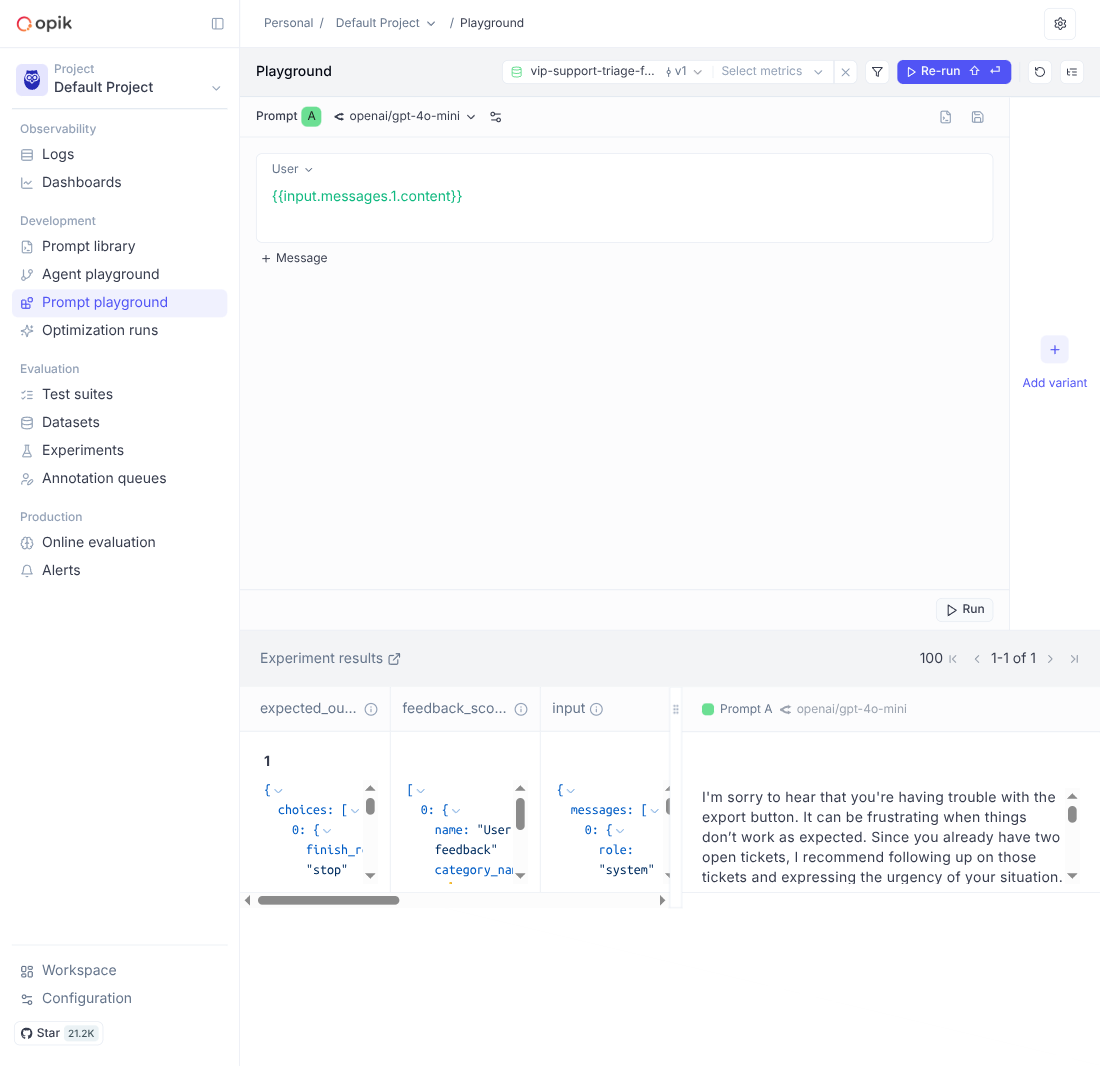
Opik's "Add to → Dataset" works straight from a trace's detail panel, and creating a new dataset is a one-step inline dialog from the same menu.
Show screenshot: Add to dataset dialog on Opik
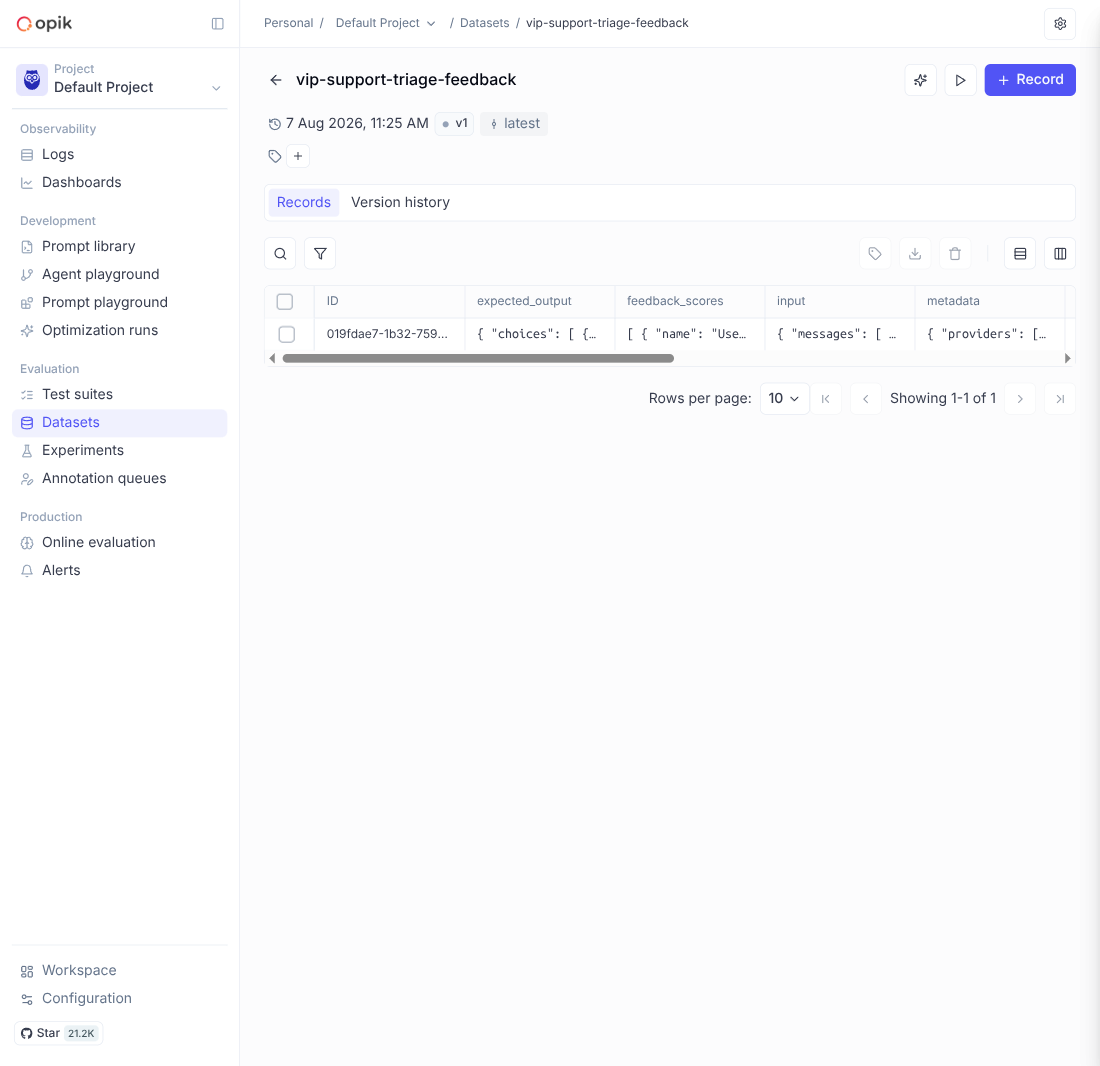
From the UI, an experiment over that dataset runs through "Open in Playground". The dataset's
rows load as bindable variables ({{input.messages.1.content}}-style paths), and then you press
Run. The dataset's "Run an experiment" button says "Use this dataset to run an experiment
using the Python SDK", so the SDK is the path for a scripted experiment and the Playground is
the interactive one.
Show screenshot: dataset-bound experiment run in Opik's Playground
| Feature | Opik | AcruxCore |
|---|---|---|
| Dataset creation | From any trace directly, inline "create new dataset" in the same dialog | Span-level trace feedback, manual entry, API, or a CSV/JSON file |
| Experiments | Interactive via Playground, or scripted via the Python SDK | Version × model sweep with an automatic baseline, run from the UI |
| Feedback scores | Thumbs-up/down "Human review", copied into the dataset row | Span-level feedback, gates dataset eligibility |
Prompt authoring & versioning
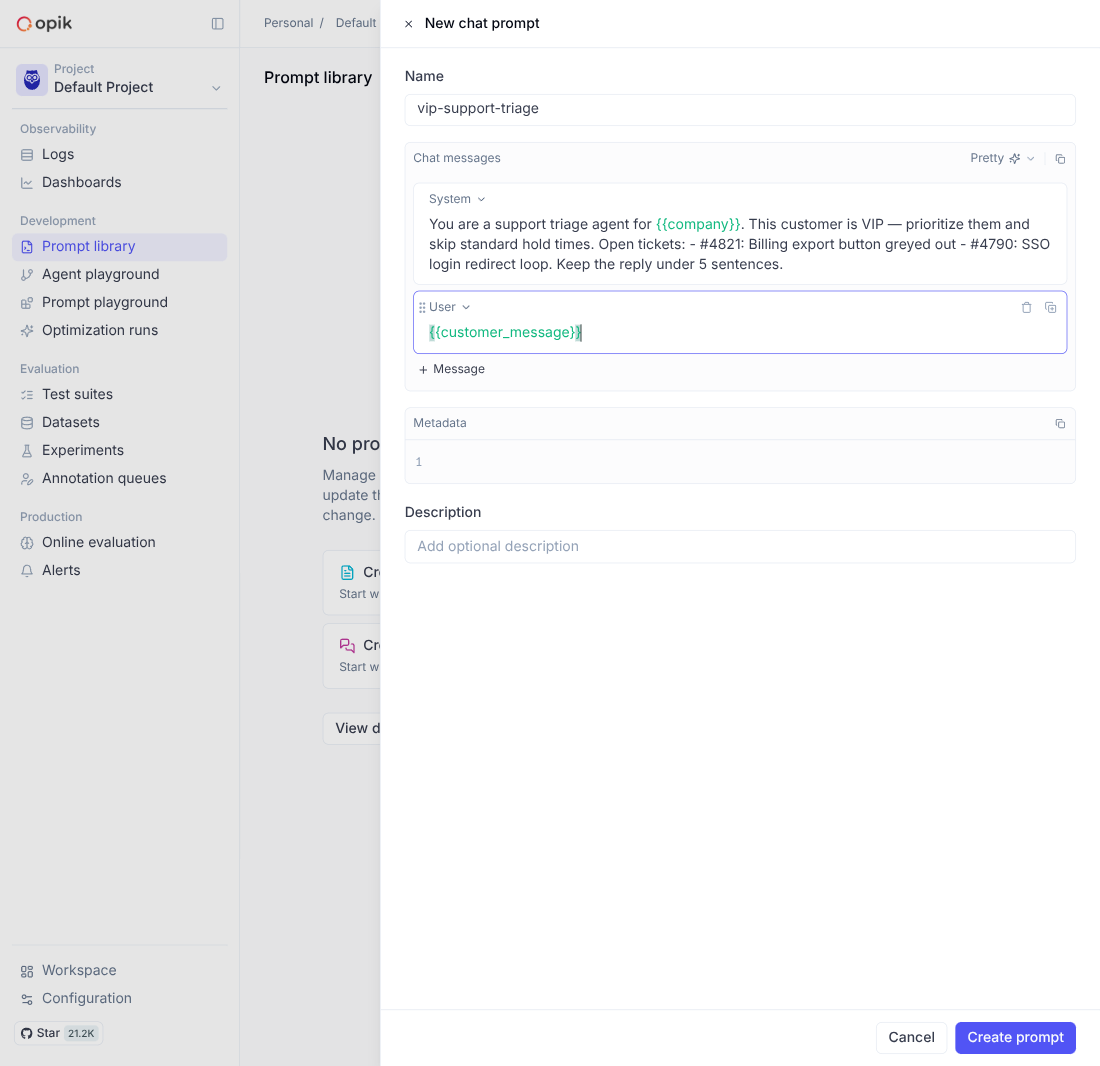
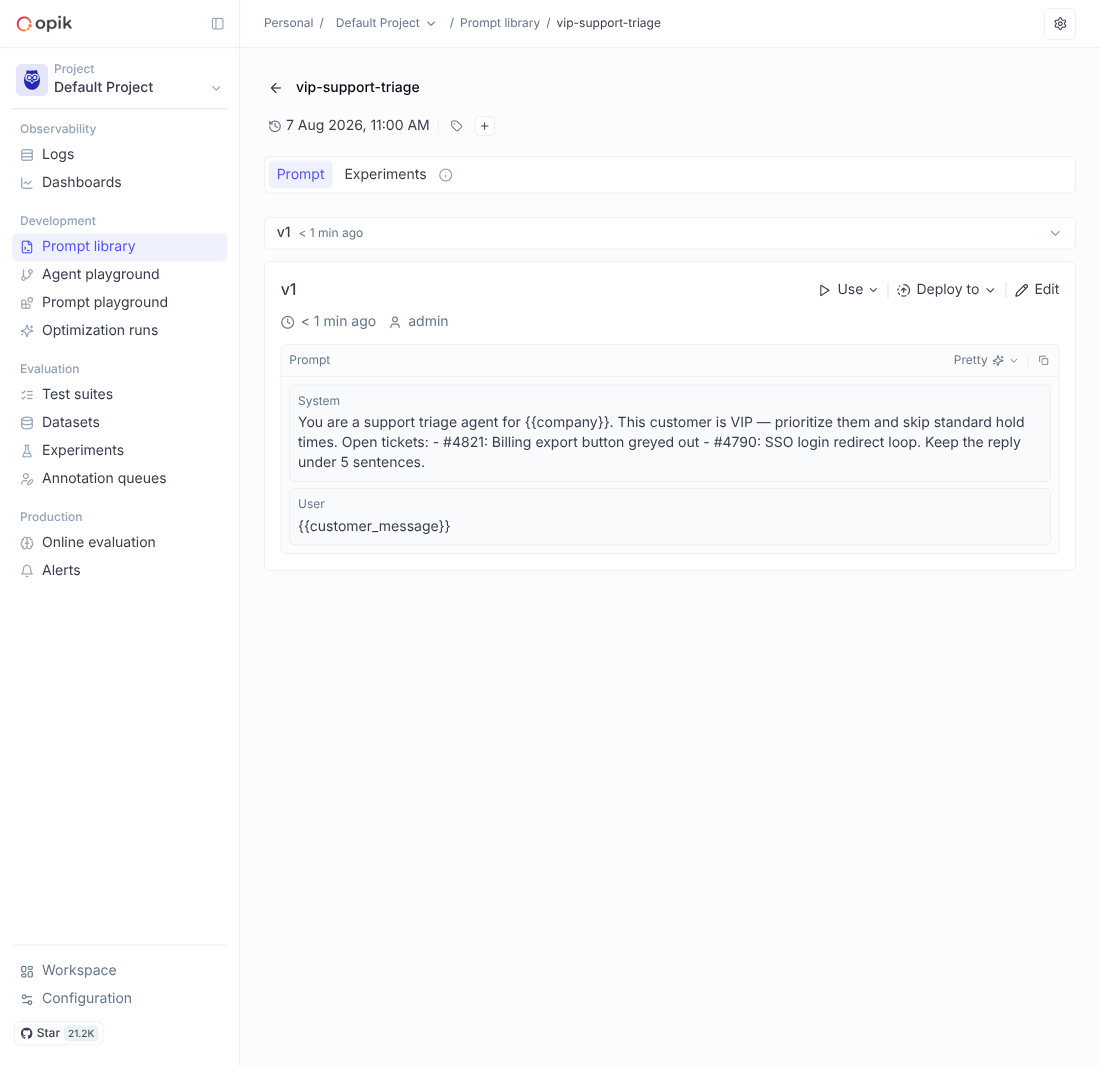
Opik's Prompt library offers a "text prompt" and a "chat prompt". In the New chat prompt dialog
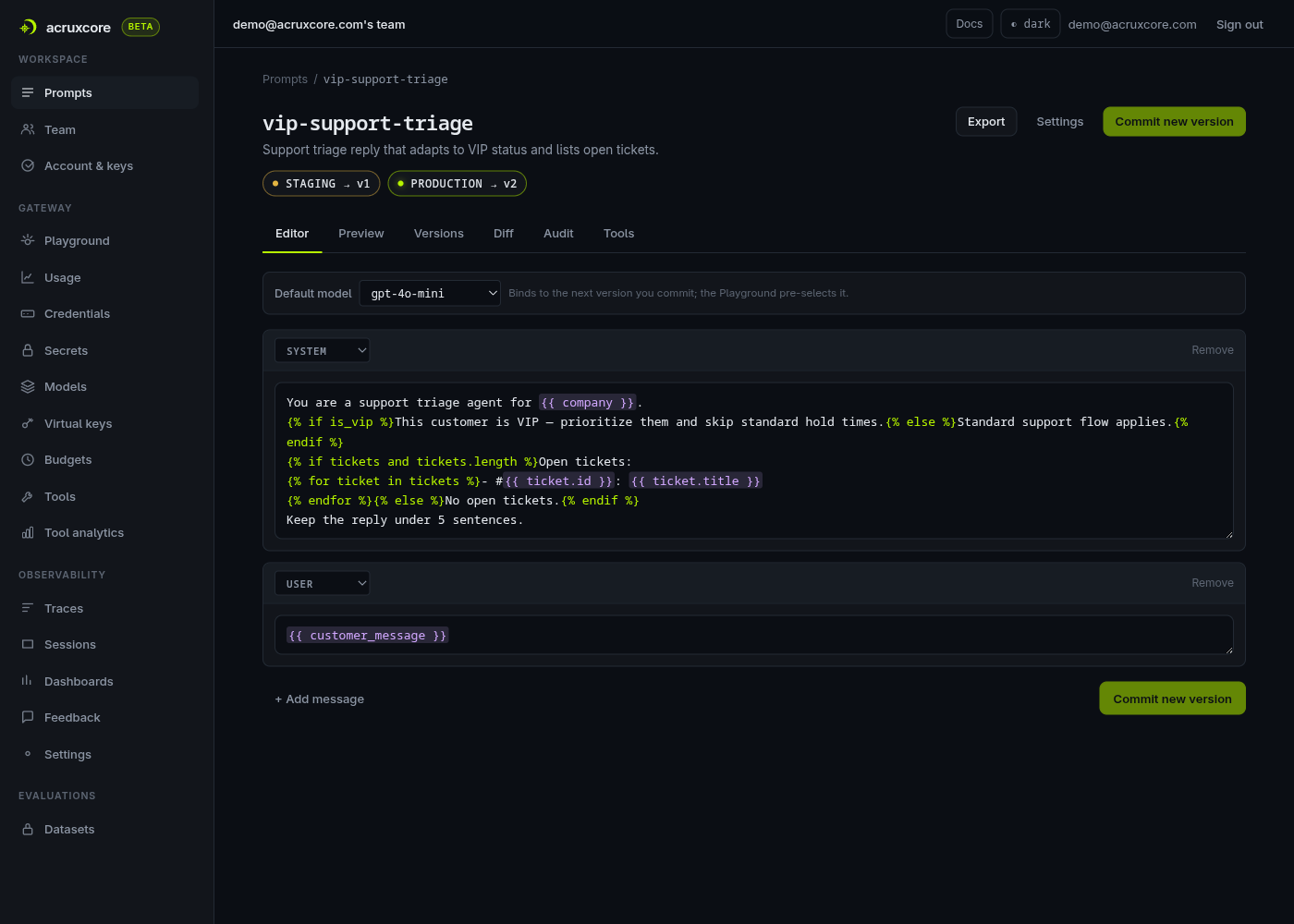
we used, the template took flat {{variable}} substitution, and we found no way to write
{% if %} or {% for %}. So we flattened the VIP-branch note and the two-item ticket list into
plain text and kept {{company}} and {{customer_message}} as the only variables.
That is not the limit of Opik's templating. Its docs say both prompt types support two engines:
Mustache, the default, and Jinja2, which "supports conditionals, loops, and filters". The SDK
selects it with type=PromptType.JINJA2 (checked on 2 November 2026). We did not test the
Jinja2 type.
Show screenshots: prompt editor and versions on both platforms
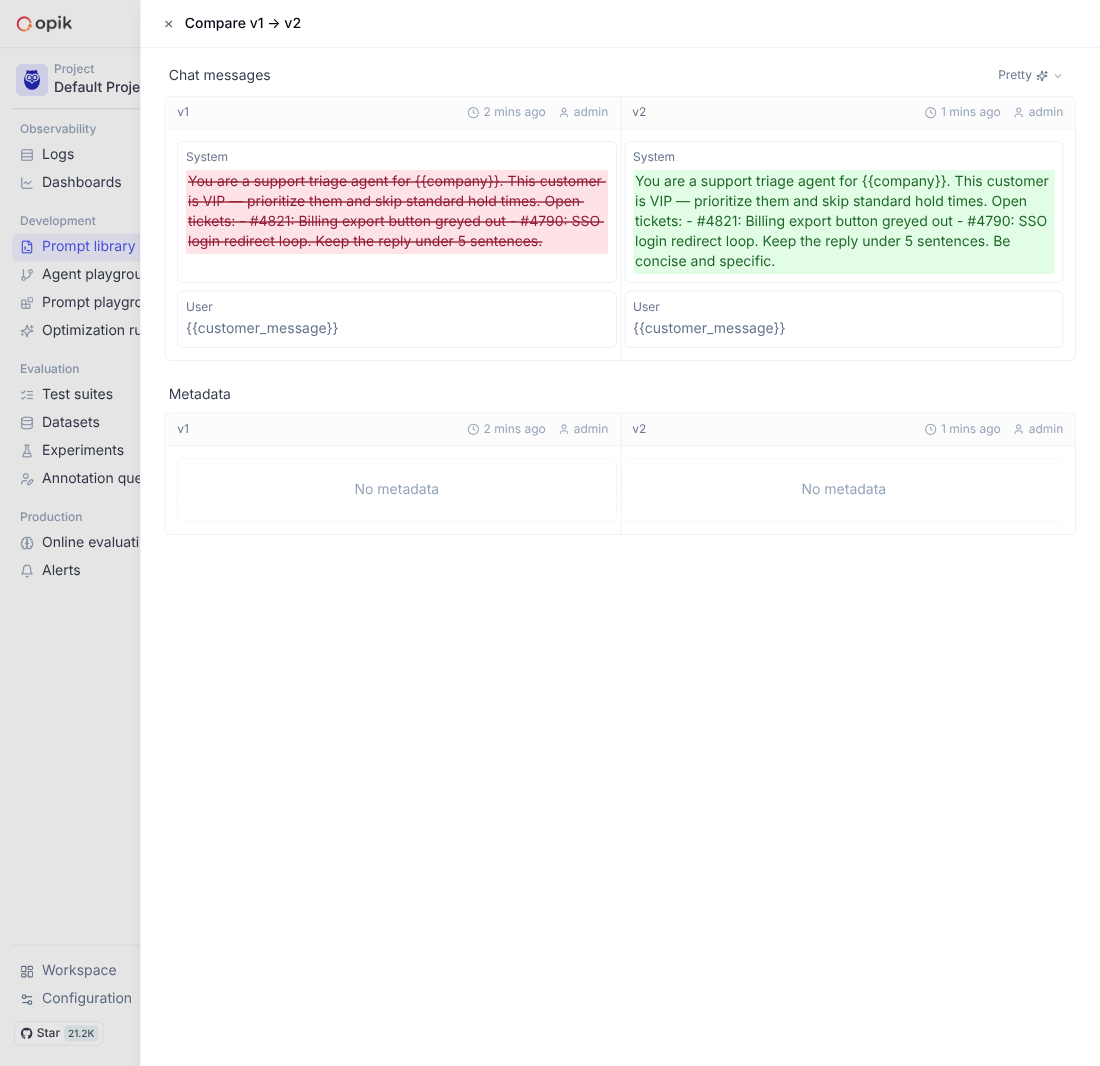
Opik has a version comparison. We edited the prompt to create v2 and used its "Diff" button:
Show screenshot: version diff panel on Opik
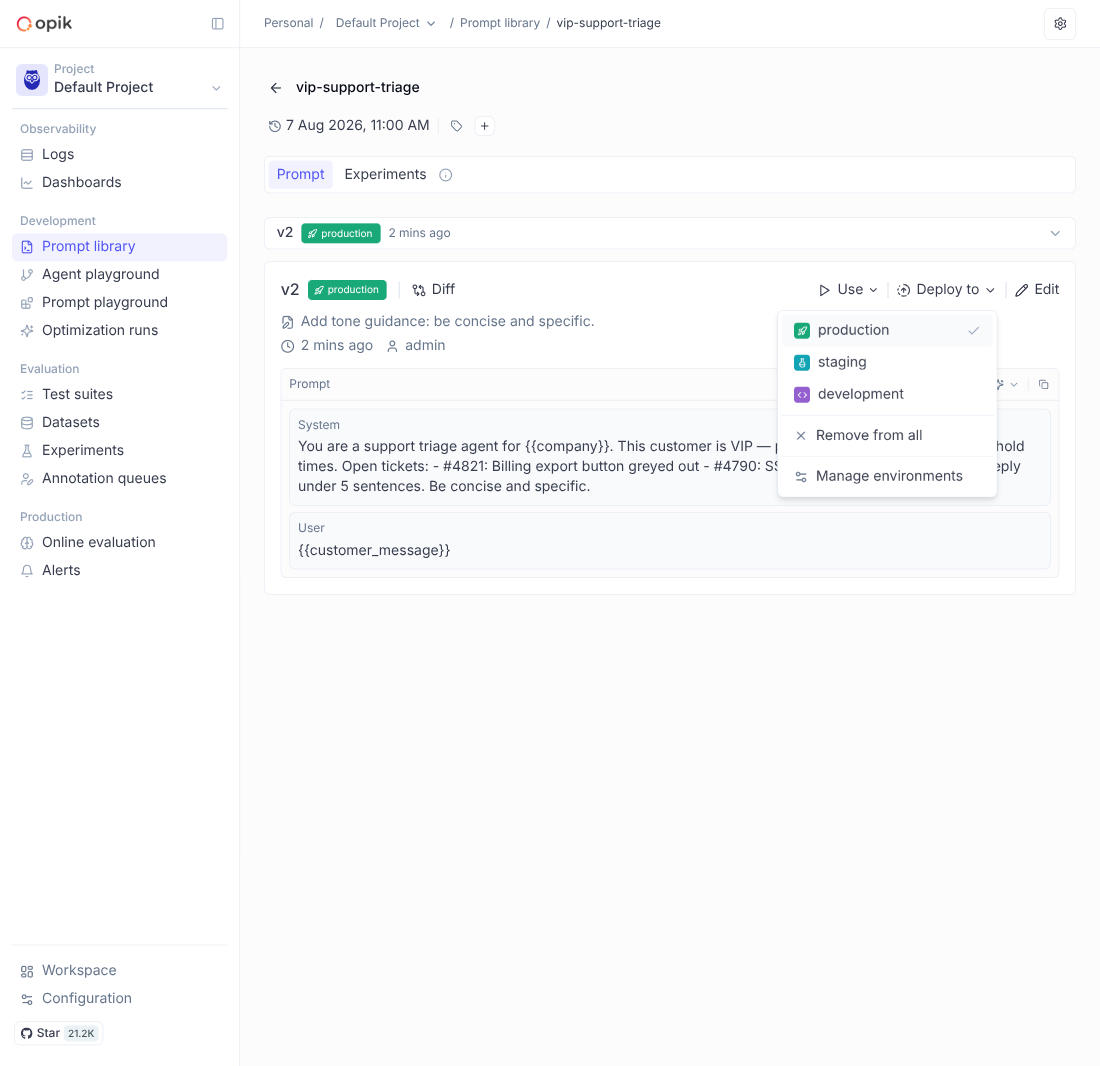
It also has an environment control, "Deploy to", that tags a version as production,
staging or development. Your code can then fetch the deployed version by environment:
client.get_prompt(name=..., environment="production") returns "the version deployed to that
environment" (Opik docs, checked on 2 November 2026). That is the same job AcruxCore's aliases
do.
Show screenshot: Deploy to / environment labels on Opik
| Feature | Opik | AcruxCore |
|---|---|---|
| Conditional templating | Jinja2 prompt type in the SDK (per docs, not tested); flat {{variable}} in the UI dialog we used | Nunjucks {% if %}/{% for %}, rendered server-side |
| Version comparison | "Diff" view, whole-message red/green (not word-level) | Diff tab, unified word-level diff between any two versions |
| Live/staging labels | "Deploy to" tags a version production/staging/development; the SDK fetches by environment | production / staging aliases, fetched by prompts.render() or the gateway |
Sending a live call
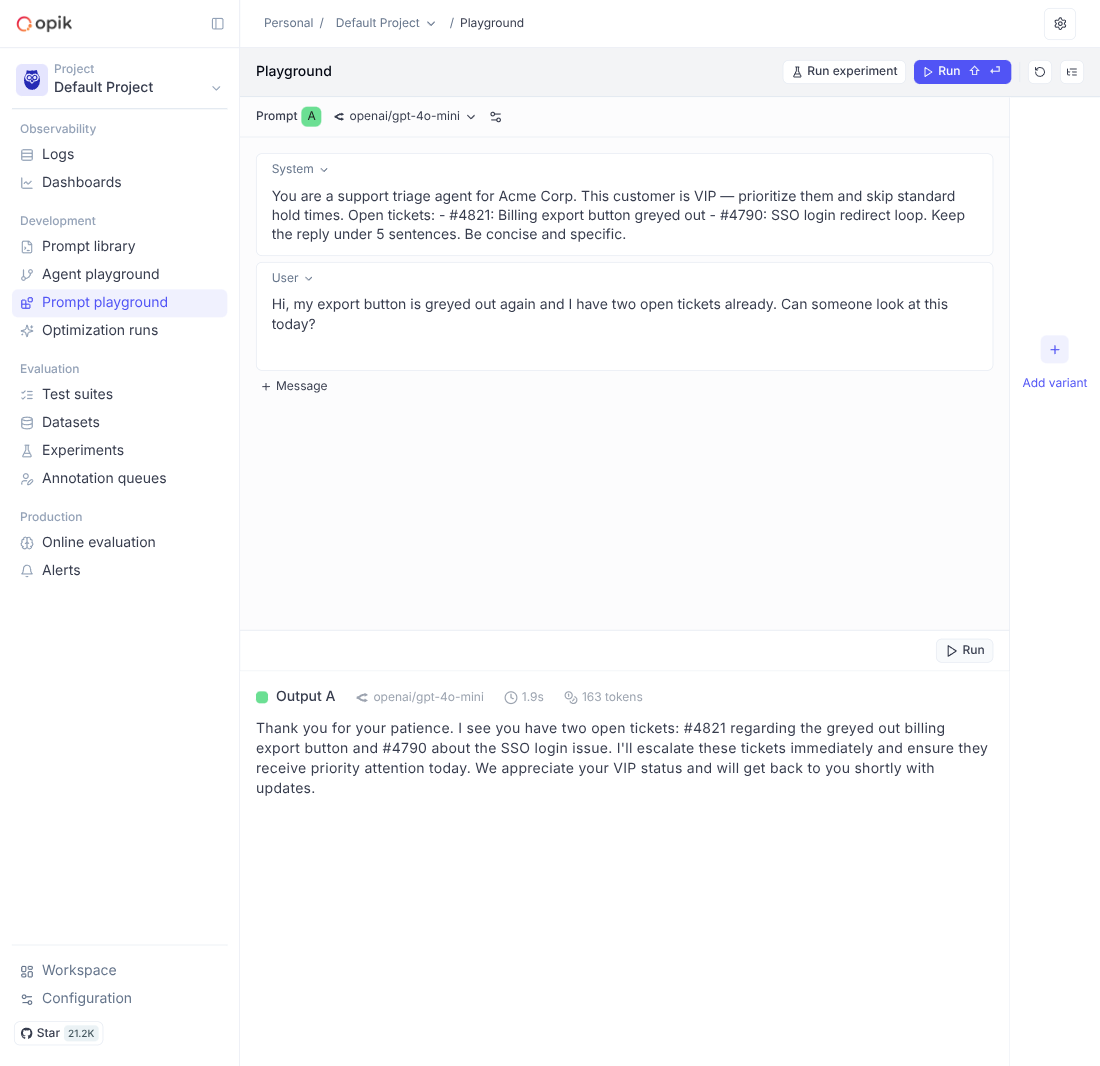
Opik's Prompt playground accepts OpenRouter as a named provider: paste a key and search any OpenRouter-routed model by name. Both playgrounds produced the same VIP reply from the same inputs.
Show screenshot: Playground run on Opik
| Feature | Opik | AcruxCore |
|---|---|---|
| Playground | Runs against any OpenRouter-routed model, shows latency + tokens inline, no cost | Runs against a stored prompt reference, shows cost/cache/latency inline |
| Requires a provider key | Yes | Yes |
Tracing & observability
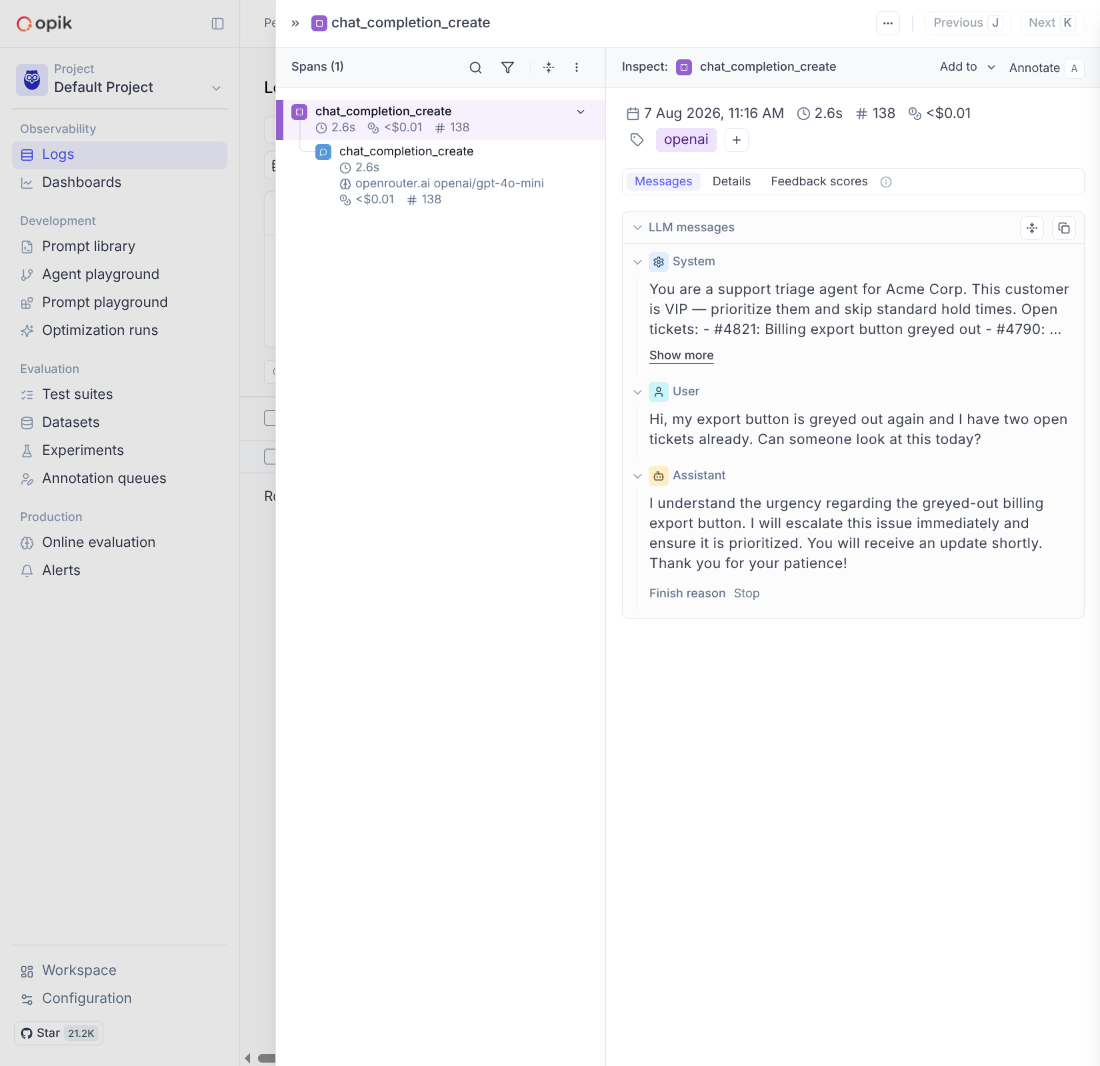
Opik's docs say each Playground result comes with "a link to the full trace" (checked on
2 November 2026). From code, we called the provider through a client wrapped with
track_openai(). That produced a two-level span tree: an outer chat_completion_create trace
around an inner LLM span with model, provider, tokens and cost.
Show screenshots: an Opik trace and an AcruxCore trace
| Feature | Opik | AcruxCore |
|---|---|---|
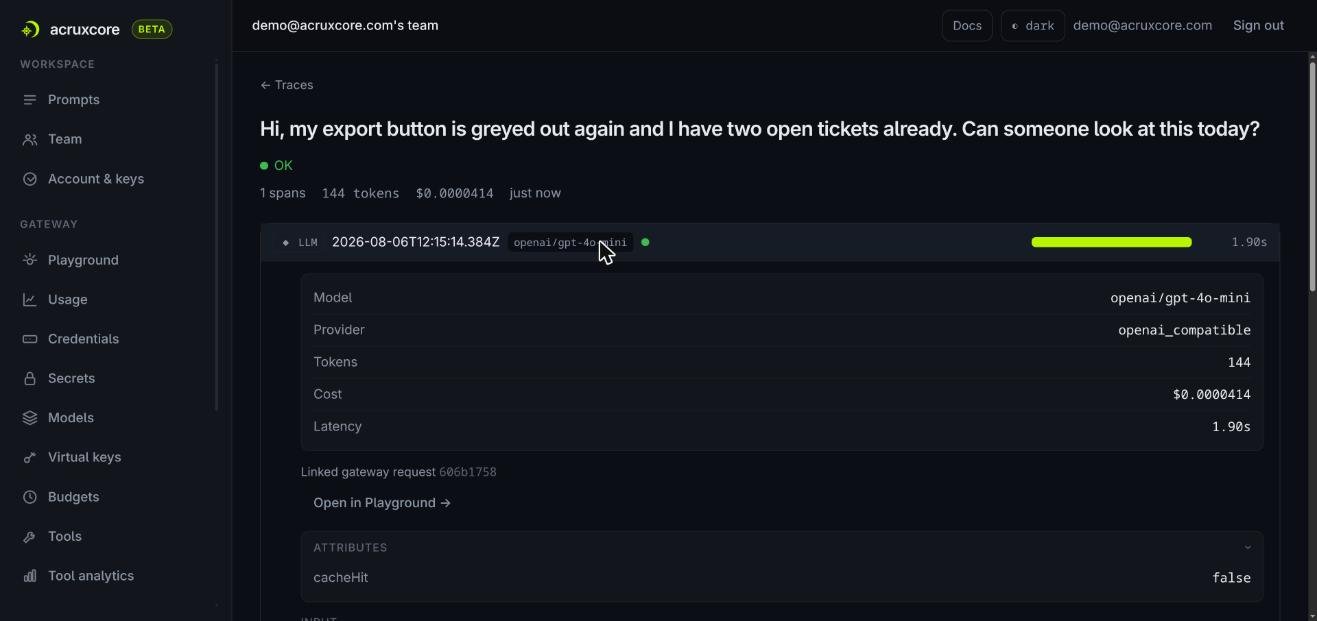
| Trace shape | Span tree (outer trace + inner LLM span) | One span per gateway call; SDK steps or OTel instrumentors add a tree around it |
| How it's produced | Client-side track_openai() wrapper | Automatic, as part of the gateway call |
| Playground produces a trace | Yes, each result links to its full trace, per Opik's docs | Yes, every Playground run is traced |
Opik's LLM Gateway
Opik's tracing records a call after your own client made it, so budgets, caching and virtual keys have nothing to act on there. Opik does offer a proxy: the Opik LLM Gateway. Its docs say "It's designed for development and testing purposes" and "The Opik LLM Gateway is currently in beta and is subject to change" (checked on 2 November 2026). We did not test it.
Every AcruxCore call goes through its gateway, which picks the provider credential, checks the cache, the budget and the virtual key, and writes the trace on that same hop.
| Feature | Opik | AcruxCore |
|---|---|---|
| Where it sits | Beside the request path for tracing; a beta gateway for development and testing | In the request path for every call |
| BYOK, caching, budgets, virtual keys | Not on the tracing path | Applied before the provider call |
Tools: no catalog, or a versioned one
Opik has no tool catalog. Its closest surface, "Agent playground", is a debugger for a live
process, not a place to define a schema. You add @opik.track(entrypoint=True) to a running
agent's own code and run a connector command in your terminal, and Opik waits for that process
to connect.
Show screenshot: Agent playground on Opik
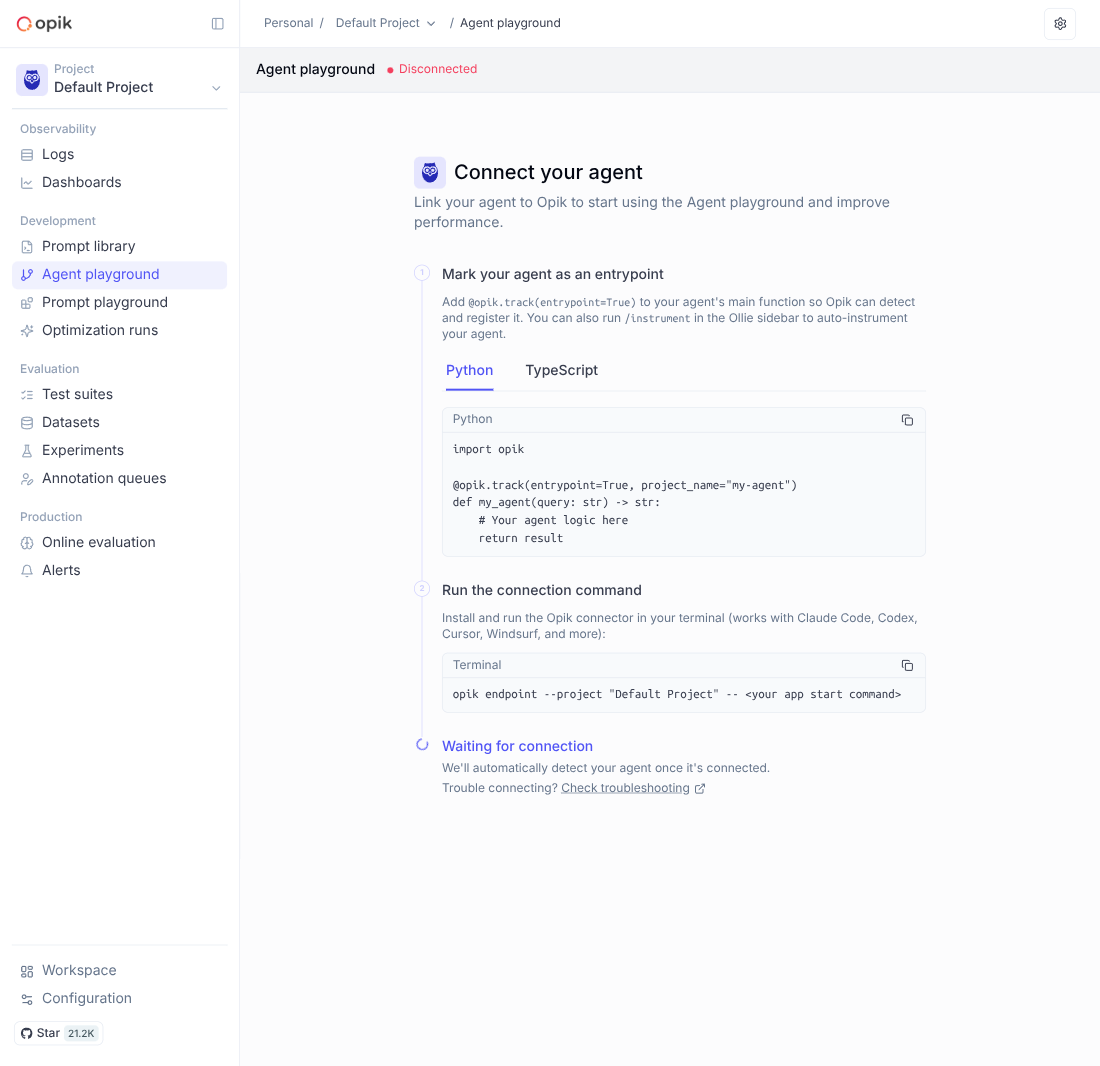
With nothing connected, the page stays at "Disconnected" and shows setup text. It cannot store a reusable tool schema from the UI.
| Feature | Opik | AcruxCore |
|---|---|---|
| Tool catalog | None: no schema object, no list view, no per-tool page | Versioned catalog with its own page |
| Agent visibility | Requires a live process connected via code + terminal command | Gateway-executed calls, traced automatically |
| Tool analytics | Not available | Calls, error rate, and latency per tool |
SDK & developer experience
Opik wraps a client you already own, and the trace appears once that wrapped client makes a
call. AcruxCore's SDK has its own calls, hub.prompts.render() and then hub.gateway.chat(),
and the trace is automatic.
client = track_openai(
    OpenAI(api_key=OPENROUTER_KEY, base_url="https://openrouter.ai/api/v1"),
    project_name="Default Project",
)
response = client.chat.completions.create(
    model="openai/gpt-4o-mini", temperature=0, max_tokens=256,
    messages=[{"role": "system", "content": SYSTEM_PROMPT},
              {"role": "user", "content": USER_MESSAGE}],
)
rendered = await hub.prompts.render("vip-support-triage", "production", VARIABLES)
result = await hub.gateway.chat(
    rendered.model, rendered.messages,
    temperature=0, max_tokens=256,
    prompt_version_id=rendered.version_id,
)
Each script's trace appeared within seconds of the call returning. The Opik trace is the one shown under Tracing & observability above.
op_trace_run.py— the Opik leg.acx_sdk_run.py— the AcruxCore leg.
| Feature | Opik | AcruxCore |
|---|---|---|
| SDK model | Wrap your own client (track_openai(OpenAI(...))) | hub.prompts / hub.gateway calls |
| Getting a trace | Automatic once the wrapped client is called | Automatic with hub.gateway.chat() |
Latency overhead — measured
Opik's figure is the cost of client-side instrumentation: the same gpt-4o-mini call on
api.openai.com, made through a client wrapped in track_openai(). AcruxCore's figure is the
cost of an extra network hop through the local gateway. Both were timed against a direct call,
in 100 interleaved rounds per run, over three runs.
| Run | Direct-call median | Opik gap | AcruxCore gap |
|---|---|---|---|
| 1 | 617 ms | +22 ms, CI [+7, +47] | +22 ms, CI [+10, +42] |
| 2 | 625 ms | +2 ms, CI [−13, +18] | +9 ms, CI [−6, +27] |
| 3 | 612 ms | +4 ms, CI [−15, +26] | +31 ms, CI [+5, +45] |
- Opik's median gap was lower than AcruxCore's in runs 2 and 3, and equal in run 1.
- In run 2 both intervals cross zero. In run 3, Opik's crosses zero and AcruxCore's does not. At this sample size, neither path is clearly slower than a direct call in every run.
Two other measurements help read these numbers. On 25 October 2026 we re-timed a local AcruxCore gateway on its own: +9 ms at the median over a direct OpenAI call, 95% interval −15 to +28 ms (method). In our August full-cycle benchmark, Opik's tracked SDK came back faster than the direct call, −140 ms in the latest of four runs. That leg sent the prompt as one merged message, so it is not the same request shape, and the post did not find the cause.
latency_bench.py — the latency benchmark.
Friction hit during this run
Opik
- 👍 No login wall on self-host: straight into a working project.
- 👍 OpenRouter is a named provider in the Playground, with no custom-base-URL workaround.
- 👍 "Add to dataset" works directly from any trace, with inline "create new dataset" in the same dialog.
- 👎 The dataset's "Run an experiment" button points to the Python SDK; from the UI, an experiment runs through the Playground.
- 👎 The Agent playground needs edits to your own agent's code and a terminal connector command before it shows anything.
AcruxCore
- 👍 Nothing to instrument:
hub.gateway.chat()(or the Playground) writes the trace, with no wrapper client. - 👍 Nunjucks conditionals and loops stay in the template.
- 👎 Before the first call you register a provider credential and a model in the gateway and create a key.
What Opik does that AcruxCore doesn't
Guardrails: five guard types, per Opik's docs. The
guardrails page lists PII, Topic,
prompt-injection, LLM-judge and custom-classifier guards. We tested the Topic and PII panel.
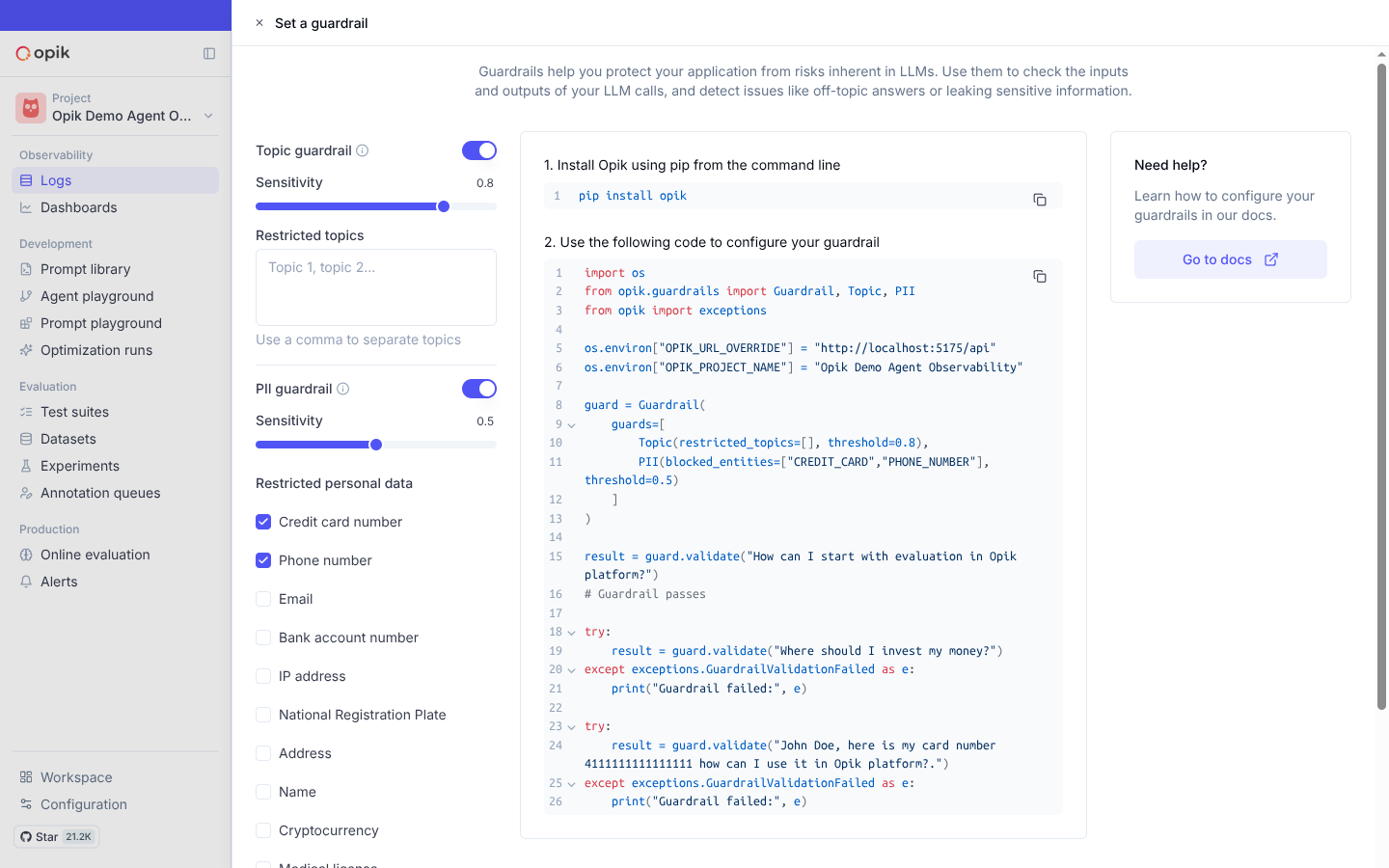
Opik's "Set a guardrail" panel turns on a topic-restriction check, with a sensitivity slider and a
comma-separated list of restricted topics. It also turns on a PII check for categories such as
credit card number, phone number and email, each with its own sensitivity threshold. The panel
gives a ready-to-run Python snippet using opik.guardrails. AcruxCore has no equivalent:
nothing checks a call's input or output for restricted topics or personal data. A self-hosted
Opik needs its guardrails server for every guard except the LLM judge.
Show screenshot: guardrails panel on Opik
Test suites: a separate object for pre-deployment regression tests. Test cases come from a CSV or JSON file, or from the SDK, each with an expected output and a scoring method. Opik frames them as regression testing, separate from dataset-driven experiments.
Show screenshot: Test suites on Opik

AcruxCore has no guardrails and no separate test-suite object. Both products score live traffic. AcruxCore's rules have a judge (built-in or your own prompt) score each matching trace as it lands. Opik's rules score new traces, threads or spans with an LLM judge, a decision model or Python code.
Is AcruxCore an Opik alternative?
For running a prompt in production day to day, yes. For pre-deployment testing, not yet.
Opik has no tool catalog, and its gateway is a beta built for development and testing. Opik's guardrails and its Test suites have no equivalent in AcruxCore. If either is the reason you run Opik, AcruxCore does not replace it.
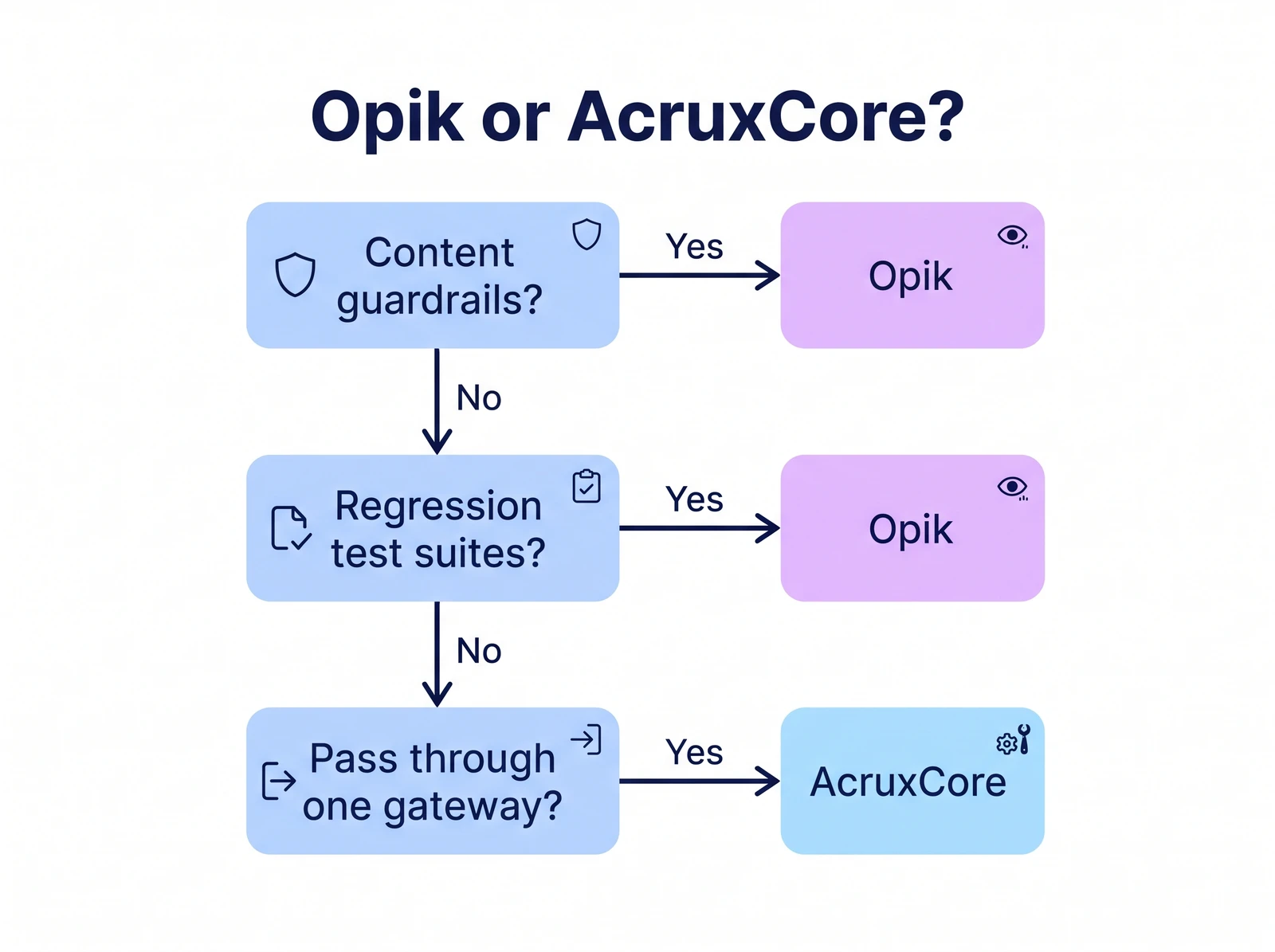
To choose, start at the top and stop at the first question you answer yes to.
| Opik | AcruxCore | |
|---|---|---|
| Strongest at | Guardrails and PII detection, test suites, self-host with no login setup, diff and deploy on prompts, Jinja2 prompts in the SDK | A request-path gateway with routing, caching and budgets on every call; tools that execute and get measured; datasets built from feedback |
| Weakest at | No tool catalog; the gateway is a beta for development and testing | No guardrails, no test-suite object |
Key point: The deciding question is whether you need content checks or call controls. Opik checks what goes in and out of a call with guardrails and test suites. AcruxCore controls the call itself: it routes, caches, caps spend and runs your tools.
FAQ
Does Opik have an AI gateway?
Yes, the Opik LLM Gateway. Opik's docs say it is designed for development and testing and is currently in beta. We did not test it.
Does Opik support Jinja2 prompt templates?
Yes. Opik's docs say text and chat prompts support Mustache, the default, and Jinja2, which
supports conditionals, loops and filters. The SDK selects it with type=PromptType.JINJA2.
Can Opik fetch the production version of a prompt at runtime?
Yes. "Deploy to" tags a version as production, staging or development, and
get_prompt(..., environment="production") returns the version deployed there.
Does Opik have guardrails?
Yes. Opik's docs list five guard types. We saw the Topic and PII panel. A self-hosted Opik needs its guardrails server for all but the LLM judge. AcruxCore has no guardrails.
Can Opik be self-hosted?
Yes. We ran it with docker compose, and the self-hosted instance had no login screen.
Other head-to-heads: AcruxCore vs Arize Phoenix and AcruxCore vs Langfuse. More tools are compared in 7 Langfuse alternatives and 10 LLM observability tools tested hands-on.