Hands-on with LangSmith: a real walkthrough
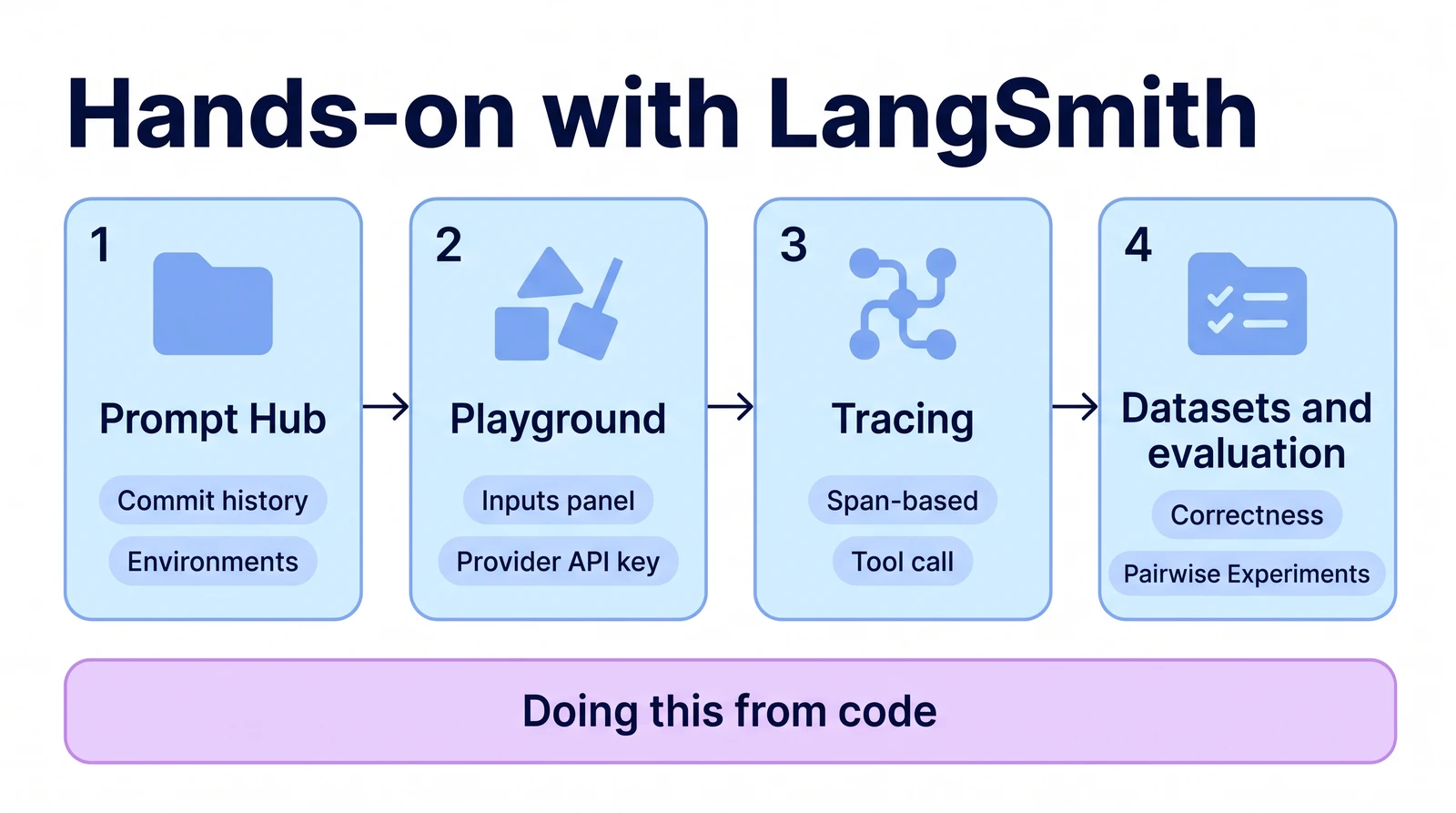
We logged into the real, hosted version of LangSmith (US region) and worked through the same four steps we're using across every platform in this comparison: create a prompt, run it and inspect the trace, and build a small eval dataset. This post is just the LangSmith leg — screenshots, actual UI, no marketing copy. The main comparison post pulls the findings from LangSmith, Langfuse, PromptLayer, and AcruxCore together. We tested LangSmith in July 2026, and the screenshots are from that month.
We build AcruxCore. We ran every tool in this post ourselves.
1. The Prompt Hub and versioning
LangSmith stores prompts under Prompts, separate from Playground. Each prompt
gets a commit history — every save is a new commit with a hash, similar to git.
Our test prompt (acruxcore-support-assistant) already had two commits: an initial
version and a follow-up edit ("v2: mention product area by name, friendlier tone").
Show screenshot: LangSmith prompt detail with two commits
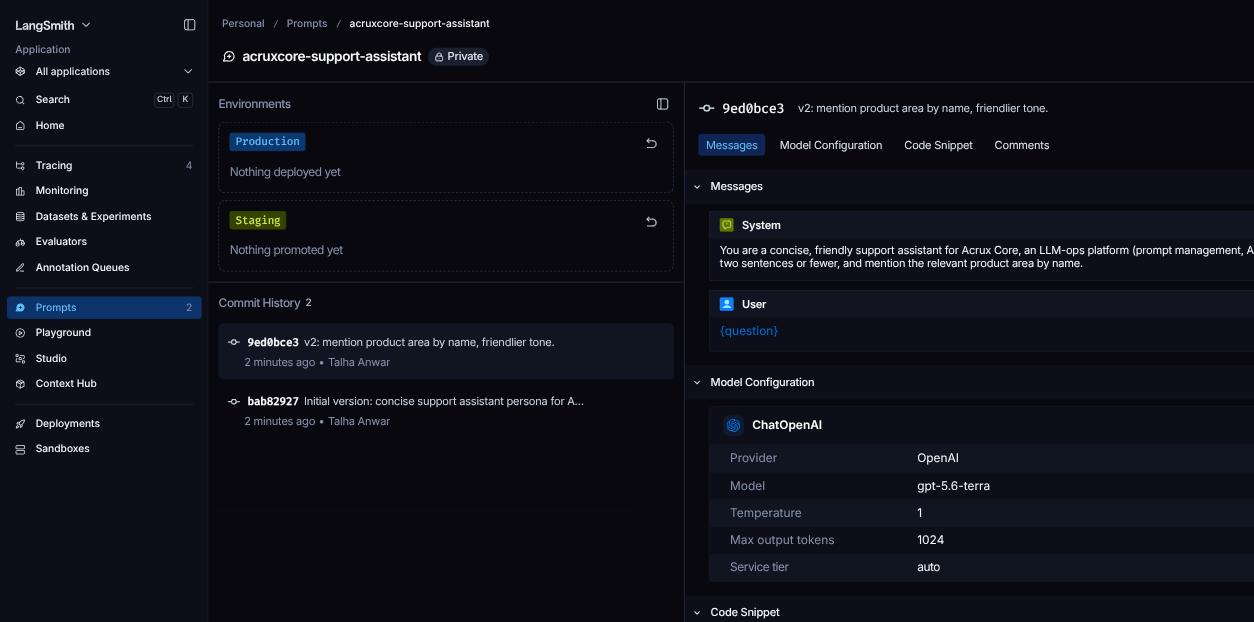
LangSmith also shows Environments (Production/Staging) at the top of the prompt page, ready to accept a deployed version — but on this account nothing had been promoted yet ("Nothing deployed yet").
2. Editing in the Playground
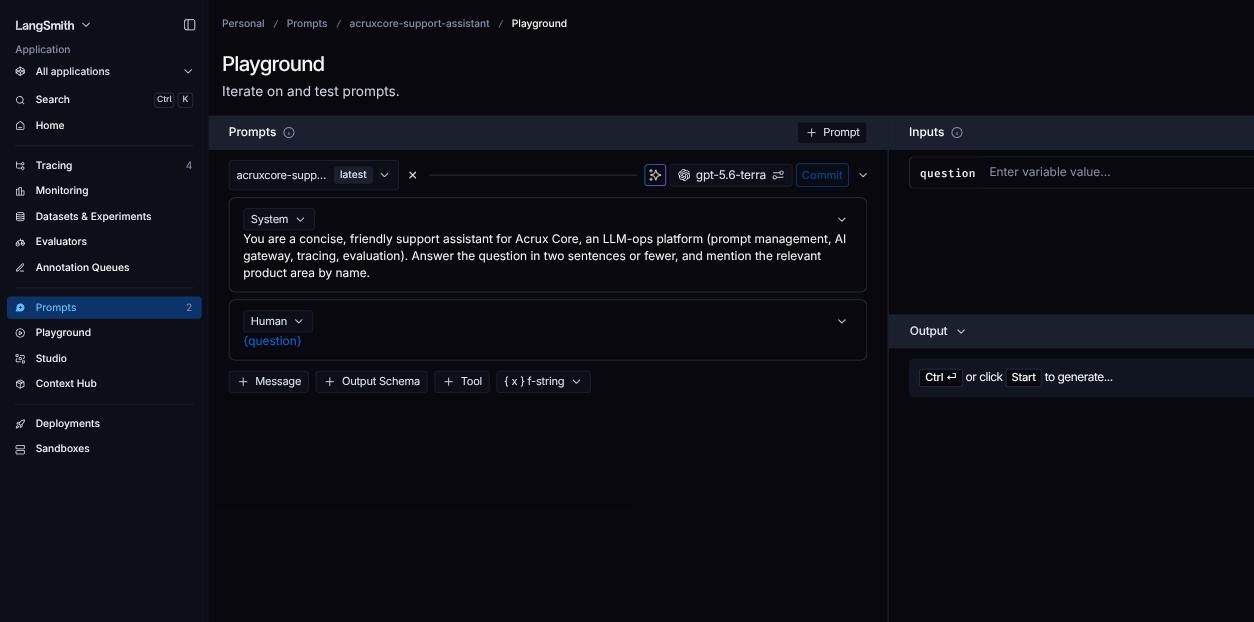
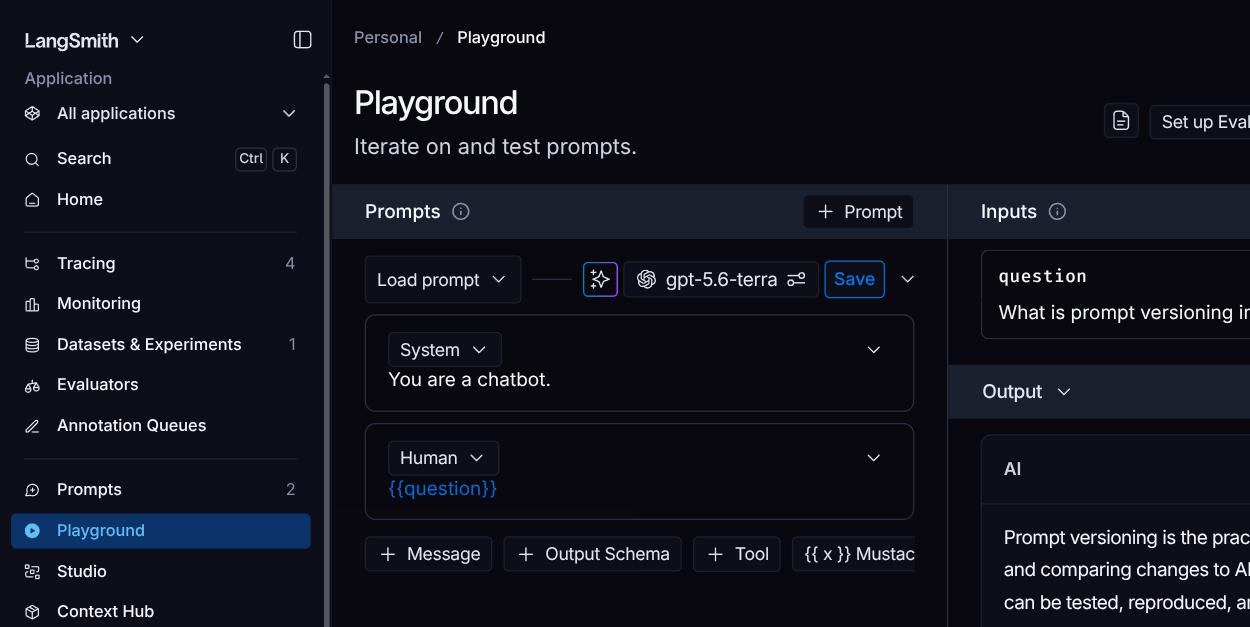
Clicking "Playground" opens the prompt with its system/user messages and model
config pre-loaded, plus an Inputs panel for the prompt's variables (here, a
single question variable).
Show screenshot: prompt loaded in the LangSmith Playground
On our account in July 2026, LangSmith's Playground needed our own provider API key (a BYOK model — bring your own key) before it executed a call. Without a key, the Playground asked for one:
Show screenshot: LangSmith Playground asking for an OpenAI API key
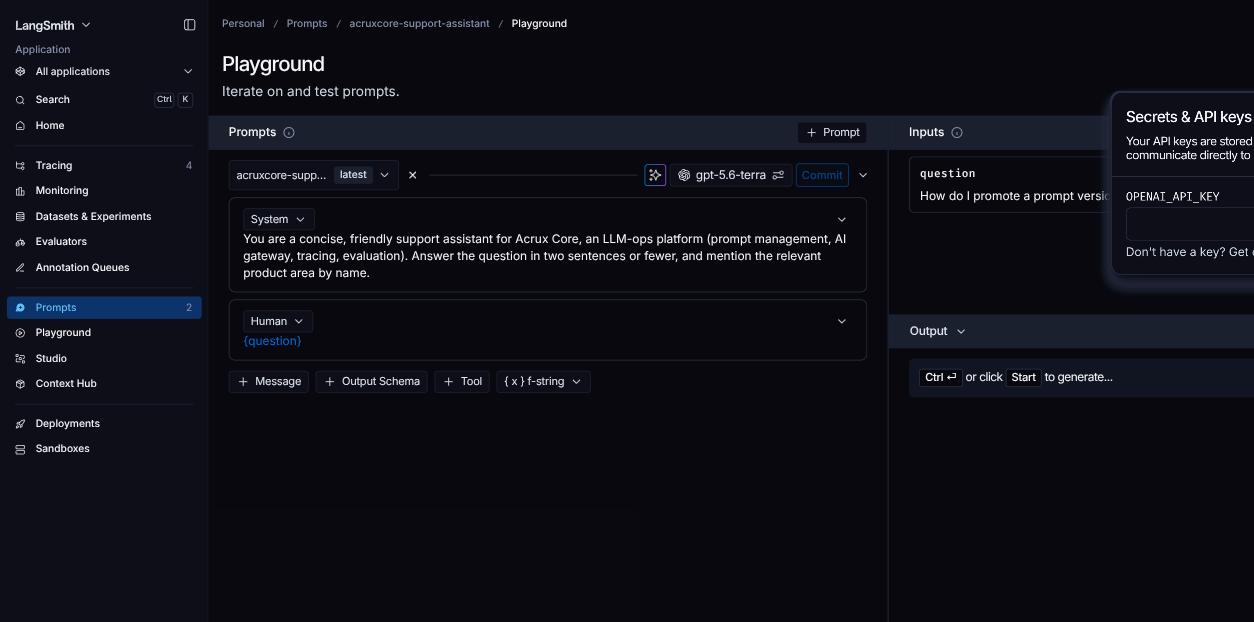
You add the key under Settings → Provider secrets → Browser Secrets, the store the Playground reads from. With an OpenAI key there, the Playground calls the model and returns an answer:
Show screenshot: completed run in the LangSmith Playground
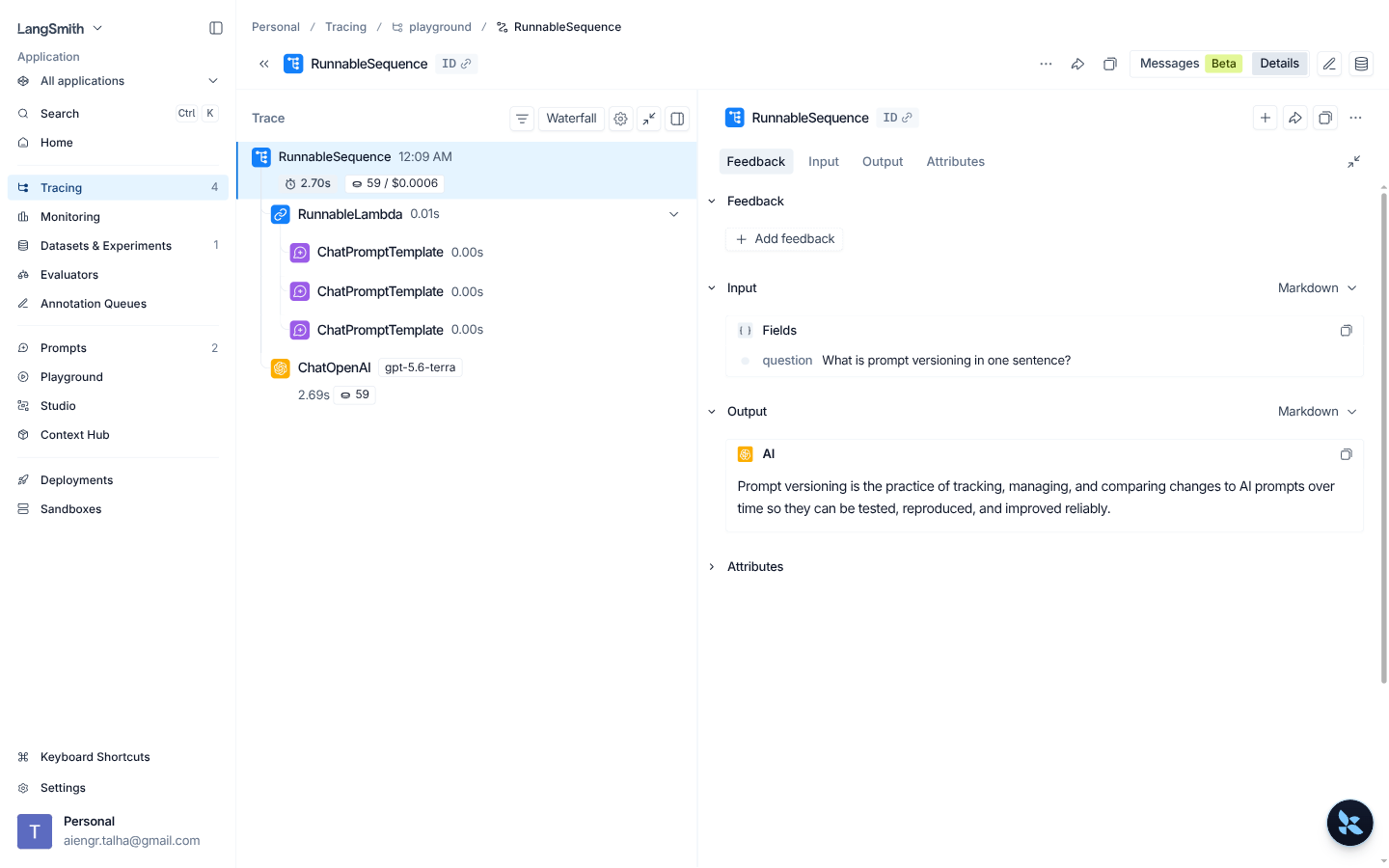
That run produced a trace. A RunnableSequence parent holds a RunnableLambda, three
ChatPromptTemplate spans, and the gpt-5.6-terra model call. The model call span shows
its latency (2.69s) and token count (59).
Show screenshot: LangSmith trace span tree for the Playground run
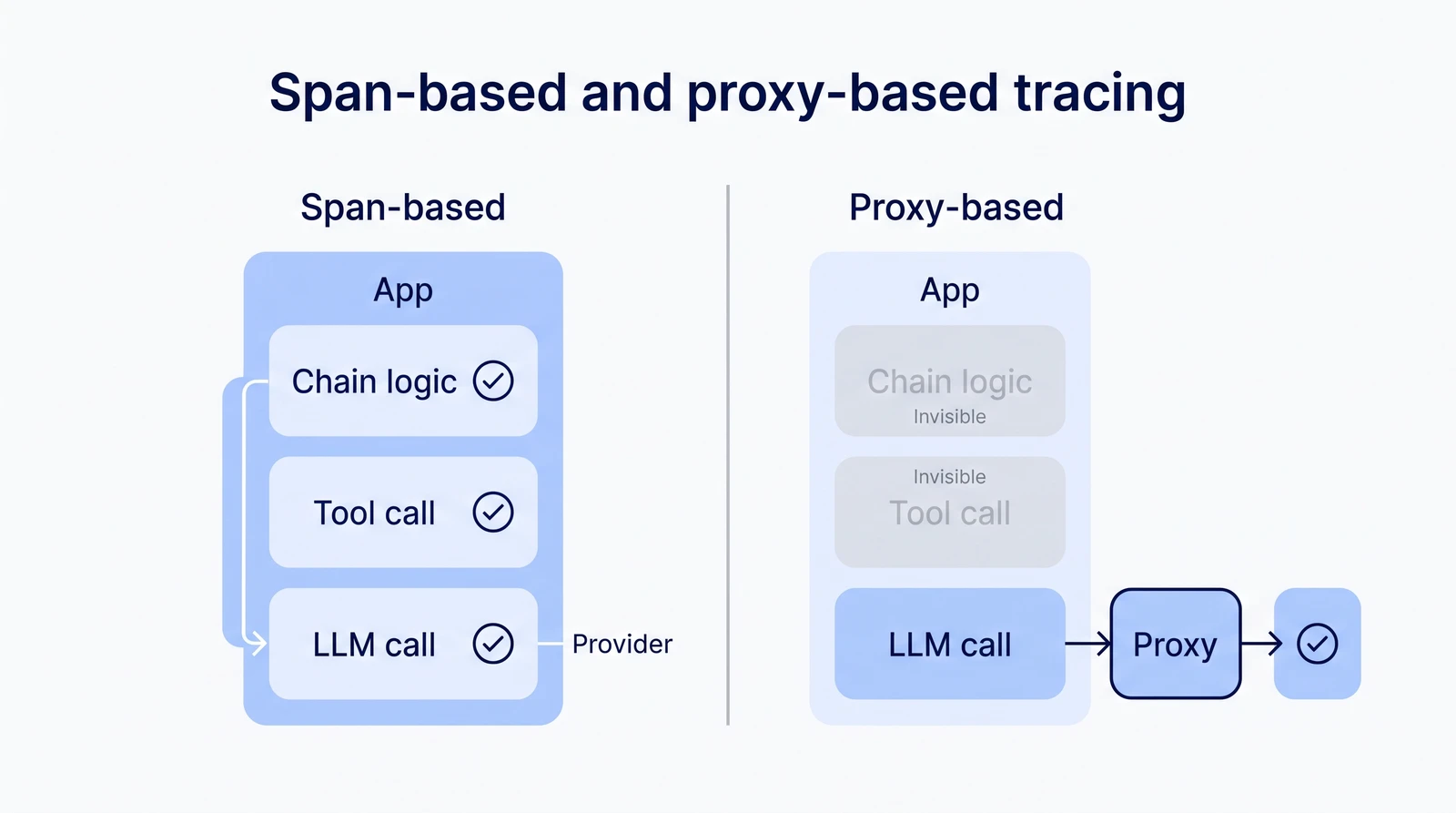
3. Tracing: span-based, not proxy-based
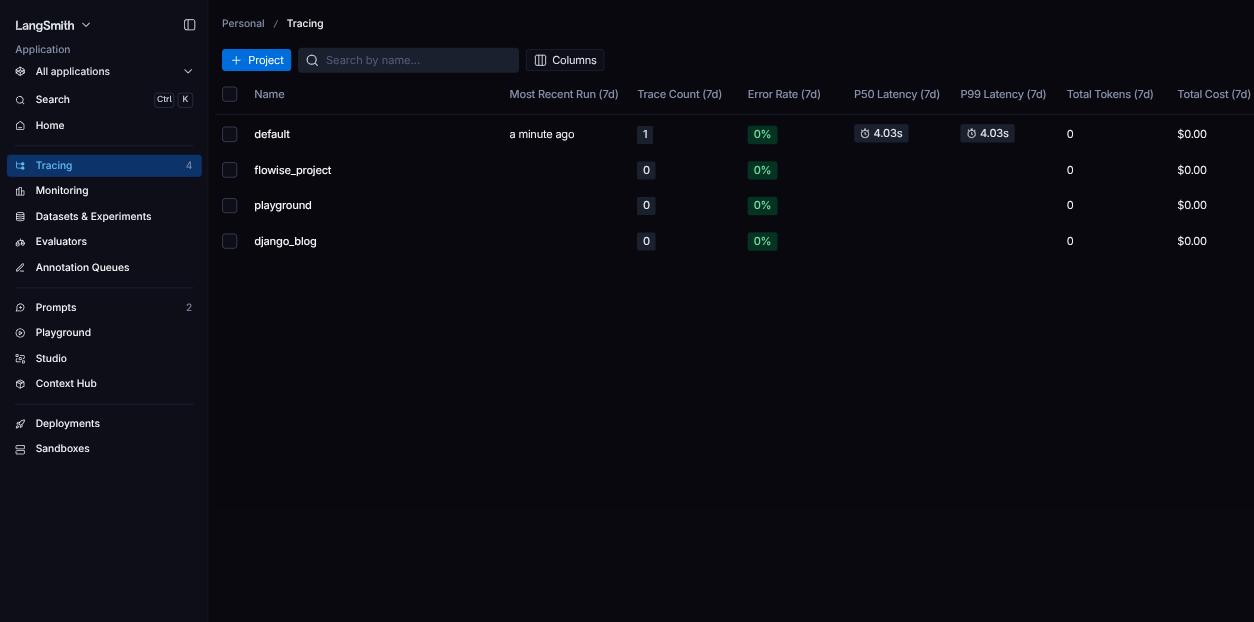
The account's existing trace history shows LangSmith's tracing model most clearly. The Tracing section lists projects (LangSmith's word for a trace-collection bucket), each showing trace count, latency percentiles, and cost.
Show screenshot: LangSmith Tracing projects overview
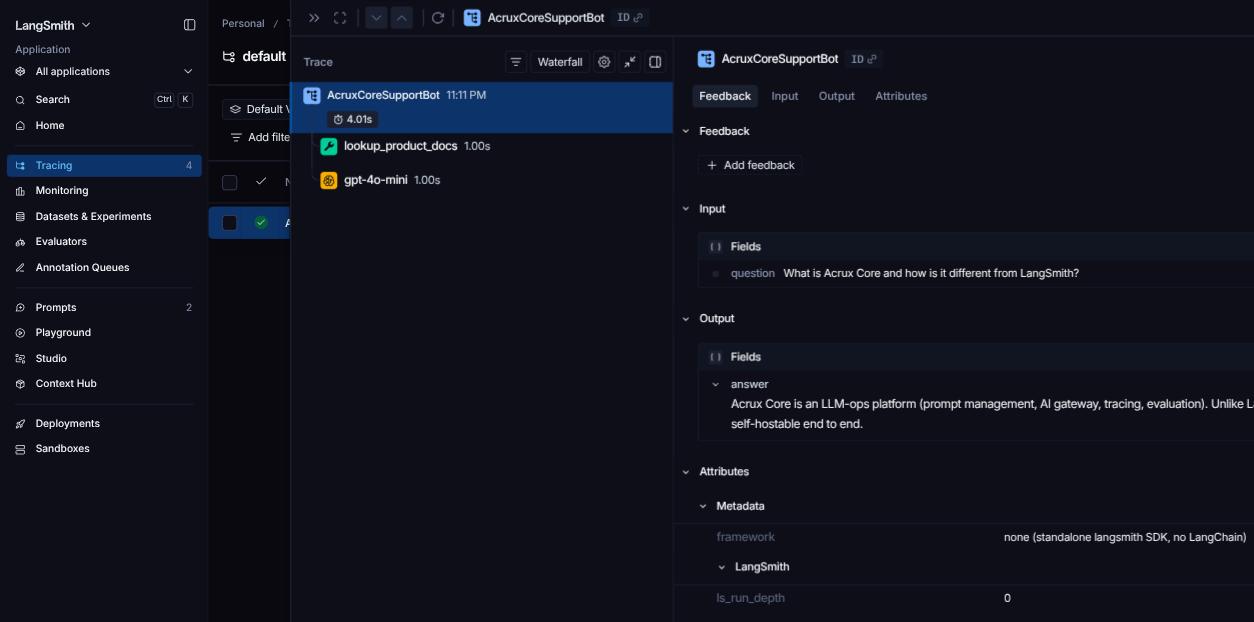
Opening a real trace confirms LangSmith is span-based: the trace isn't just
"one LLM call logged," it's a tree. Our AcruxCoreSupportBot trace has a
parent run containing two child spans — a lookup_product_docs tool call
and a gpt-4o-mini LLM call — each with its own latency, so you can see exactly
where time and tokens went inside a multi-step chain, not just the final model
call.
Show screenshot: LangSmith trace waterfall with child spans
This is the core structural difference between span-based and proxy-based tracing: a proxy only ever sees the calls that were routed through it (so a non-LLM tool call would be invisible), while a span-based SDK can capture every step you explicitly instrument, chain logic included.
4. Datasets and evaluation
Datasets & Experiments is a first-class section with its own dedicated eval
UI (dataset examples, evaluators, and pairwise experiments — a way to compare two
experiment runs side by side). We opened an existing dataset
(acruxcore-support-qa) and added examples through the + Example dialog:
paste JSON into an Inputs box, JSON into a Reference Outputs box, pick a
split (base by default), and submit.
Show screenshot: LangSmith Add Example to dataset dialog
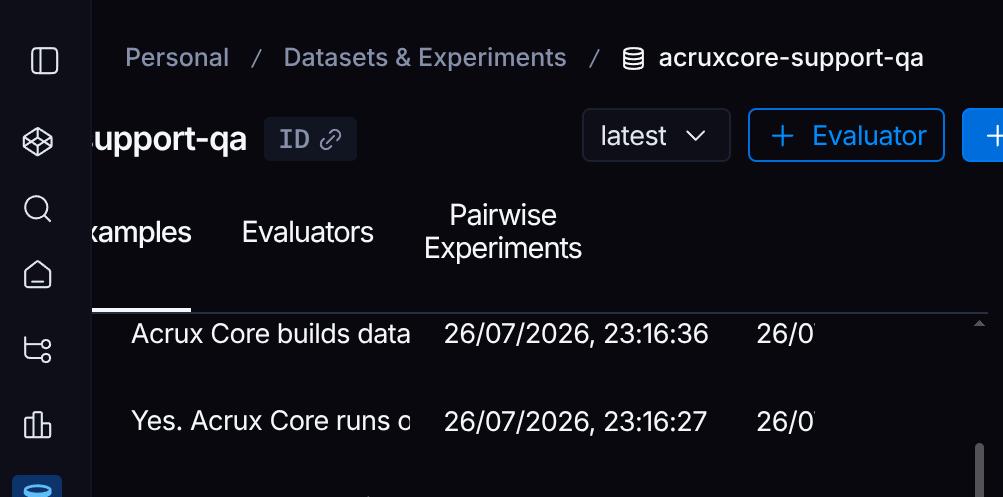
Each submit gave an immediate "Example added to dataset" confirmation, and the Examples table updated in place. Running a full Experiment (an evaluation run against the dataset) needed the same provider key as the Playground.
Key point: On our account in July 2026, LangSmith's Playground needed our own provider API key before it executed a call, and a full Experiment needed the same key. Since then, Gateway Credits let paid plans other than Enterprise call LangChain-hosted models with no provider key. On 2 November 2026 those were two Kimi models, not any model you pick.
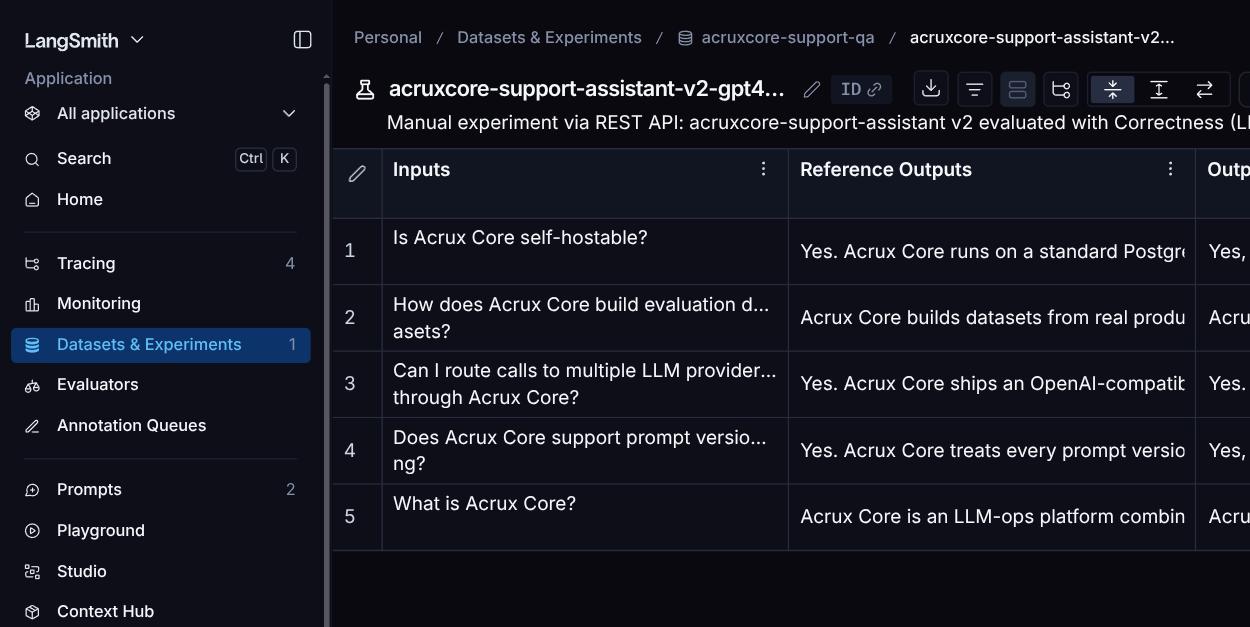
With the key in place, an Experiment run against the acruxcore-support-qa dataset
completed. It covered 5 examples, each with input, reference-output and actual-output
columns. The automatic Correctness evaluator scored 0.80, and P50/P99 latency was
around 0.99s.
Show screenshot: LangSmith experiment results grid
Doing this from code
The UI walkthrough above is one way to generate a trace. The more realistic developer path is the SDK: wrap your existing OpenAI client once, and every call it makes is traced automatically — no manual "start a trace" step. Here's the actual script we ran:
import os
from openai import OpenAI
from langsmith.wrappers import wrap_openai
from langsmith import traceable

client = wrap_openai(OpenAI(api_key=os.environ["OPENAI_API_KEY"]))


@traceable(name="explain-prompt-versioning")
def explain_prompt_versioning():
    response = client.chat.completions.create(
        model="gpt-4o-mini",
        messages=[
            {"role": "user", "content": "Explain prompt versioning in one sentence."}
        ],
    )
    return response.choices[0].message.content


if __name__ == "__main__":
    print(explain_prompt_versioning())
Run with LANGSMITH_API_KEY, LANGSMITH_TRACING=true, and OPENAI_API_KEY
set as environment variables (a LangSmith Personal Access Token, created
under Settings → API Keys — separate from the Browser Secret used for the
Playground). The real output:
Prompt versioning is the practice of creating and managing multiple iterations
of a prompt to assess performance, effectiveness, or relevance in generating
responses from AI models.
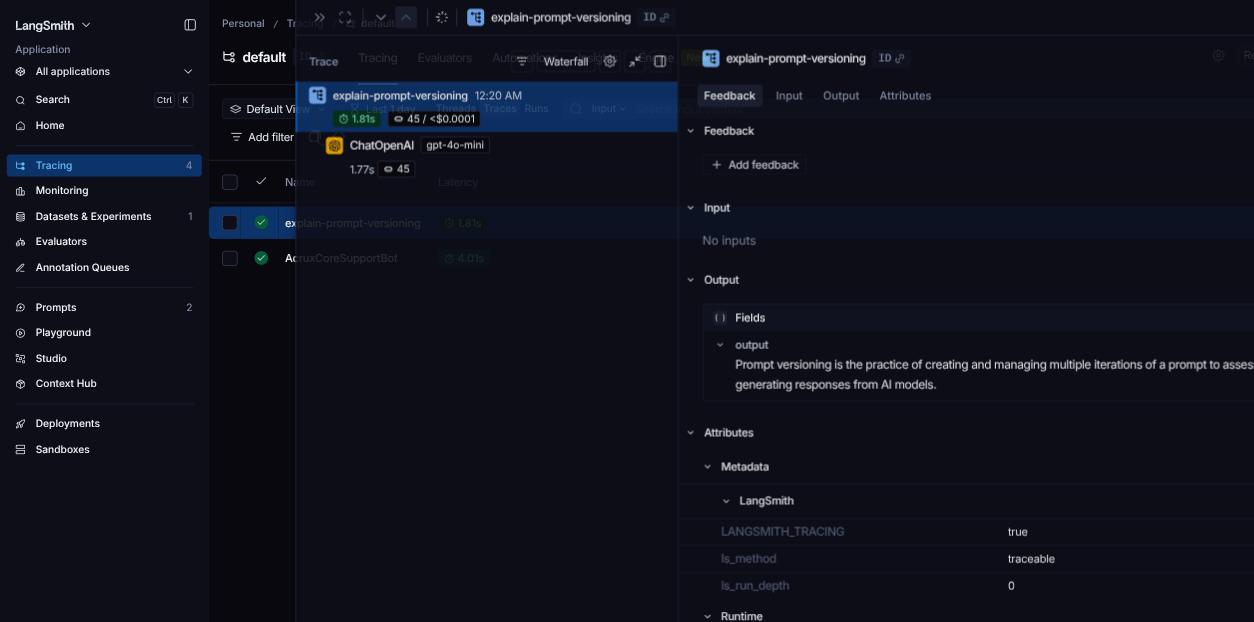
wrap_openai alone is enough to get a span for the underlying ChatOpenAI
call; the @traceable decorator adds an outer span (named
explain-prompt-versioning here) so the function itself shows up as the
trace's root, not just the model call inside it. Both spans, with real token
count and latency, showed up immediately in the default project:
Show screenshot: LangSmith trace from the SDK script
No LangChain/LangGraph required for this — wrap_openai and @traceable work
against a plain OpenAI client.
What's unique to LangSmith
- Git-like prompt commits with named Environments. Every save is a commit with a hash; Production/Staging are explicit deploy targets you promote a specific commit into, right on the prompt page.
- LangGraph/LangChain-native ecosystem. The sidebar has a dedicated Studio section for connecting LangGraph agents, something none of the other platforms in this comparison have an equivalent for.
- Pairwise Experiments. A dedicated UI specifically for comparing two experiment runs against each other side by side, beyond just viewing each experiment's aggregate scores separately.
- Rich per-span metadata out of the box. The trace view surfaced fields
like
ls_run_depthand aframeworktag automatically, without any extra configuration on our part.
Takeaway
LangSmith's tracing is genuinely deep (real span trees, not just LLM call logs), and its prompt commit history plus Environments give a clean, git-like way to version and promote prompts. In our July 2026 run, Playground runs and Experiments both needed our own model provider key. You add the key once. With it in place, Playground runs, traces and dataset Experiments all worked.
LangSmith vs AcruxCore
| Feature | LangSmith | AcruxCore |
|---|---|---|
| Framework integration | Deep LangChain/LangGraph-native instrumentation, plus a dedicated Studio for LangGraph agents | Framework-agnostic — plain REST or either published SDK, no LangChain dependency |
| Prompt management | Git-like prompt commits with named Environments (Production/Staging) | Immutable versions with alias promotion (production/staging), no redeploy |
| Gateway | LLM Gateway in beta (as of 2 November 2026): model fallbacks, spend and rate limits, data policies; no response cache documented | Gateway sits in front of every provider call — one audited, cost-visible path |
| Tool calling | Traces tool calls from any code with @traceable(run_type="tool"), with or without LangChain | First-class, versioned tool catalog, callable via a client-side tool loop in either SDK |
| Evaluation | Rich, mature evaluation suite with many built-in evaluators and a Pairwise Experiments UI | Datasets built from real production feedback, typed by hand, or imported from a CSV/JSON file |
| Hosting & pricing | Self-hosting is an enterprise add-on | Open source and self-hostable by default |
Langfuse vs LangSmith runs one app end to end on LangSmith and Langfuse. AcruxCore vs Langfuse vs LangSmith builds the same app on all three platforms and measures each step. 7 LangSmith alternatives compares the tools teams move to.
Want to see the same loop on AcruxCore? The Quickstart gets you from sign-up to a traced, gateway-routed call in about ten minutes.