LLMOps MCP Servers Compared: What Your Coding Agent Can Read, Write and Run
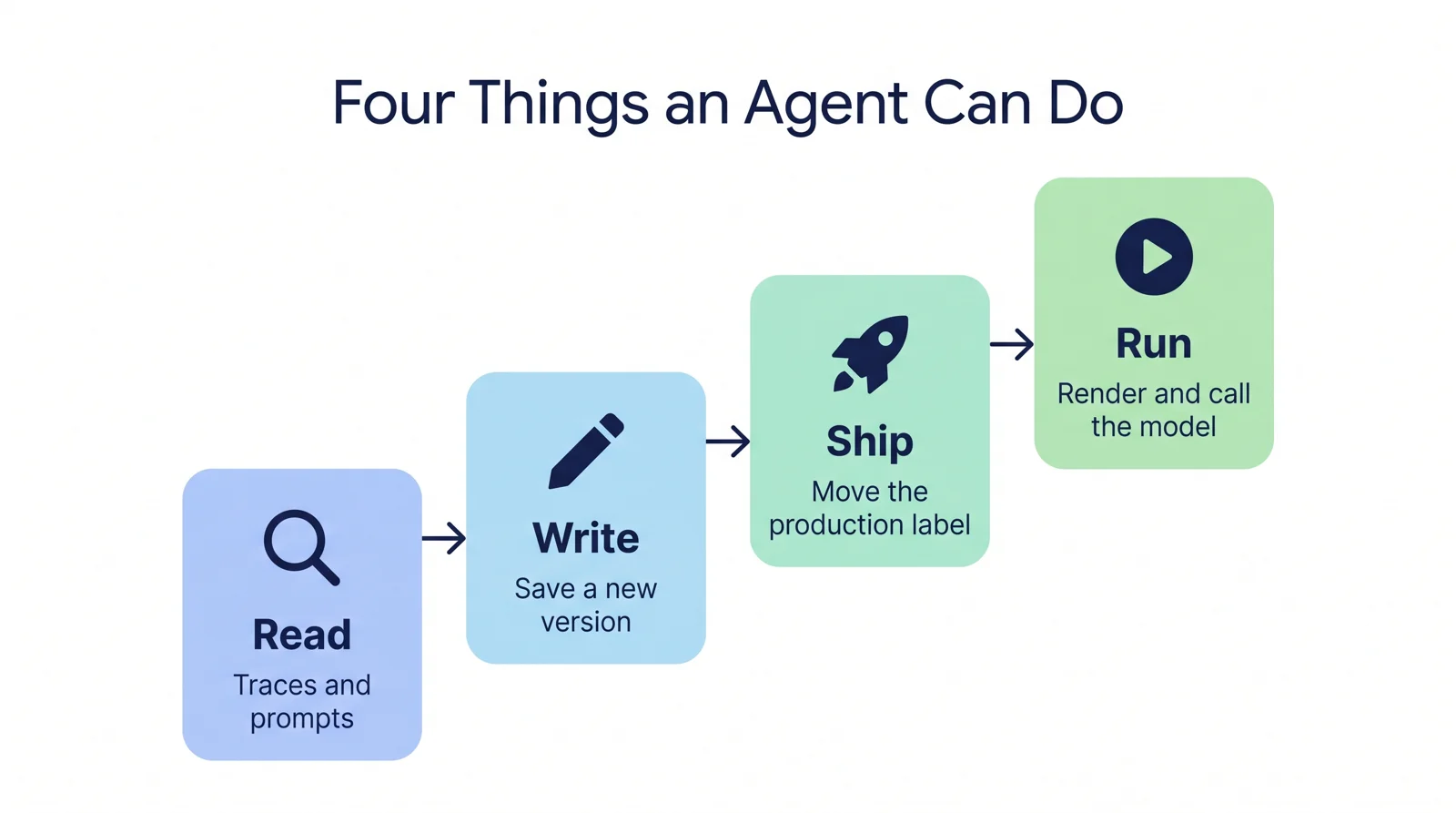
Every major LLMOps and LLM observability platform now ships an MCP server. So "does it have MCP?" no longer tells you anything. The useful question is what a coding agent such as Claude Code or Cursor can actually do once it is connected.
We read the server source of ten platforms (or the docs, where the source is closed) and sorted every tool into four verbs: read, write, ship and run. Most servers read well. Fewer write. Only a few can move a prompt into production. And only one has a single tool that renders a stored prompt, sends it to a model and returns the trace.
We build AcruxCore, one of the ten. Every competitor fact below links to its source or docs.
The short verdict
- Widest data access: Langfuse (109 tools), Braintrust (44) and Phoenix (its whole REST API, plus SQL and GraphQL).
- Agent can ship a prompt change by itself: AcruxCore, Langfuse, Phoenix and LangSmith's remote server.
- Agent can run a stored prompt in one call: only AcruxCore. Braintrust gets close through
run_eval. - Safest to hand to an agent: Laminar (read-only by design) and W&B Weave (a real read-only mode).
At a glance
| Platform | Where it runs | Tools | Save prompt version | Move label (ship) | Run stored prompt | Read-only switch |
|---|---|---|---|---|---|---|
| AcruxCore | Hosted + local | 32 | Yes | Yes | Yes, one tool | Yes |
| Langfuse | Hosted + self-host | 109 (87 always on) | Yes | Yes | No | No (client allowlist) |
| LangSmith (remote) | Hosted + self-host | 15 documented | Yes | Yes: seen live, not in the docs¹ | No | Not documented |
| Phoenix (remote) | In every Phoenix server | 7 code-mode tools over the REST API | Yes | Yes | No (agent can chain it) | Partial: read-only deployment only |
| Braintrust | Hosted only | 44 | Yes | No | Partial: inside an eval only | Not documented |
| Opik | Hosted + local | 5 | Yes | No | No | No ("not yet") |
| W&B Weave | Hosted + local | 17–39 by profile | No: no prompt tools | No | No | Yes |
| MLflow | Local only | 26 (default profile) | No: no prompt tools | No | No | Partial: category filter |
| Helicone | Local only | 3 | No: no prompt tools | No | No (raw messages only) | No |
| Laminar | Hosted + self-host | 3 | No: no prompt tools | No | No | Yes: always read-only |
¹ The LangSmith docs list 15 tools for the remote server, including push_prompt. A live tool list we saw on 19 November 2026 had 89, including tag_prompt_commit.
Agenta is left out of the table. Its MCP server searches Agenta's documentation and does not touch your prompts, traces or evaluations.
How we checked
- Dates: AcruxCore, Langfuse and LangSmith on 19 November 2026, the other platforms on 18 October 2026. MCP servers change fast; treat every count as a snapshot.
- Open-source servers: read at a pinned commit. Each claim links to the file or the vendor's page.
- Closed servers (Braintrust, LangSmith remote): vendor docs only.
- AcruxCore: listed the tools of the npm package
@acruxcoreai/mcp-server0.3.1 over a live MCP session. The hosted endpoint serves the same toolsets. - What we did not do: run the competitors' servers. This is a feature comparison, not a benchmark.
- Sources: AcruxCore · Langfuse · LangSmith · Phoenix · Braintrust · Opik · W&B Weave · MLflow · Helicone · Laminar · Agenta
The four verbs
A prompt registry stores prompts the way Git stores code. A version is an immutable commit. A label (also called an alias or tag) such as production points at one version. Your application asks for "the production version", so moving the label is what ships a change.
That gives four things an agent can do, in rising order of power:
| Verb | Means | Why it matters |
|---|---|---|
| Read | Search traces, read prompts and datasets | The agent can debug production with real data |
| Write | Save a new prompt version, add dataset rows | The agent can propose a change |
| Ship | Move the production label to a version | The agent can release the change, and roll it back |
| Run | Render a stored prompt and call the model | The agent can test the change the way production will see it |
Read: almost everyone
Every server reads something. For traces, the differences are in how:
- SQL over your data: Laminar (
query_laminar_sql), Braintrust (sql_query) and Phoenix (executeSql, read-only). This is the strongest reading tool here. - GraphQL: Phoenix (queries and mutations) and W&B Weave (queries only).
- Search plus fetch: AcruxCore, LangSmith, MLflow, Opik, Helicone.
- Langfuse: its trace (observation) tools sit behind a v4 preview flag in the source. We could not confirm whether Langfuse Cloud turns that flag on.
- Ask a built-in agent: Laminar's
ask_agenthands your question to Laminar's own agent.
AcruxCore has no SQL tool. Its search_traces filters by fields, and get_trace returns one span tree.
Write: the split begins
| Can save a new prompt version | Tool |
|---|---|
| AcruxCore | commit_prompt_version |
| Langfuse | createTextPrompt, createChatPrompt |
| LangSmith remote | push_prompt |
| Phoenix | createPromptVersion (REST operation) |
| Braintrust | create_prompt with if_exists: replace |
| Opik | write with the prompt_version.save operation |
Weave, MLflow, Helicone and Laminar expose no prompt tools at all. For MLflow and Helicone this is a choice of the server, not of the product: both products have prompt features.
Writing is broader than prompts. Langfuse's server also manages dashboards, annotation queues and evaluator rules. Braintrust's creates alerts, monitoring views and scheduled jobs. AcruxCore's write tools cover prompts, datasets, experiments, trace feedback and the tool catalog, and nothing for dashboards or alerts.
Ship: four servers can release a change
Saving a version is safe, because production does not read it yet (unless your app reads a latest label). Moving the label is the release.
- AcruxCore:
promote_prompt_alias. Promoting an earlier version is the rollback. - Langfuse:
updatePromptLabels. The tool description tells the model to setproductiononly when you ask. - Phoenix:
createPromptVersionTaganddeletePromptVersionTag. - LangSmith remote:
tag_prompt_commit, which moves a tag whenmoveis true.
Opik can set tags only at the moment it saves a version. Braintrust has no tool that assigns an environment to a prompt.
Run: where the servers differ most
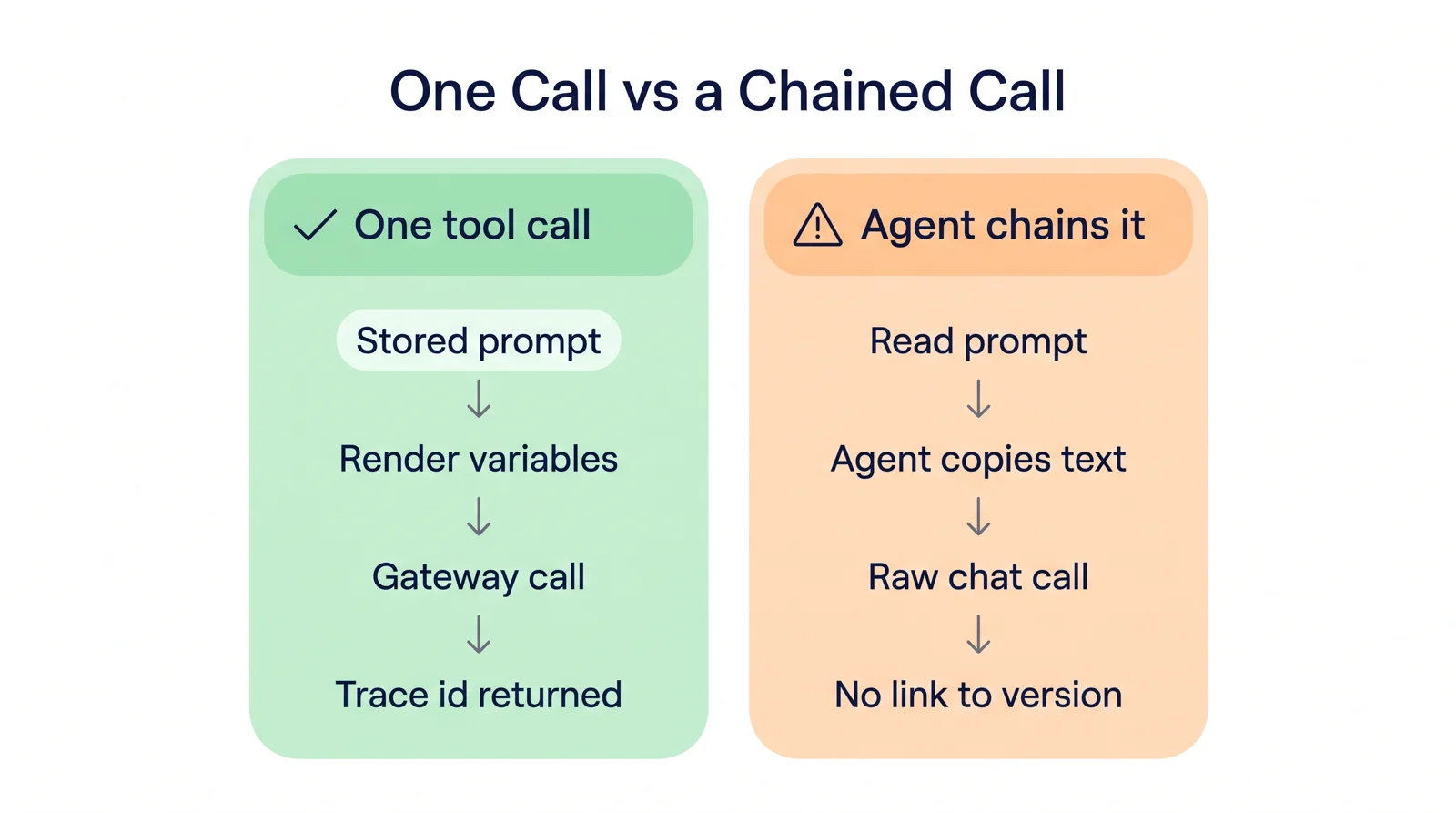
To test a prompt change honestly, the agent needs to run the stored version, with its saved model and settings, the way your application does. Sending the model a copy of the text is not the same test.
Key point: Only AcruxCore's
run_promptruns a stored prompt in one tool call and returns the trace. Braintrust runs a saved prompt only inside an eval, and Phoenix and Helicone take raw messages the agent has to copy in.
| Platform | Closest tool | What it does |
|---|---|---|
| AcruxCore | run_prompt | Resolves the alias, renders the variables, calls the model through the gateway, records cost, returns the trace id |
| Braintrust | run_eval | Runs a saved prompt as the task of an experiment over dataset rows |
| Phoenix | createChatCompletion | OpenAI-compatible call with raw messages; the agent must read the prompt and copy it in |
| Helicone | use_ai_gateway | Sends raw messages through Helicone's gateway; no stored prompt |
| Langfuse | testEvaluator | Runs an LLM judge, not your prompt |
| Others | — | No model call from the server |
In a real Claude Code session, one plain-language request on AcruxCore became six tool calls: read the prompt, commit version 2, diff it against version 1, promote production, run it, and open the trace the run returned. The walkthrough is in the MCP guide.
Braintrust's route is the better fit when "test it" means "score it over a dataset". AcruxCore has that too (run_experiment), but it is a separate tool from run_prompt.
Safety: how to stop an agent writing
Handing an agent a write-capable key is a real risk. The servers handle it very differently:
| Platform | How you limit it |
|---|---|
| Laminar | Nothing to limit: all three tools are read-only |
| W&B Weave | WANDB_MCP_ACCESS_MODE=read-only removes every write tool |
| AcruxCore | A read-only option removes every write tool: 32 tools become 19 |
| Phoenix | A read-only Phoenix deployment drops the mutation tool |
| MLflow | MLFLOW_MCP_TOOLS picks tool categories; no read-only flag |
| Langfuse, Opik, Braintrust | No server switch; the docs say to use your client's tool approval |
A server-side switch is stronger than client approval. A tool that is never listed cannot be called by mistake, however the request is worded.
On AcruxCore, the API key also carries the role of the person who made it. A key from a viewer can read but cannot commit, promote or run.
Connecting: auth and setup
| Platform | Auth | Setup |
|---|---|---|
| AcruxCore | Bearer API key | Hosted URL, or npx -y @acruxcoreai/mcp-server |
| Langfuse | Basic auth, project keys | Hosted URL on any instance |
| LangSmith | OAuth 2.1 or API key | Hosted URL |
| Phoenix | OAuth 2 or API key | /mcp on your Phoenix server (beta) |
| Braintrust | OAuth 2.0 or API key | Hosted URL |
| Opik | OAuth (hosted), API key (local) | Hosted URL, or uvx opik-mcp |
| W&B Weave | Bearer API key | Hosted URL, or uvx from GitHub |
| MLflow | MLflow auth | mlflow mcp run (experimental) |
| Helicone | API key | npx @helicone/mcp |
| Laminar | Bearer project key | Hosted URL |
OAuth matters for clients that cannot send custom headers. AcruxCore, Laminar and Weave are key-only today, so some clients need a local proxy for them.
One thing only two servers do
MCP has a prompts primitive: ready-made messages the client shows you, often as slash commands. AcruxCore publishes every registry prompt at the production alias this way, with the template variables as arguments. In Claude Code it appears as /mcp__acruxcore__<prompt-name>.
Langfuse's older standalone server, mcp-server-langfuse, did the same, but its newer built-in server dropped it. MLflow uses the primitive too, but for its own analysis commands, not your prompts.
Which one fits
- You want an agent to investigate production data: Laminar, Braintrust or Phoenix, for SQL.
- You want an agent to manage the whole platform, dashboards included: Langfuse.
- You want an agent to change a prompt, ship it and test it in one session: AcruxCore.
- You want a read-only agent you never have to watch: Laminar or W&B Weave.
To connect AcruxCore's server to Claude Code, Cursor or another client, follow the MCP guide.
Related posts
- AcruxCore vs Opik: prompts, tracing, tools and guardrails compared.
- 7 Langfuse alternatives for startups: self-hosted, cheaper and open source.
- 7 LangSmith alternatives for startups: open source, self-hosted and cheaper.
- Self-hosting LLM observability tools: seven measured, six open source.