AcruxCore vs LangChain: one tool-calling agent, built twice
This post compares the code you write for a tool-calling agent when the tool is a function
in your own app. We built the agent twice: once with LangChain's create_agent, and once with
the AcruxCore SDK's run_tool_loop. Both use the same tool, the same question and the same
model (openai/gpt-4o-mini via OpenRouter), and both ran live. The run date and the
langchain, langgraph and acruxcore versions were not recorded. The AcruxCore leg ran on
hosted acruxcore.com, as the trace link in its output shows.
A separate post compares how LangSmith and AcruxCore trace the same agent.
We build AcruxCore. Both agents' scripts are printed in full at the end of the post.
LangChain: the tool is a decorated function, the loop is a graph
LangChain builds the tool schema from your type hints and docstring. You write one function, and LangChain derives the JSON Schema from it:
@tool
def get_weather_tool(city: str) -> dict:
    """Get the current weather for a city.

    Returns temperature in Celsius, what it feels like, a text condition, and humidity.

    Args:
        city: City name, e.g. 'Lahore' or 'Berlin'.
    """
    return get_weather(city)


model = ChatOpenAI(model="openai/gpt-4o-mini", api_key=..., base_url="https://openrouter.ai/api/v1")
agent = create_agent(model=model, tools=[get_weather_tool], system_prompt=SYSTEM_PROMPT)
result = agent.invoke({"messages": [{"role": "user", "content": QUESTION}]})
Tracing needs zero lines. Set LANGSMITH_TRACING=true before the import and every
run reports itself. That is the strongest thing about the LangChain/LangSmith pairing: if
you are already on LangChain, observability costs you an environment variable.
What you get in the trace is a graph, not a list:
LangGraph                     386 tokens
├─ model
│   └─ ChatOpenAI             150
├─ tools
│   └─ get_weather_tool
└─ model
    └─ ChatOpenAI             236
Seven runs for one agent turn. The model and tools wrappers are LangGraph's own nodes.
Useful when you are debugging the graph itself; noise when you only want to know what the
tool returned.
AcruxCore: the same decorator, and the tool becomes a catalog version
The AcruxCore side is the LangChain shape with one word changed:
from acruxcore import AcruxCore, acrux

@acrux.tool
def get_weather_local(city: str) -> dict:
    """Get the current weather for a city.

    Returns temperature in Celsius, what it feels like, a text condition, and humidity.

    Args:
        city: City name, e.g. 'Lahore' or 'Berlin'.
    """
    return get_weather(city)


async with AcruxCore() as client:
    result = await client.gateway.run_tool_loop(
        model="gpt-4o-mini",
        messages=build_messages(),
        tools=[get_weather_local],
        trace={"name": "weather-tool-agent-sdk"},
    )
@acrux.tool reads the same three things off the function that LangChain's @tool does:
the name from __name__, the model-facing description from the docstring summary,
and the argument schema from the type hints, with each Args: line becoming that
property's description. run_tool_loop owns the whole loop — call the model, run the tool
calls, append results, repeat — and reports one trace over all of it.
The difference is what happens to the tool. On the first call the loop sends the derived
spec to POST /tools/sync, and the tool becomes a versioned catalog entry: name,
description, parametersSchema, version number, production and staging aliases. That
call is create-or-commit-or-nothing — it creates the tool when the name is new, commits a
version only when the spec changed, and commits nothing on a re-run — so it is safe at the
top of a long-running service. We verified the idempotency: run the script twice and the
version count stays at 1.
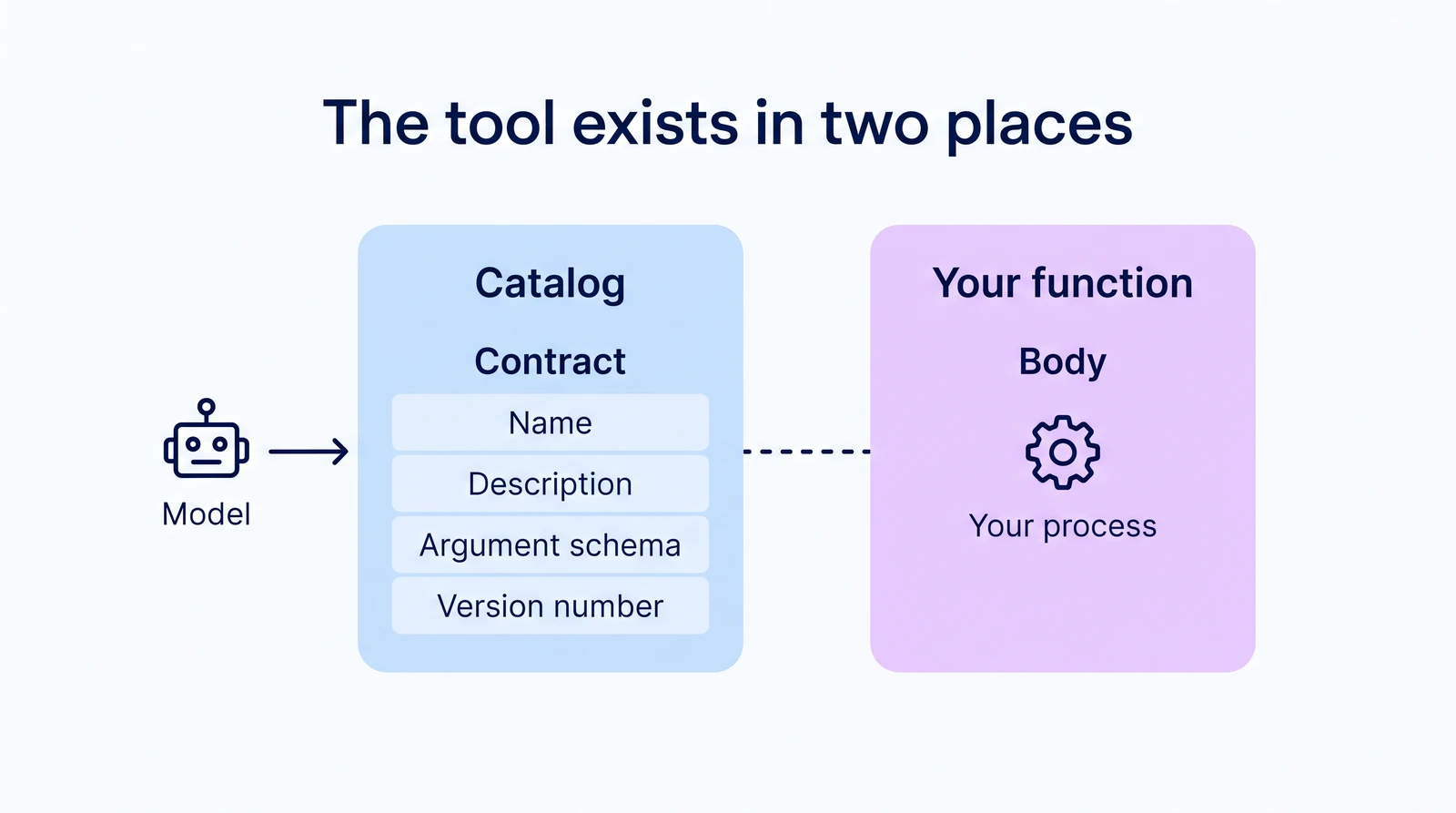
So the tool exists in two places. The catalog owns the contract that the model is shown,
and your function owns the body. Another service, in any language, can read the same
versioned schema. It cannot run this tool, because the version's executor is client: only
the process that holds the function runs the body. A version with an http executor is one
the platform can run for any caller.
Two ways in, and why this post uses one of them
There are exactly two ways a tool gets into the catalog, and the choice follows from one question: who runs the tool body?
| The body is | You declare it with | Who executes it |
|---|---|---|
| a function in your code | @acrux.tool on the function | your process |
| an HTTP request to some API | an http executor via POST /tools/sync, or the dashboard | the platform |
Both produce the same artifact — a versioned catalog entry with aliases — and neither needs
a setup step before your script runs. The version records which one it is in its executor
field, so nothing has to guess later:
{"type": "client"}                                   // your app runs it
{"type": "http", "url": "...", "method": "GET", ...} // the platform runs it
This post uses the first. The tool-call traces post
uses the second, which is why the tool here is named get_weather_local rather than reusing
that post's get_weather: one name per execution model, so neither version lies about who
does the work.
Create a tool walks through the whole path — declaring, syncing, inspecting the result in the dashboard, attaching it to a prompt, and the routing rules for tools you did not declare locally.
The trace
From the self-contained run at the end of this post, which declares the same tool under the
name get_weather_standalone:
weather-agent-standalone      3 spans   371 tokens   ok
├─ llm  (openai/gpt-4o-mini)  1632ms   131
│   └─ tool get_weather_standalone   603ms   (toolVersionId 82e53d6a…:1)
└─ llm  (openai/gpt-4o-mini)  1746ms   240
Three spans, one per model call or tool call. The script has no tracing-specific code: no
trace id, no span object, no tracing environment variable. The gateway writes the llm
spans because it makes the provider call, and the SDK writes the tool span around the
function that @acrux.tool decorates and puts it in the same trace.
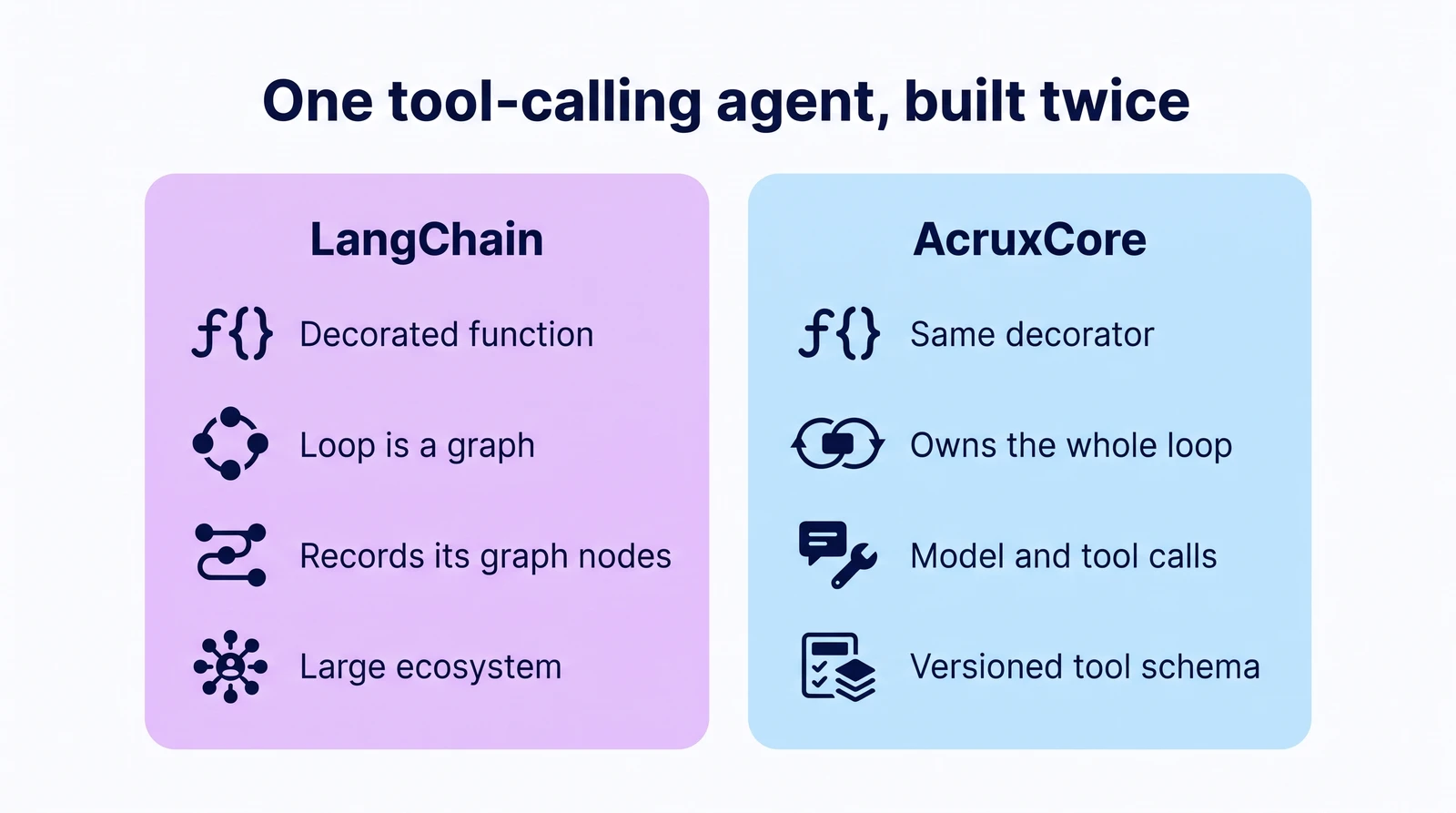
Key point: Both frameworks derive the tool schema from the same function and run the loop for you. The trace shape is where they differ: LangGraph records its graph nodes, and AcruxCore records only the model and tool calls.
Show screenshot: the client tool span in AcruxCore
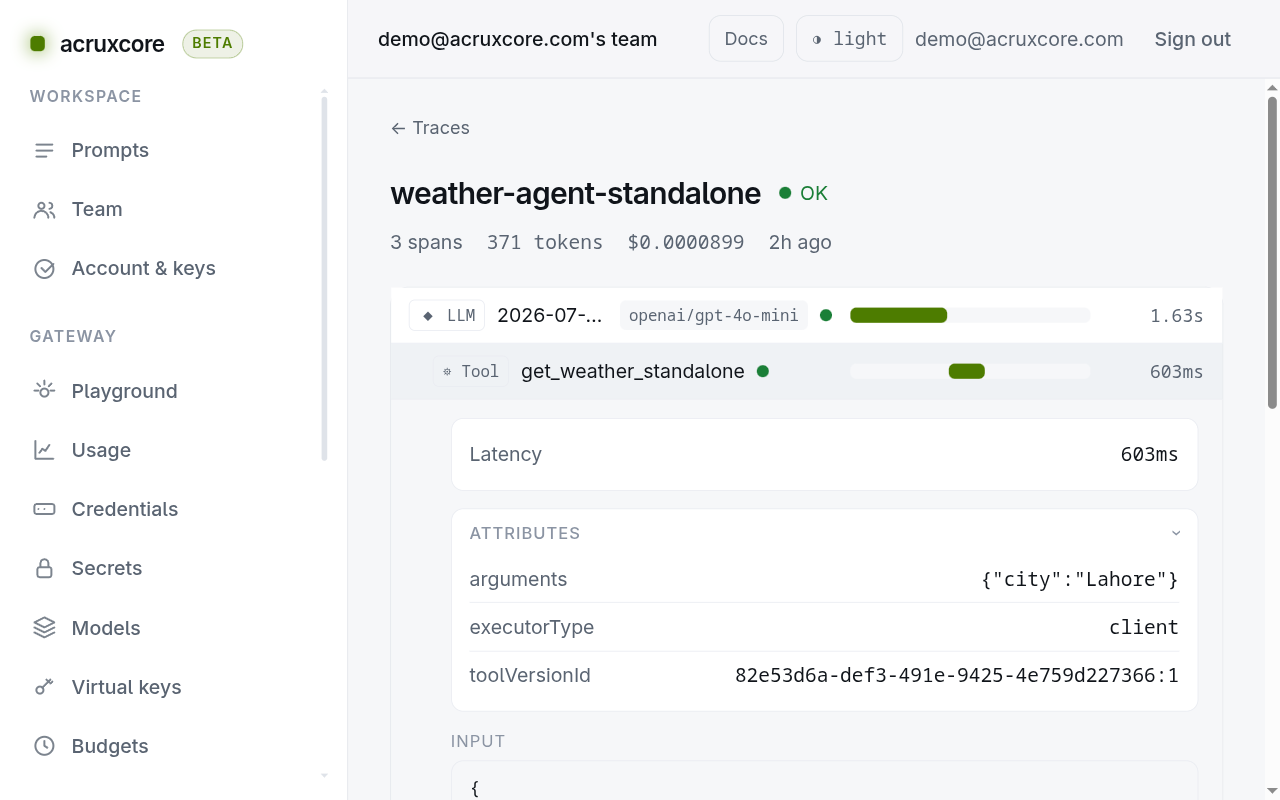
executorType: client is the span saying your process ran the tool, and toolVersionId
names the exact contract version the model was shown — the thing a decorated local function
on its own cannot tell you, and the reason the catalog round-trip is there at all.
Counting the code
One rule for this to mean anything: each script must run on its own, with no setup done beforehand in a terminal or a dashboard. Registration counts if it is required. Lines of real code, excluding docstrings, comments and blank lines:
| LangChain + LangSmith | AcruxCore SDK | |
|---|---|---|
| Agent with tracing | 49 | 36 |
| Complete self-contained script (the two at the end of this post) | 40 | 40 |
The first row differs because the LangChain leg wires the model client itself —
ChatOpenAI(model=..., api_key=..., base_url=...) plus the tracing env vars — while the
AcruxCore leg names a model the gateway already knows. On the fully self-contained scripts
the two have 40 lines each.
Both figures are checkable: the two self-contained scripts are at the end of this post, and the pair behind the first row is here. They import one shared module for the tool body and the question, which is printed in full in the tool-call traces post. All four scripts in this post are in the repo.
tool-agent-sdk-langchain-vs-acruxcore/ — all four scripts in this post.
tool_agent_langchain.py — LangChain's create_agent, 49 lines of code
"""SDK leg: the same get_weather agent using LangChain + LangSmith.

The counterpart to `tool_agent_acruxcore_sdk.py`. LangChain's `create_agent`
owns the loop, `@tool` turns a plain function into a tool with a schema derived
from its type hints and docstring, and tracing needs no code at all — importing
LangChain with `LANGSMITH_TRACING=true` set is enough.

Run:
  export LANGSMITH_API_KEY=lsv2_pt_...
  export OPENROUTER_API_KEY=sk-or-v1-...
  python scripts/blogs/tool-agent-sdk-langchain-vs-acruxcore/python/tool_agent_langchain.py

Needs: pip install langchain langchain-openai langsmith
"""

import json
import os
import sys

PROJECT = "weather-tool-agent-langchain"

# Must be set before LangChain is imported — the tracer reads them at import time.
os.environ["LANGSMITH_TRACING"] = "true"
os.environ["LANGSMITH_PROJECT"] = PROJECT

if not os.environ.get("LANGSMITH_API_KEY"):
    sys.exit("LANGSMITH_API_KEY is not set")
if not os.environ.get("OPENROUTER_API_KEY"):
    sys.exit("OPENROUTER_API_KEY is not set")

from langchain.agents import create_agent  # noqa: E402  (after the env vars above)
from langchain_core.tools import tool  # noqa: E402
from langchain_openai import ChatOpenAI  # noqa: E402

from weather_tool_shared import (  # noqa: E402
    MODEL_OPENROUTER,
    QUESTION,
    SYSTEM_PROMPT,
    get_weather,
)


@tool
def get_weather_tool(city: str) -> dict:
    """Get the current weather for a city.

    Returns temperature in Celsius, what it feels like, a text condition, and humidity.

    Args:
        city: City name, e.g. 'Lahore' or 'Berlin'.
    """
    return get_weather(city)


def main() -> None:
    """Build the agent and run the same question through it."""
    model = ChatOpenAI(
        model=MODEL_OPENROUTER,
        api_key=os.environ["OPENROUTER_API_KEY"],
        base_url="https://openrouter.ai/api/v1",
    )
    agent = create_agent(model=model, tools=[get_weather_tool], system_prompt=SYSTEM_PROMPT)

    result = agent.invoke({"messages": [{"role": "user", "content": QUESTION}]})

    messages = result["messages"]
    tool_calls = [
        {"name": tc["name"], "args": tc["args"]}
        for m in messages
        for tc in (getattr(m, "tool_calls", None) or [])
    ]
    print(
        json.dumps(
            {
                "answer": messages[-1].content,
                "tool_calls": tool_calls,
                "message_count": len(messages),
            },
            indent=2,
        )
    )
    print(f"\nLangSmith project: {PROJECT}")


if __name__ == "__main__":
    main()
tool_agent_acruxcore_sdk.py — the AcruxCore SDK's run_tool_loop, 36 lines of code
"""SDK leg: the same get_weather agent using the `acruxcore` Python SDK.

`run_tool_loop` owns the entire loop — call the model, run the tool calls, append
results, repeat — and reports one trace covering all of it. Compared with writing
the loop yourself against the gateway, three things disappear:

* No registration step: `@acrux.tool` is the tool definition, and the loop
  reconciles it with the catalog on its first call. Re-running with an unchanged
  function commits nothing.
* No tool schema is assembled: the derived schema is what the catalog holds, and
  the gateway serves the model that same version.
* No trace plumbing: no trace id to mint, no headers to set, no parent span to
  thread. The gateway writes the `llm` spans, the SDK writes the `tool` spans.

Run:
  export ACRUXCORE_API_KEY=acx_sk_...
  python scripts/blogs/tool-agent-sdk-langchain-vs-acruxcore/python/tool_agent_acruxcore_sdk.py

Needs: pip install acruxcore
"""

import asyncio
import json
import os
import sys
from typing import Any

from acruxcore import AcruxCore, acrux

from weather_tool_shared import MODEL_ACRUXCORE, build_messages, get_weather

BASE_URL = os.environ.get("ACRUXCORE_BASE_URL", "https://acruxcore.com/api/v1")
TRACE_NAME = "weather-tool-agent-sdk"

if not os.environ.get("ACRUXCORE_API_KEY"):
    sys.exit("ACRUXCORE_API_KEY is not set")


# A distinct name from the `http`-executor `get_weather`: this loop runs the tool in
# this process, so its version declares a `client` executor. Registering both under
# one name would mean one of them lying about who runs the tool. The decorator takes
# the name from the function, so the distinction lives in the function name.
@acrux.tool
def get_weather_local(city: str) -> dict[str, Any]:
    """Get the current weather for a city.

    Returns temperature in Celsius, what it feels like, a text condition, and humidity.

    Args:
        city: City name, e.g. 'Lahore' or 'Berlin'.
    """
    return get_weather(city)


async def main() -> None:
    async with AcruxCore(api_key=os.environ["ACRUXCORE_API_KEY"], base_url=BASE_URL) as client:
        result = await client.gateway.run_tool_loop(
            model=MODEL_ACRUXCORE,
            messages=build_messages(),
            # One argument replaces the register-then-reference dance: the loop syncs
            # this tool, then names it to the gateway as a catalog ref.
            tools=[get_weather_local],
            trace={"name": TRACE_NAME},
        )

    print(
        json.dumps(
            {
                "answer": result.content,
                "iterations": result.iterations,
                "stopped_at_limit": result.stopped_at_limit,
                "trace_id": result.trace_id,
            },
            indent=2,
        )
    )
    print(f"\nAcruxCore trace: {BASE_URL.replace('/api/v1', '')}/traces/{result.trace_id}")


if __name__ == "__main__":
    asyncio.run(main())
The 40 lines give you different things. LangChain gives you a graph and a large ecosystem of components. AcruxCore gives you a versioned tool schema in its catalog, and a tool span that names the version the model was shown.
Is AcruxCore a LangChain alternative?
For a tool-calling agent, yes. For an agent that needs LangChain's retrievers, memory and integrations, no.
On tool ergonomics they are the same. Both decorators read the schema off your type hints and docstring, and neither needs a separate registration step.
On the loop they are the same. create_agent and run_tool_loop each run the whole
loop in one call. LangGraph's tool node manages parallel tool execution, and run_tool_loop
runs a round's tool calls concurrently, so neither has an edge there.
AcruxCore differs on the trace and the tool record. Its trace has three spans, one per model or tool call, where LangChain's has seven runs that include LangGraph's own nodes. Each tool call is stored against a versioned catalog entry.
LangChain wins on reach. If your agent needs retrievers, memory, a vector store and four integrations, that ecosystem exists and ours does not.
On tracing setup they are effectively tied at zero. LangChain needs an env var; the AcruxCore SDK needs nothing, because the trace is a property of the gateway call rather than something a client library has to be told to emit.
If you already use LangChain, stay there and turn on LangSmith: tracing costs one
environment variable. If you want a versioned record of each tool's schema and a trace with
only the model and tool calls, run_tool_loop gives you that for the same amount of code.
Run it yourself: the two complete scripts
Everything above is excerpts. These two are the whole thing — no local imports, nothing to set up in a dashboard or a terminal first. Both were executed exactly as printed, and the output of those runs is shown underneath each one. Open either to copy it.
tool-agent-sdk-langchain-vs-acruxcore/python/ — both standalone scripts.
standalone_langchain_agent.py — LangChain + LangSmith, 40 lines
pip install langchain langchain-openai langsmith requests
export LANGSMITH_API_KEY=lsv2_pt_...
export OPENROUTER_API_KEY=sk-or-v1-...
python standalone_langchain_agent.py
"""Complete, self-contained LangChain + LangSmith tool agent.

Copy-pasteable: no local imports, nothing to set up first. This is the version
embedded in the blog post, kept here so it can be run and stay honest.

  pip install langchain langchain-openai langsmith requests
  export LANGSMITH_API_KEY=lsv2_pt_...
  export OPENROUTER_API_KEY=sk-or-v1-...
  python standalone_langchain_agent.py
"""

import os

# Must be set before LangChain is imported — the tracer reads them at import time.
os.environ["LANGSMITH_TRACING"] = "true"
os.environ["LANGSMITH_PROJECT"] = "weather-agent-standalone"

import requests
from langchain.agents import create_agent
from langchain_core.tools import tool
from langchain_openai import ChatOpenAI

MODEL = "openai/gpt-4o-mini"
SYSTEM_PROMPT = (
    "You are a concise outdoor-activity advisor. When a question depends on the "
    "weather, call the weather tool before answering. Answer in at most three "
    "sentences and always state the temperature you based the advice on."
)


@tool
def get_weather(city: str) -> dict:
    """Get the current weather for a city.

    Returns temperature in Celsius, what it feels like, a text condition, and humidity.

    Args:
        city: City name, e.g. 'Lahore' or 'Berlin'.
    """
    res = requests.get(f"https://wttr.in/{city}", params={"format": "j1"}, timeout=20)
    res.raise_for_status()
    payload = res.json()
    current = payload["current_condition"][0]
    return {
        "location": payload["nearest_area"][0]["areaName"][0]["value"],
        "temp_c": int(current["temp_C"]),
        "feels_like_c": int(current["FeelsLikeC"]),
        "condition": current["weatherDesc"][0]["value"],
        "humidity_pct": int(current["humidity"]),
    }


def main() -> None:
    model = ChatOpenAI(
        model=MODEL,
        api_key=os.environ["OPENROUTER_API_KEY"],
        base_url="https://openrouter.ai/api/v1",
    )
    agent = create_agent(model=model, tools=[get_weather], system_prompt=SYSTEM_PROMPT)

    result = agent.invoke(
        {"messages": [{"role": "user", "content": "Should I go for a run in Lahore this evening?"}]}
    )

    print(result["messages"][-1].content)
    print(f"\nTrace: smith.langchain.com → project '{os.environ['LANGSMITH_PROJECT']}'")


if __name__ == "__main__":
    main()
Real output:
The temperature in Lahore is currently 40°C, which feels like 35°C. It's quite hot, so
consider an evening run only if you are well-hydrated and accustomed to high temperatures.
Otherwise, it may be better to postpone your run for a cooler time.

Trace: smith.langchain.com → project 'weather-agent-standalone'
standalone_acruxcore_sdk_agent.py — AcruxCore SDK, 40 lines
pip install acruxcore requests
export ACRUXCORE_API_KEY=acx_sk_...
python standalone_acruxcore_sdk_agent.py
"""Complete, self-contained AcruxCore SDK tool agent.

Copy-pasteable: no local imports, nothing to set up first. `@acrux.tool` carries the
name, the model-facing description and the argument schema, and `run_tool_loop`
reconciles that with the Tool Catalog on its first call. This is the version embedded
in the blog post, kept here so it can be run and stay honest.

  pip install acruxcore requests
  export ACRUXCORE_API_KEY=acx_sk_...
  python standalone_acruxcore_sdk_agent.py
"""

import asyncio
import os

import requests
from acruxcore import AcruxCore, acrux

BASE_URL = os.environ.get("ACRUXCORE_BASE_URL", "https://acruxcore.com/api/v1")
API_KEY = os.environ["ACRUXCORE_API_KEY"]
MODEL = "gpt-4o-mini"

SYSTEM_PROMPT = (
    "You are a concise outdoor-activity advisor. When a question depends on the "
    "weather, call the weather tool before answering. Answer in at most three "
    "sentences and always state the temperature you based the advice on."
)


@acrux.tool
def get_weather_standalone(city: str) -> dict:
    """Get the current weather for a city.

    Returns temperature in Celsius, what it feels like, a text condition, and humidity.

    Args:
        city: City name, e.g. 'Lahore'.
    """
    res = requests.get(f"https://wttr.in/{city}", params={"format": "j1"}, timeout=20)
    res.raise_for_status()
    payload = res.json()
    current = payload["current_condition"][0]
    return {
        "location": payload["nearest_area"][0]["areaName"][0]["value"],
        "temp_c": int(current["temp_C"]),
        "feels_like_c": int(current["FeelsLikeC"]),
        "condition": current["weatherDesc"][0]["value"],
        "humidity_pct": int(current["humidity"]),
    }


async def main() -> None:
    async with AcruxCore(api_key=API_KEY, base_url=BASE_URL) as client:
        result = await client.gateway.run_tool_loop(
            model=MODEL,
            messages=[
                {"role": "system", "content": SYSTEM_PROMPT},
                {"role": "user", "content": "Should I go for a run in Lahore this evening?"},
            ],
            # The first call creates the tool, commits v1 and points `production` at it.
            # A later run with an unchanged function commits nothing.
            tools=[get_weather_standalone],
            trace={"name": "weather-agent-standalone"},
        )

    print(result.content)
    print(f"\nTrace: {BASE_URL.replace('/api/v1', '')}/traces/{result.trace_id}")


if __name__ == "__main__":
    asyncio.run(main())
Real output — this is the run whose trace is shown earlier in the post:
The current temperature in Lahore is 34°C, but it feels like 38°C with smoky haze. It's
advisable to avoid running in these conditions, as the heat and air quality may affect your
health. Consider postponing your run until temperatures are cooler and the air quality
improves.

Trace: https://acruxcore.com/traces/d29ff672-a065-4e7a-877f-104d4dce5685
FAQ
Can AcruxCore replace LangChain for a tool-calling agent?
Yes: both build the tool schema from a decorated function and run the loop for you. For an agent that needs LangChain's retrievers, memory and integrations, no.
How does LangChain's create_agent trace tool calls?
With LANGSMITH_TRACING=true set before LangChain is imported, every run reports itself to
LangSmith with no tracing code. One agent turn in this test produced seven runs, including
LangGraph's model and tools nodes.
What does run_tool_loop do?
run_tool_loop in the AcruxCore Python SDK calls the model, runs the tool calls, appends the
results and repeats until the model answers. It reports one trace for the whole loop.
Do I need to register a tool before using run_tool_loop?
No. On its first call the loop sends the schema from @acrux.tool to the catalog, creating the
tool or committing a new version only when the schema changed. A second run with an unchanged
function commits nothing.
How many lines of code does each agent take?
The complete self-contained scripts are 40 lines each. With shared helpers, the LangChain agent with tracing is 49 lines and the AcruxCore agent is 36, because the LangChain leg sets up the model client itself.