Audit trail
An audit log of every change your team makes.
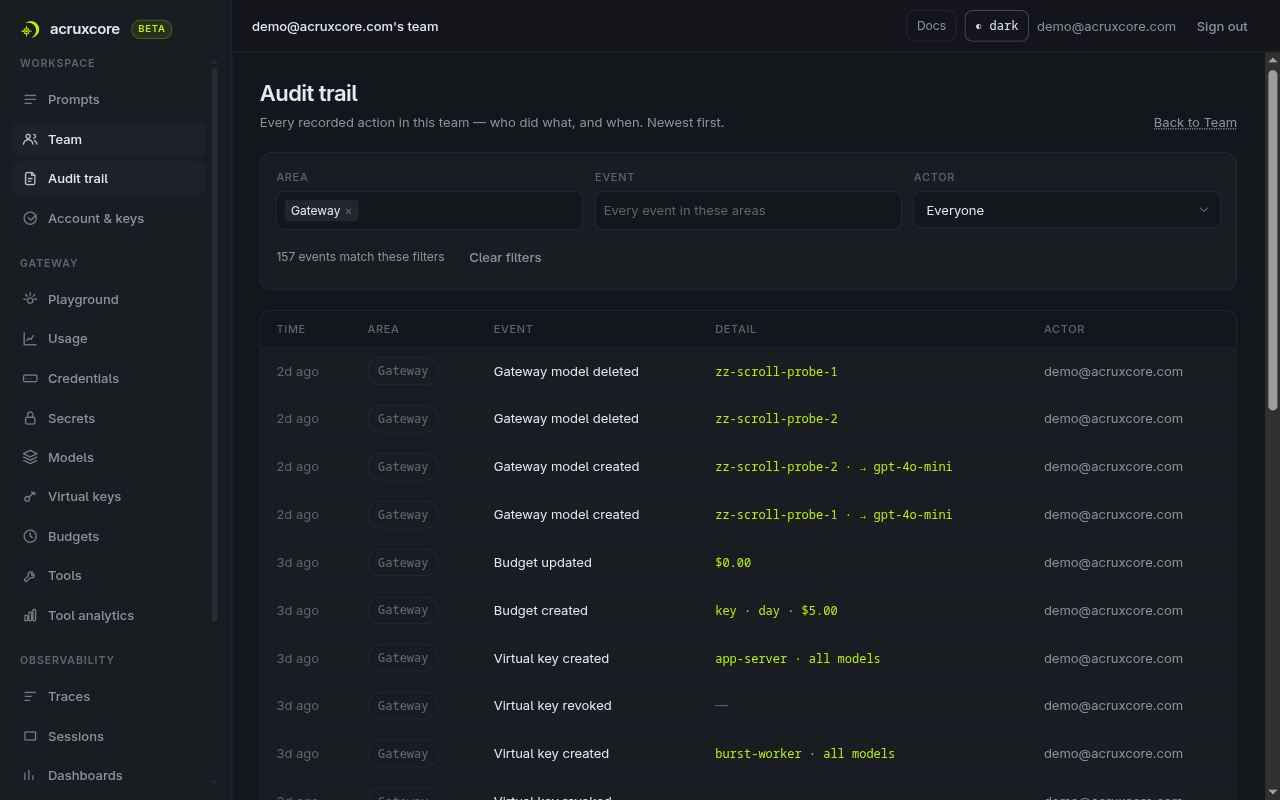
Who revoked that key, who changed a role, who moved production to v7. Every write the platform performs is recorded with the person behind it and the detail that makes it readable — and the whole team reads back as one list you can filter and share.
What you get
Coverage, grouping, per-actor filters and role gating.
One list for the whole team
Thirty-nine kinds of event across eight areas — keys, members and invites, gateway, secrets, settings, prompts, tools and evaluations — newest first, in one place instead of one tab per resource.
A readable line, not a row of ids
Each event carries its own detail: the key name, the alias move as production · v1 → v2, the budget as team · monthly · $50.00. A member change names the person by email, including someone who has already left.
Filters that narrow, in the URL
Pick an area, then one event inside it, then the person who did it. Every filter and the page number live in the address, so a filtered view can be pasted into a ticket and opened by a teammate.
Owner and admin only
A member without the role never sees the screen or the nav item. The read takes a signed-in session rather than an API key, because a record of what people did should not be readable by a program holding a key.
Coverage
What the trail records.
Every write worth answering a question about, grouped the way you would ask about it. The filter offers these eight areas rather than one flat list of thirty-nine event names.
| Area | What it records |
|---|---|
| Prompts | Created, renamed, updated and deleted, plus every version commit, alias promotion and alias deletion. |
| Tools | Created, version committed, alias promoted, version superseded, and every prompt binding set or removed. |
| Members & invites | Invited, joined, role changed, removed, invite revoked — each naming the person it happened to. |
| API keys | Generated, with the name the key was given, and revoked. |
| Gateway | Provider credentials, gateway models, virtual keys and budgets — added, updated, deleted or revoked. |
| Secrets | Created, rotated and deleted. The name is recorded and the value never is, so the trail cannot leak what it protects. |
| Evaluations | Datasets created and deleted, and evaluation rules created, updated and deleted. |
| Settings | Trace payload capture switched on or off for the team. |
This is the record of changes people made, not a log of your traffic. Model calls are traces, not audit events — the two answer different questions, and a completion never appears here.
Reading it back
Adding a filter always makes the answer smaller.
A thousand events is not something you page through. The three filters compose in one direction, so the second one you add never widens what the first one found.
Area, then event
Choosing areas narrows what the event picker offers, and naming one event filters to exactly that event. The area is the shortlist; the event is the answer.
The actor list comes from the trail
The people you can filter by are read from the recorded events, each with a count — so a contractor who was removed last month is still there to select. Built from the current member list, they would not be.
Filtered in the database
The count above the table is the number of matching events in the whole team, not the number on the page you happen to be reading. A match on page 30 is still counted, and still reachable.
Pagination is 25 events to a page, and changing any filter returns you to page 1 — so a narrowed search never leaves you on a page number that no longer exists.
Access
Who can read it, and what it does not do yet.
A trail is only worth having if the people who can read it are exactly the people who should. That is a role question, and it has one answer.
Owner and admin
Editors and viewers get neither the page nor the nav entry pointing at it — a link they could not open would only advertise a dead end. The per-prompt and per-tool trails are unchanged, and any member can still read those.
A person, not a key
The team-wide read is the one call in the platform an API key cannot make: it needs a signed-in session, and a Bearer key gets 401 instead of a filtered list.
Not yet: export and retention
There is no CSV or JSON download, and no retention window to configure — every event is kept, and the way to hand a colleague a slice of it is the URL of the filtered view.
In the dashboard
Everything without writing a line of code.
The API and SDKs cover the automated path. For the day-to-day, the dashboard does the same work in the browser.
- Read every recorded action in the team, newest first, 25 to a page.
- Filter by area, then narrow to a single event type inside it.
- Filter by the person who did it — including someone who has left the team.
- Read a member change as an email address rather than a user id.
- Jump from a prompt or tool event straight to the prompt it changed.
- Share what you are looking at by copying the URL.
Go deeper
Documentation for this piece.
The rest of the platform
It composes with the other six.
Each piece works on its own, and they get better together — a trace links back to a prompt version, a dataset is built from feedback.