Evaluation & optimization
An LLM evaluation platform with prompt optimization.
Prove the new prompt is actually better. Build a dataset from real feedback, by hand, or from a CSV or JSON file, sweep it across prompt versions and models, read the result cell by cell — and let the optimizer draft the candidate rewrites before you move the production alias.
What you get
Datasets, experiments, per-cell results and an optimizer.
Datasets, however you start
Examples can come from the feedback your team left on real traces, from rows you write by hand or import from a CSV or JSON file, or from live calls a standing rule already scored badly. Existing traffic helps; it is not a prerequisite.
Experiments as sweeps
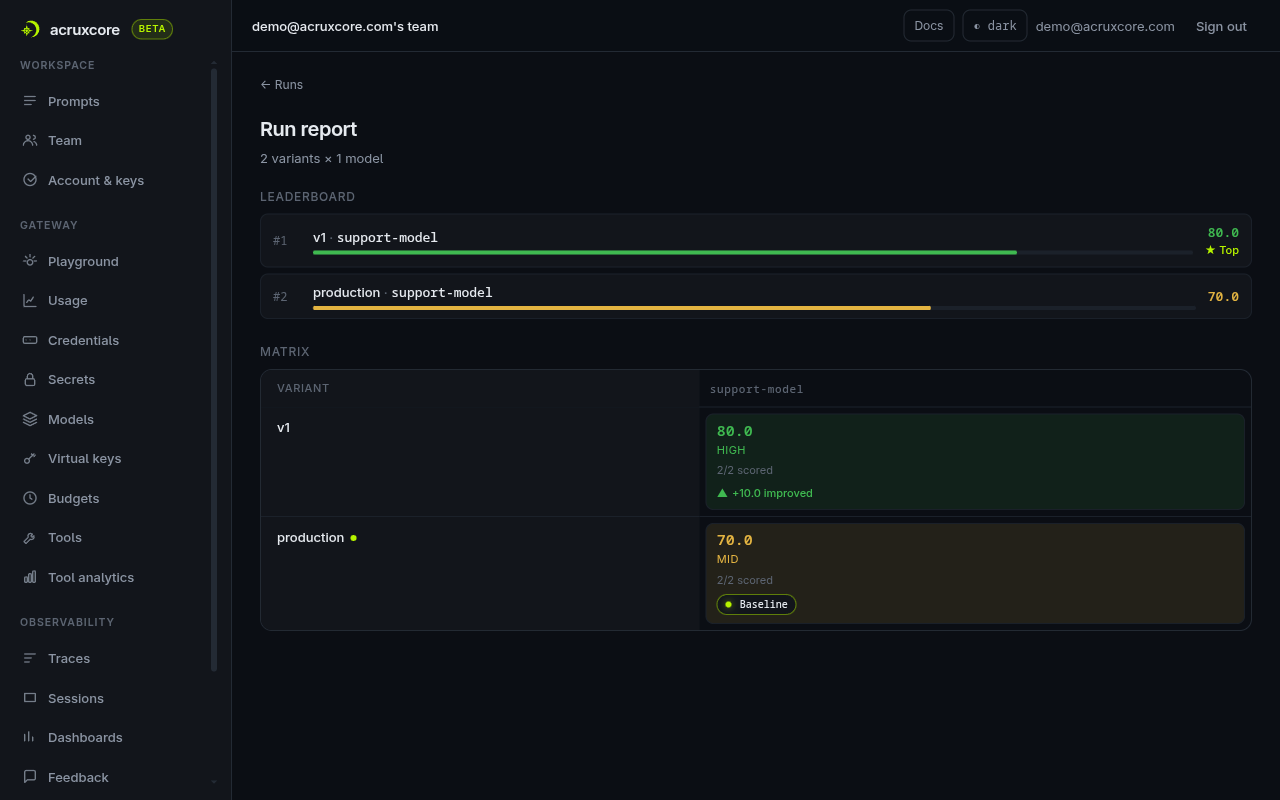
An experiment is a dataset crossed with prompt versions and models. Ask "does the new version beat production on the cheaper model?" and get a grid instead of an opinion.
Per-cell results
Read every combination back individually — scores, outputs, and the judge reason — so a win in the aggregate cannot hide a regression on the cases you care about.
An optimizer that drafts the next version
Point an optimize run at a dataset and a model rewrites your live prompt — several candidates, each scored against the same cases as the version in production. Promoting one commits a real version and moves the alias.
Datasets
Four ways to fill a dataset.
An example is two things: the prompt variables to render, and the criteria a judge should check. Where those rows come from is up to you — a brand-new prompt with no traffic can still be evaluated today.
From feedback
Pick the traces your team marked wrong and pull them in. Each row brings the variables the call was made with, the comment as its criteria, and the session history behind it.
By hand
New dataset creates an empty one, and Add example writes a row: the variable fields, and what a good answer has to do. This is the path for a prompt that has no traffic yet.
From a file
Import file reads a CSV or JSON test set of up to 500 rows and shows a preview first. Rows with a problem are listed by their row number and left out of the import.
From live scores
A standing evaluation rule collects the calls it scored below your threshold. One action turns that pile into a dataset of real failures, ready to run against.
A complaint reused word-for-word as a rubric grades correct answers badly, so criteria stays editable in place — rewording it is routine curation, not a rare correction.
Offline and online
Evaluate before deployment, monitor after it.
The same judge runs in two places: on demand against a fixed dataset, and continuously against traffic that is already live.
Offline experiments
A grid of prompt versions and models over one dataset, run when you ask for it. This is the one that gates a promotion, because every variant sees identical inputs.
Online rules
A standing rule matches live LLM calls and a worker scores them shortly after the response returns. It is a measurement, not a gate — nothing is held back from your user while judging happens.
What judging costs
A rule samples 10% of matching calls and stops at 500 judge calls a day by default. Judge calls run through your own gateway keys, so a breached budget disables the rule and notifies the owners.
Only LLM calls are ever judged. Tool spans are recorded and visible, but a rule never scores one — so a rule cannot be used to grade a tool result directly.
Optimizer
Let a model draft the next prompt version.
The hardest failure is the one with no stack trace: the answer came back well formed, your code accepted it, and a human read it and said it was wrong. An optimize run turns that judgment into candidate rewrites and scores them the way a hand-written version would be scored.
What it reads
A dataset, and the version the chosen alias points at — production by default. You pick the model that writes the rewrites, and can swap the built-in instructions for a prompt of your own.
What it produces
Several candidate rewrites, each rendered against the same examples and judged with the same criteria, ranked in one report beside the version that is live.
What you do with it
Read the diff and the optimizer's own rationale, then promote the candidate that earned it. Promoting commits an ordinary numbered version and moves the alias — there is no separate optimized-prompt object.
A rewrite that drops or invents a {{ variable }} is discarded before it is ever scored, so a candidate you can promote is always one your code can still render.
In the dashboard
Everything without writing a line of code.
The API and SDKs cover the automated path. For the day-to-day, the dashboard does the same work in the browser.
- Build a dataset from feedback, write the first examples by hand, or import a CSV or JSON file.
- Configure a run across prompt versions and models in one form.
- Watch the run progress as the worker processes each cell.
- Compare outputs side by side, then drill into a single cell.
- Start an optimize run from a dataset and review each candidate's diff.
- Promote the winning version to production the moment you are convinced.
Go deeper
Documentation for this piece.
The rest of the platform
It composes with the other six.
Each piece works on its own, and they get better together — a trace links back to a prompt version, a dataset is built from feedback.