Prompt management
A prompt management platform with versions, aliases and diffs.
Prompts are versioned data, not code. Every save commits an immutable version, and the production alias points at whichever one you promote — so shipping a new prompt is a promotion, not a release.
What you get
Versions, aliases, templating and an audit trail.
Immutable versions
Every save commits a new numbered version. Nothing is overwritten, so you can always read back, compare, or return to exactly what shipped last Tuesday.
Named aliases
production and staging are pointers, not copies. Promote a version and the next render through the API returns it; SDK callers pick it up within their cache window — 60 seconds by default, and configurable per client.
Server-side templating
Message sets render on the server with nunjucks, the Jinja2-style syntax: {{ variables }}, {% if %} branches, {% for %} loops and filters. No client is left string-building its own copy.
Diff and audit trail
A unified diff between any two versions, plus a newest-first record of who changed what and when — commits, promotions and renames, each naming the member. On every plan, self-hosted included, in the dashboard and over the API.
Templating
One prompt, every branch of your logic.
Templating is more than substitution. Because rendering runs nunjucks on the server, a single version can carry the tier-specific paragraph, the optional context block and the list of past tickets — instead of your code assembling three near-identical prompts.
Variables
{{ ticket }} takes the value you pass at render time. Every name the template mentions needs a value: a missing one comes back as a 400 that names it, rather than a prompt that silently rendered an empty string.
Conditions
{% if plan == "enterprise" %} … {% else %} … {% endif %} keeps one prompt where teams usually keep three. Filters and dotted access work too — {{ user.name | upper }}.
Loops
{% for msg in history %} … {% endfor %} walks a list you pass in, and {% for k, v in fields %} destructures pairs. The loop variable counts as a referenced name, so give it any value — the render never reads it.
The dashboard Preview tab binds every variable as text, so a loop over a real array is exercised against the render endpoint or an SDK rather than in Preview. A conditional-only example works in Preview as it is.
Prompts + gateway
Send the prompt name, not the messages.
A gateway completion can carry a stored prompt reference in place of a message array. The platform renders the version the alias points at, attaches the tools bound to it, calls the model and records the version behind the answer — in one request.
What you send
A model name, plus prompt: { name, alias, variables }. Which version is live stays out of your code entirely.
What comes back
An ordinary OpenAI-shaped response, with the provider, cost and prompt version on the gateway headers and in the trace.
Or keep the two steps
Render first when your app needs the messages itself — a client-side tool loop, or a provider you call directly. Rendering does not require the gateway at all.
In the dashboard
Everything without writing a line of code.
The API and SDKs cover the automated path. For the day-to-day, the dashboard does the same work in the browser.
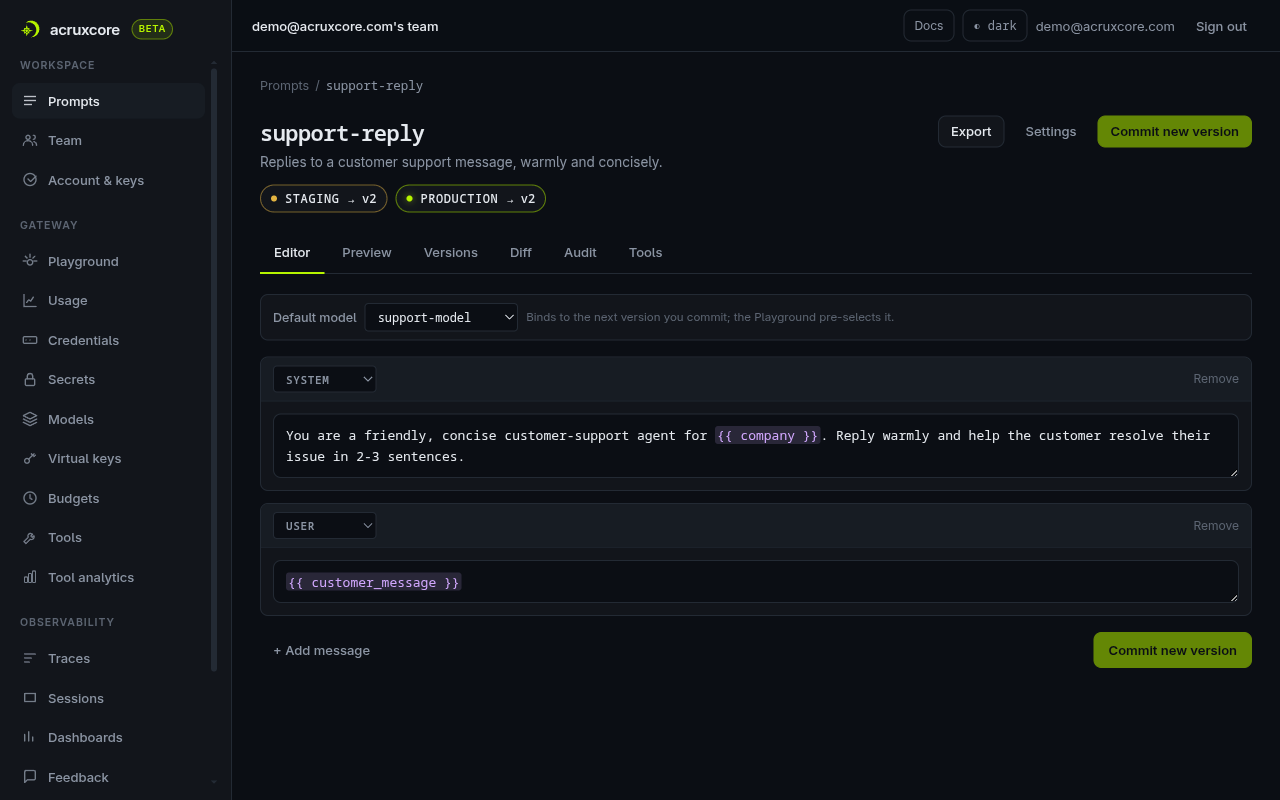
- Edit a prompt and commit a new version straight from the browser.
- Preview a render with sample variables before you commit it.
- Set a default model per prompt so callers never have to pass one.
- Attach tools from the catalog — render returns them alongside the messages.
- Promote or roll back an alias in one click, written to the audit log.
- Export a version as portable JSON, and import it back into another team.
Go deeper
Documentation for this piece.
The rest of the platform
It composes with the other six.
Each piece works on its own, and they get better together — a trace links back to a prompt version, a dataset is built from feedback.