Model Context Protocol
An MCP server for prompt management and tracing.
Connect Claude Code, Claude Desktop, Cursor or any other MCP client to your AcruxCore team. The assistant gets 28 tools for prompts, the gateway, the tool catalog, traces and evaluations. You ask in plain language, and the assistant picks the tool.
What you get
Two ways to connect, 28 tools, slash commands and a read-only mode.
Hosted or local
The hosted endpoint at /api/v1/mcp uses Streamable HTTP, so you install nothing. The local server is a Node 20 program that runs on your machine over stdio.
28 tools in five toolsets
The toolsets are prompts, gateway, tools, traces and evaluations. Each tool comes with a name, a description and its arguments, and the assistant reads them to choose a tool for your request.
Prompts as slash commands
Each prompt you store in AcruxCore is also offered as an MCP prompt template, using the version that production points at. In Claude Code, the prompt support-reply becomes the slash command /mcp__acruxcore__support-reply.
A read-only mode
Start the local server with --read-only and it registers 17 tools. The assistant can list, read, render and diff, but it cannot create, commit, promote or run anything.
A real session
One message, six tool calls.
In one message, we asked Claude Code to commit version 2 of a prompt, compare version 2 with version 1, promote version 2 to production, run the prompt and open the trace of the run. Claude Code called six tools, one after the other.
| Tool | What came back |
|---|---|
| get_prompt | One version, with the production and staging aliases both on v1. |
| commit_prompt_version | Version 2. Production still pointed at v1, because a commit moves no alias. |
| diff_prompt_versions | The prompt messages of v1 and v2 are the same. Only the model changed. |
| promote_prompt_alias | The production alias now points at version 2. |
| run_prompt | The answer from the model, sent through the gateway, for $0.0000141. |
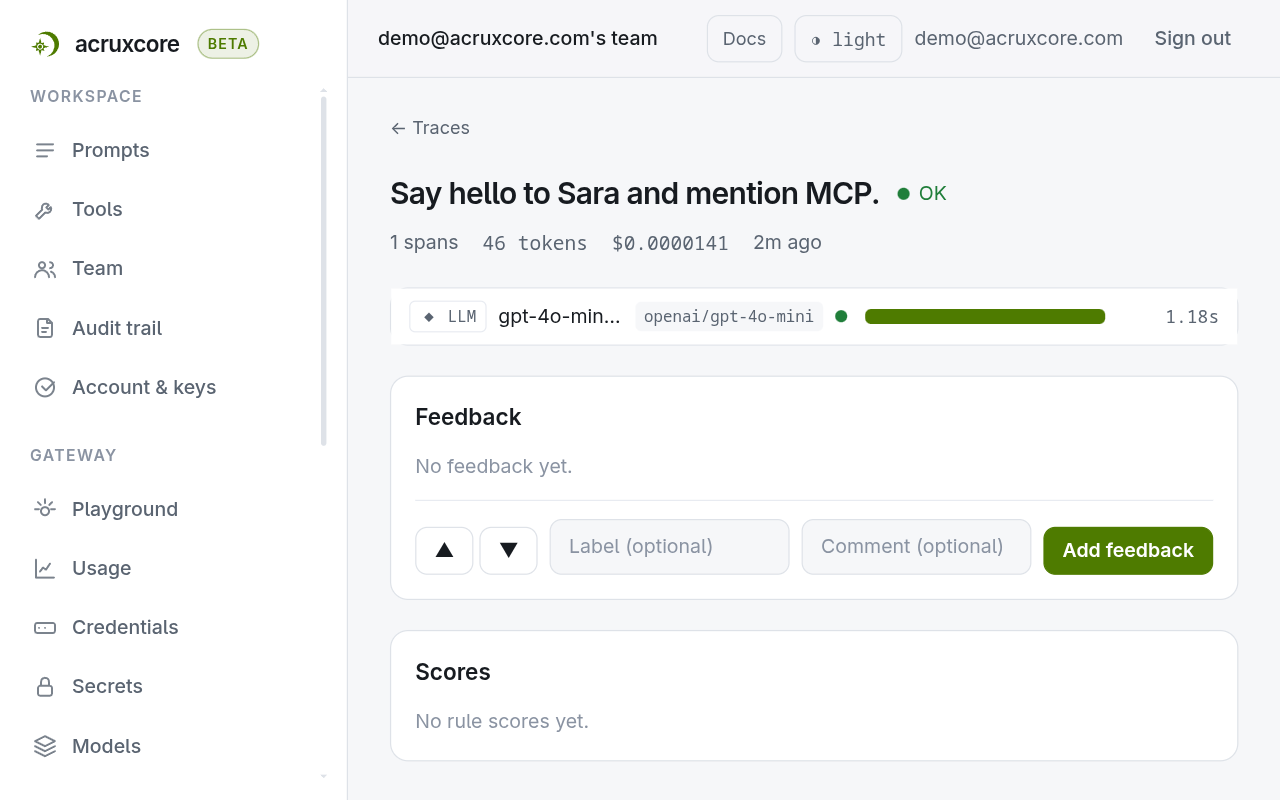
| get_trace | The trace of that run: status ok, 1 span, 46 tokens and $0.0000141. |
The team audit trail records each step, under the name of the person who created the API key. The cost of the run counts toward any gateway budget your team has set.
Access
The assistant can do what your key can do.
The server signs in with your API key. An API key has the same role in the team as the person who created it.
A viewer key
A key created by a team member with the viewer role can only read. An assistant with that key cannot save versions, move aliases or run prompts.
Read-only mode
The --read-only option removes every tool that changes data. The assistant never receives a tool that changes data, so the assistant cannot call one, whatever you ask.
Fewer toolsets
The --toolsets prompts,traces option keeps only the toolsets you name. A shorter tool list also helps the assistant pick the right tool.
Only the local server takes --read-only and --toolsets. No tool deletes anything: to delete a prompt, a tool or a dataset, use the dashboard or the API.
The tools
What each toolset holds.
Pass any of these toolset names to --toolsets to keep only those tools.
| Toolset | Tools |
|---|---|
| prompts | list_prompts, get_prompt, render_prompt, diff_prompt_versions, create_prompt, commit_prompt_version, promote_prompt_alias |
| gateway | run_prompt, chat_completion, list_models, get_gateway_usage |
| tools | list_catalog_tools, get_catalog_tool, sync_catalog_tool, execute_catalog_tool |
| traces | search_traces, get_trace, get_trace_analytics, list_sessions, get_session, submit_trace_feedback |
| evaluations | list_datasets, get_dataset, create_dataset, add_dataset_example, run_experiment, list_experiment_runs, get_experiment_run |
When a tool call fails, for example because a variable value is missing, the assistant receives the AcruxCore error code and message. The assistant can then fix the call and try again.
In the dashboard
Everything without writing a line of code.
The API and SDKs cover the automated path. For the day-to-day, the dashboard does the same work in the browser.
- Create the API key the MCP server signs in with, under Account & keys.
- Open a prompt to see the version the assistant committed and the alias that points at it.
- Open Traces to read each run the assistant made, with its tokens, cost and model.
- Read each change the assistant made in the team audit trail, under the name of the key owner.
Go deeper
Documentation for this piece.
The rest of the platform
It composes with the other six.
Each piece works on its own, and they get better together — a trace links back to a prompt version, a dataset is built from feedback.